Using MFA to Log in to Kron PAM Web GUI
3 min
MFA can be used to log in to Kron PAM.
To activate One-Time Password (OTP) for the Kron PAM Web GUI login, follow the steps below:
- Send users the QR Code and make all necessary configurations. Refer to Connecting Kron PAM and Kron PAM Mobile Client
- Configure MFA for the Admins by creating a QR Code and sending it to the Admins so that the Admins can sync their Kron PAM and the Kron PAM Mobile App. After enabling MFA, the Admins should use it to log in to the system. Admins won’t be able to log in if MFA has not been configured.
If the Admin gets locked out, please contact the Krontech Support Team. One of the User groups needs to be OTP enabled. Refer to Enabling One-Time Password (OTP) If there is no User group enabled for OTP, MFA will not work. If one or more user groups are enabled for OTP, MFA will be enabled for all the users for Kron PAM logins.
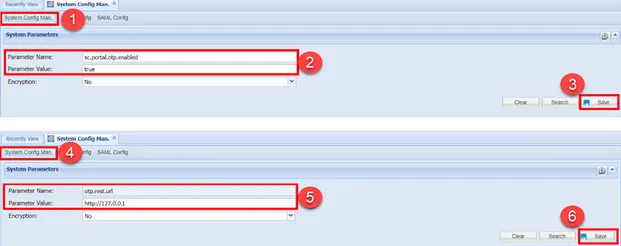
- Navigate to Administration > System Config Man.
- Set the required parameters:
sc.portal.otp.enabled=true | One time password enabled for GUI Login. |
|---|---|
otp.rest.url=http://127.0.0.1 | If SSL is enabled in the network, the URL should be https://127.0.0.1 |
- Log out and log in again. After the login screen, Kron PAM asks for an offline token.
- Open the Kron PAM mobile app, select Offline Token, and enter the token value to log in.