Configuring HTTP Policy
HTTP policies define which web pages are permitted or denied. There is also a filtration for the HTTP logs. The main URL is configured in the previous section. This section is only for configuring the HTTP policy to allow or deny the pages under the main URL. For example, if the main URL is “http://facebook.com,” policies are only applicable for http://facebook.com and its sub URLs. To configure HTTP policies in Kron PAM:
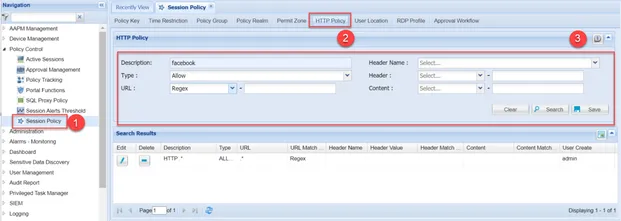
- Navigate to Policy Control > Session Policy
- Open the HTTP Policy tab
- Create an HTTP Policy by filling in the fields as described below:
Field | Description |
|---|---|
Description | Enter the description of the web page. The description is only a name to distinguish the web page. |
Type |
Multiple Policies It is possible to apply more than one HTTP policy to a web page. In this scenario, HTTP proxy checks the Deny criteria first. If the requested web page matches the Deny criteria, HTTP Proxy denies the web page; otherwise, it checks for the Allow criteria. If the requested page matches the Allow criteria, HTTP Proxy allows the web page; otherwise, HTTP Proxy denies the web page. Logging All denied criteria are logged indisputably. As for the allowed criteria, HTTP Proxy checks if it is configured in the Filter Log. If not, the allowed logs are stored as well.
|
URL | To deny specific sub URLs under the main URL, admins must specify these sub-URLs here. The URL can be a) Exact, b) Contains, c) Regex and, d) Is empty. Admins can select: a) Exact if URL can be entered as is b) Contains to restrict all URLs which contain specific words c) Regex to define URLs by regex d) Is Empty if the sub URL is empty Even if the main URL is configured as a device in the previous section, it should be allowed in the HTTP policy as well. Generally, regex .* is used to allow the main URL and all sub-URLs. Another policy can be defined to deny the sub URLs that should be denied. |
Header Name | A sub webpage can be restricted by the header. The Header Name needs to be added here and the keywords should be defined in the Header field. |
Header | The Header option is used if an admin user wants to restrict the web page with a keyword in the header. The Header Name of the keyword should be configured in the Header Name field. It can be selected as a) Exact, b) Contains, c) Regex and, d) Is empty. |
Content | Web pages can also be denied for a word in the web page content. It can be selected as a) Exact, b) Contains, c) Regex and, d) Is empty. |