Adding a Web Page as a Device
2 min
Kron PAM has role-based management functionality. Users and devices are connected to each other by realms. In HTTP Proxy, the user and the web page should be connected as well. Therefore, you need to define the web page as a device and then add this device to a device group. The device group realm should be configured between the device group and the user group. Step 1: First, you must create the website element group:
- Navigate to Device Management > Element Type.
- Fill in the Element Type ID and Element Type Name with the name of the website. These are descriptive fields to distinguish the element.
- Click Save.
Step 2: To create devices, device groups, and realms:
- Navigate to Device Management > Device Group.
- Fill in the Device Group Name and then Save.
- Navigate to Device Management > Device Inventory.
- Open the New Device Discovery tab.
- Fill in the fields with the necessary information and then click Discover and Add.
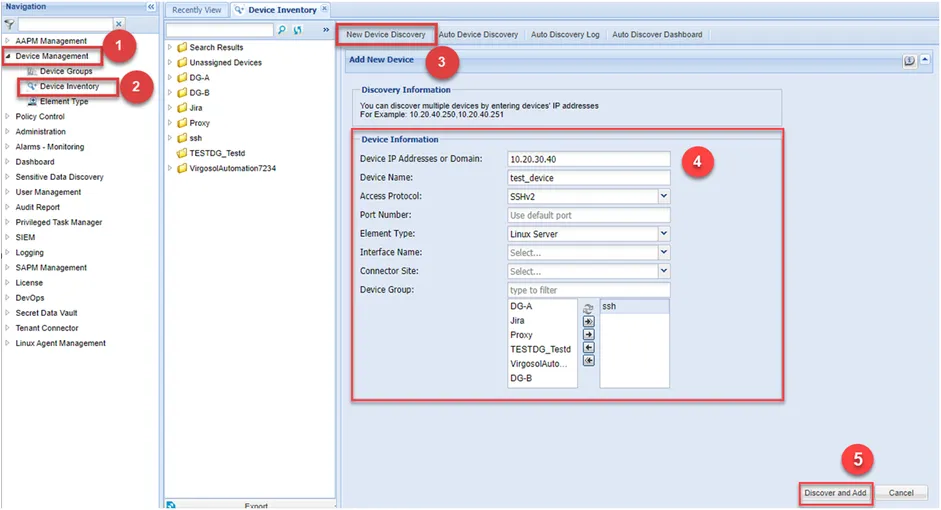
Device Information
- Navigate to Device Management > Device Group.
- Open the Device Group Realms tab.
- Choose the web page’s Device Group and the User Group which is permitted to use HTTP Proxy.