Adding Permissions to Password Vault Accounts
You can define different authorization levels for the SAPM accounts. SAPM accounts are created by admins, but they are used by other users.
To give permission rights to these users:
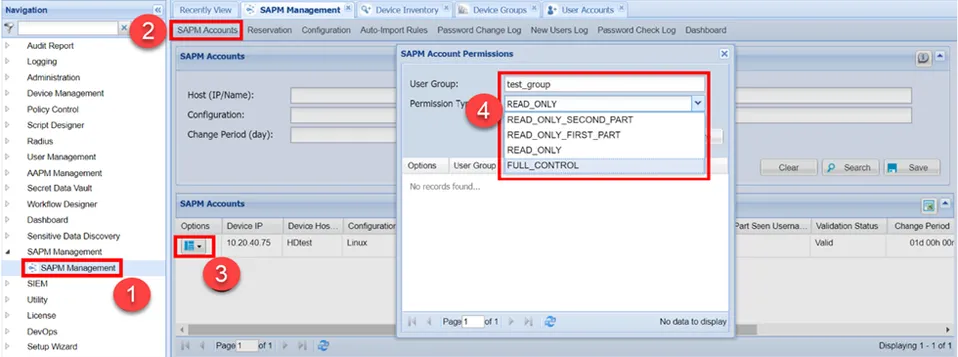
- Navigate to SAPM Management > SAPM Management.
- Open the SAPM Accounts tab.
- Search and select the account to give permissions to, click the Options button and then the Permissions button.
- Select the user group, permission, and Save.
Types | Description |
|---|---|
READ_ONLY | These users only have the authority to see the dynamic password. |
FULL_CONTROL | Users who have full control permission are admins of Password Vault accounts. These users have full authority, such as resetting, changing the password, and giving permissions to users. |
READ_ONLY_FIRST_PART | These users only have the authority to see the first half of the dynamic password. |
READ_ONLY_SECOND_PART | These users only have the authority to see the second half of the dynamic password. |
One user can be a member of multiple user groups with different rights. In this case, the permission order is as follows:
FULL_CONTROL > READ_ONLY > READ_ONLY_FIRST_PART > READ_ONLY_SECOND_PART
It means that if a user has FULL_CONTROL and READ_ONLY rights, they will have the FULL_CONTROL right, which is superior. If they have the READ_ONLY_FIRST_PART and READ_ONLY_SECOND_PART rights, they will get the first part of the password.