Adding a Device Manually
1 min
Kron PAM creates a secure bridge between users and devices.
After creating device groups, you add devices to Kron PAM.
To add a device to Kron PAM:
- Navigate to Device Management > Device Inventory.
- Click the New Device Discovery button.
- Fill out the relevant device’s information and save it by clicking Discover and Add. Some notes about device information:
Access Protocol: Select according to the connected device. E.g., SSH2 for Linux devices and RDP for Windows devices.
Port number: Don’t enter if the default ports are in use for the Access methods.
Element Type: Select the type of connected device. E.g., Linux, Windows, etc. Don’t enter the interface name.
Device Group: Select the related device group.
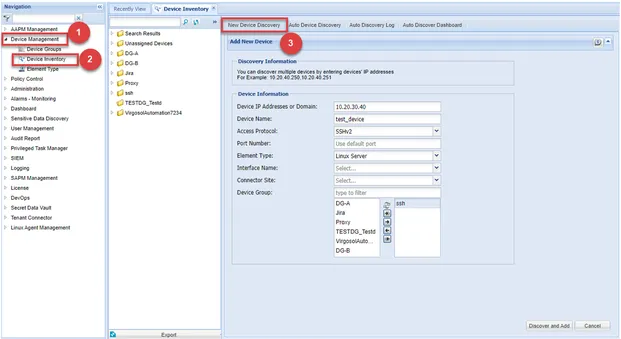
New Device Discovery