Cisco Duo MFA Integration
3 min
For Single Connect integration with Cisco Duo, users should log in to Cisco Duo with the email addresses defined in Single Connect. The Username must match the information on Single Connect. After logging in to the Duo portal, the token verification can be done through different verification methods.
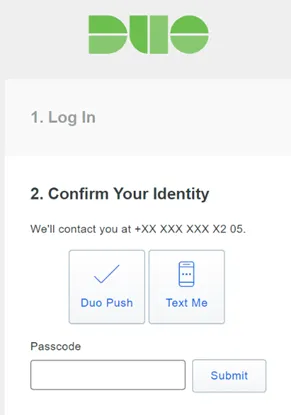
Duo Verification Methods
- To use the Duo verification method, users must download the Duo Mobile mobile app. Duo Mobile should be activated from the user portal settings area. Users must be added to the Duo portal. The Duo Mobile app should be activated on the devices.
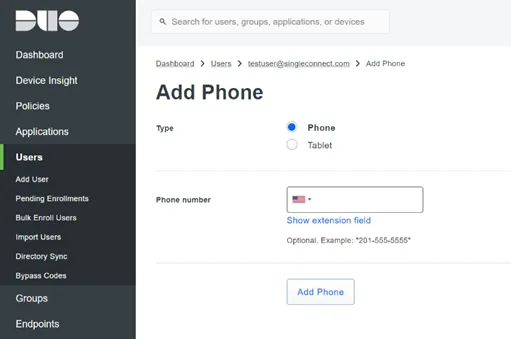
Duo MFA Activation
Single Connect integrates with Cisco Duo via API, as long as certain parameters are defined in Single Connect:
- API key (the API key is created by Duo for each customer environment)
- URL (the URL is unique for each customer environment)
- Integration key (the integration key is created by Duo for each customer environment)
To adjust the Duo Integration Settings:
- Navigate to Administration > System Config Manager.
- Set the following parameters: mfa.provider=duo (default: internal) mfa.external.provider.duo.api.hostname=XXX mfa.external.provider.duo.integration.key=XXX mfa.external.provider.duo.secret.key=XXX (encrypted) mfa.external.provider.duo.factor = {passcode, sms, push} mfa.external.provider.duo.push.type = "the message which will be shown in the push notification on mobile device" default: Single Connect MFA Request
- With Duo enabled, the token can be sent in different ways:
Passcode | Token in the mobile app is used. |
|---|---|
SMS | Token is sent by SMS. |
Push | Verification is confirmed from the mobile application. |