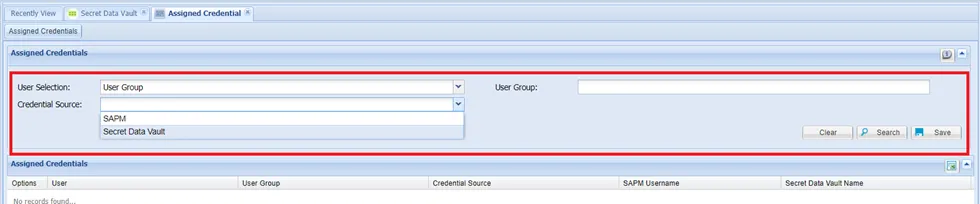
Assigned Credentials
Assigning credentials correlates different Single Connect users with specific local or Active Directory (AD) users or groups in target systems. It sets up the connection towards the target system by matching the Single Connect users with local or AD users or groups.
In SSH or RDP connections, the network element’s credentials are either entered as global username/password or the credentials can be retrieved from the Dynamic Password Controller. In either situation, the users use just one local user to connect to the network element and these credentials are defined for the whole device group.
In some cases, different users might need to connect to the same devices with different user accounts. In this case, assigning credentials will let different Single Connect users connect to target devices with different user accounts. Also, as mentioned above, user groups can be retrieved from Active Directory. Credentials that are kept in SAPM can be assigned to AD user groups, as well as users.
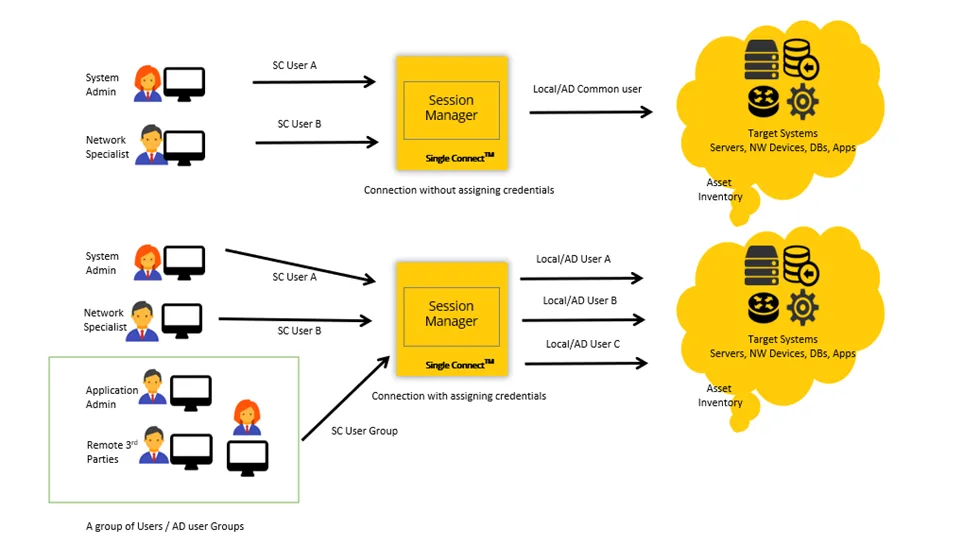
In the example illustrated above, the users are connecting to target devices with and without assigned credentials. In the first diagram, Single Connect users A, B and AD user groups use the same local/AD user accounts to connect to the target devices. In the second diagram, assigned credentials were configured between Single Connect User A and Local/AD user A, and between Single Connect User B and Local/AD user B, which allowed Single Connect User A to log in to target devices as Local/AD user A, and Single Connect User B to log in as Local/AD user B.
Defining the Assigned Credentials allows using the defined accounts in Active Directory, LDAP, WinRM, SMB strategies to connect to different devices. But first, you must configure the local/AD user as a Dynamic Password Controller account to use assigned credentials. See the related sections in this document for configuration details. To configure assigned credentials:
- Navigate to User Management > Assigned Credentials.
- Enter the Single Connect user in the User field and select Credentials Source.
- Enter the local/AD username to be used to connect to the target devices in the SAPM Username field and click Save.
- Navigate to Device Management > Device Groups.
- Right-click the device group that will connect to the target devices via assigned credentials and select Show Properties.
- Define the following configurations: Property Key: addAssignedCredentialToUserSelection Value: true