SAML Authentication
SAML is a protocol used to share security credentials across one or more network systems. SAML Authentication integration can be used to integrate external identity providers with Single Connect.
Single Connect can be integrated with OneLogin identity provider. OneLogin integration consists of two steps:
- OneLogin Configuration
- Single Connect Configuration
OneLogin Configuration
First you need to add Single Connect to OneLogin as an application. To add Single Connect as an application, perform the following configuration steps in OneLogin:
- Go to the Applications section in OneLogin.
- Click Add App and search for SAML Custom Connector (Advance).
- Enter a display name (such as Single Connect) and then click Save.
- Navigate to the Configuration tab of the created Single Connect App.
- Fill in the following parameters related to Single Connect:
Audience: singleconnecthost/samlCheck Ex: https://10.20.30.40/login-ui/samlCheck Recipient: URL: singleconnecthost/samlRecipient Ex: https://10.20.30.40/login-ui/samlRecipient ACS (Consumer) URL Validator: Set “.*” regular expression ACS (Consumer) URL: Same as Recipient Ex: https://10.20.30.40/login-ui/samlRecipient Single Logout URL: URL: singleconnecthost/samlLogout Ex: https://10.20.30.40/login-ui/samlLogout
The Email (SAML NameID) should be the same as the Single Connect username.
- After saving the configurations above, go to the SSO tab of the added application to extract some information for filling Single Connect SAML configuration.
Parameter Name | Example Value |
|---|---|
Issuer URL | |
SAML 2.0 Endpoint (HTTP) | |
SLO Endpoint (HTTP) | |
X.509 Certificate | -----BEGIN CERTIFICATE----- MIIEMjCCAxqgAwIBAgIUG2HXQgRMpy/pUehFqTqzw0YaelAwDQYJKoZIhvcNAQEF BQAwYTEsMCoGA1UECgwjS3JvbiBUZWxla29tdW5pa2FzeW9uIEhpem1ldGxlcmkg QXMxFTATBgNVBAsMDE9uZUxvZ2luIElkUDEaMBgGA1UEAwwRT25lTG9naW4gQWNj hkQm6mlNsRnfCipDrtz1lqf2VKgc9g== -----END CERTIFICATE----- |
Single Connect Configuration
After adding Single Connect as an application in OneLogin, you need to set additional configurations in Single Connect.
Step 1: Define the required parameters in Single Connect.
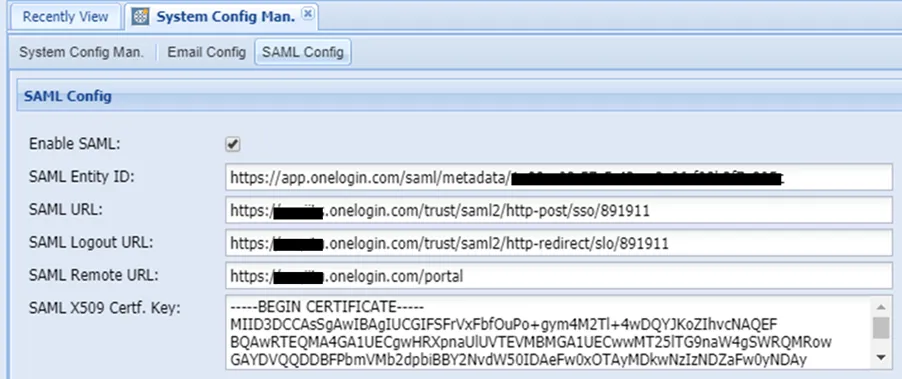
- Navigate to Administration > System Config. Man.
- Open the SAML Config tab.
- Fill in the following parameters related to OneLogin:
Parameter Name | Description | Example Value |
|---|---|---|
Enable SAML | It must be enabled to use SAML authentication. | |
SAML Entity ID | SAML Test Connector Issuer URL from the OneLogin Portal. | |
SAML Logout URL | SAML Connector SLO Endpoint (HTTP) URL from the OneLogin Portal | |
SAML Remote URL | Personal Portal URL | |
SAML URL | SAML Connector SAML 2.0 Endpoint (HTTP) URL from the OneLogin Portal | |
SAML X509 Cert. Key | SAML Connector X.509 Certificate from the OneLogin Portal. | *-----BEGIN CERTIFICATE----- MIIEMjCCAxqgAwIBAgIUG2HXQgRMpy/pUehFqTqzw0YaelAwDQYJKoZIhvcNAQEF BQAwYTEsMCoGA1UECgwjS3JvbiBUZWxla29tdW5pa2FzeW9uIEhpem1ldGxlcmkg QXMxFTATBgNVBAsMDE9uZUxvZ2luIElkUDEaMBgGA1UEAwwRT25lTG9naW4gQWNj hkQm6mlNsRnfCipDrtz1lqf2VKgc9g== *-----END CERTIFICATE----- |
Step 2: Add TomcatCorsFilter to the tomcat configuration file. After setting the required configuration in Step 1, you need to TomcatCorsFilter in the tomcat configuration:
- Open the web.xml file under the following directory. /u01/netright-tomcat/conf
- Find TomcatCorsFilter part and add Onelogin URL, as shown below in bold.