Duplicating SAPM Configurations
2 min
Users can duplicate SAPM Configurations with all of its existing properties. To duplicate a SAPM Configuration:
- Navigate to SAPM Management > SAPM Management.
- Open the Configuration tab.
- Click the Search button to see the saved configurations.
- Click the Option drop-down menu and select Duplicate.
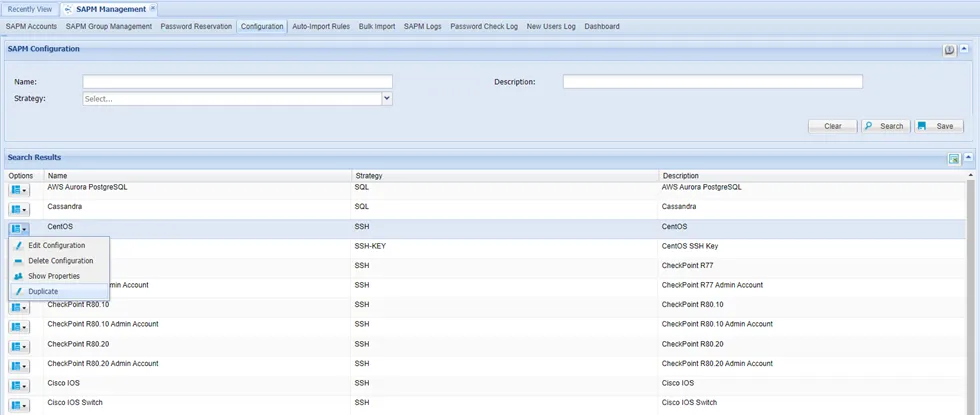
Duplicating SAPM Configurations
- Type in the new name, select the Strategy, and click Save.
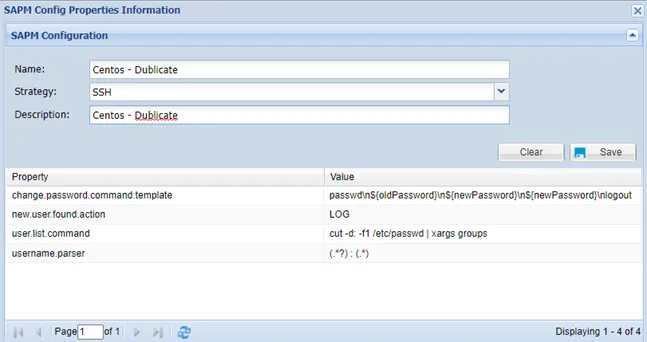
SAPM Configuration Duplication Screen
After saving, a duplicate configuration will be created, and its properties can be edited later.