8.8 SIEM Configuration
4 min
Single Connect can send logs to SIEM systems. RFC_5424 and RFC_3164 formats are supported. SIEM host IP address, port, RFC format and content format are configurable.
Setting SIEM Server and Log Parameters
- Log in to the Single Connect GUI
- Navigate to Administration > System Config Management
- Set the server address, log type etc.
- Save
Parameter | Default value | Possible Values |
|---|---|---|
syslog.server.hostName | - |
|
syslog.server.port | 514 |
|
syslog.message.rfcFormat | RFC_5424 | RFC_5424, RFC_3164 |
syslog.message.content.format | KEY_VALUE | KEY_VALUE, CEF |
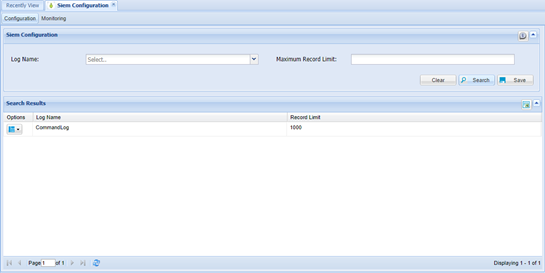
SIEM Log Configuration
- Log in to the Single Connect GUI
- Navigate to SIEM Configuration
- Select Log Type and Maximum Record Limit
- Save
SIEM Log Disable/Enable Property
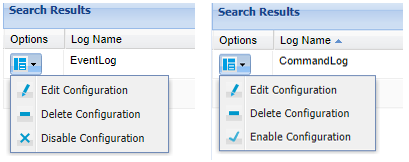
Recording the logs can be stopped and then started again manually.
- Log in to the Single Connect GUI
- Navigate to SIEM Configuration
- Click the “Options” drop-down menu button of the Log Configuration
- Select “Disable” or “Enable”
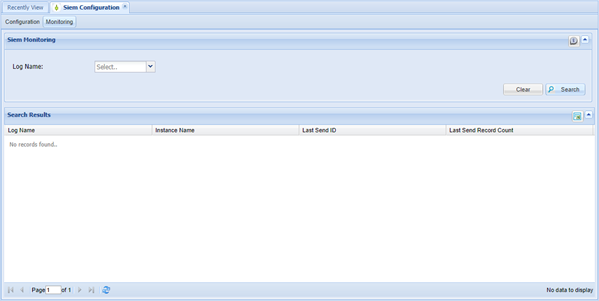
SIEM Log Monitoring
- Log in to the Single Connect GUI,
- Navigate to SIEM Configuration,
- Open the “Monitoring” tab,
- Enter in fields to filter, and Search