8.10.2 Audit Report Linux
3 min
Audit Report is used to report the current security status of local accounts in Linux devices.
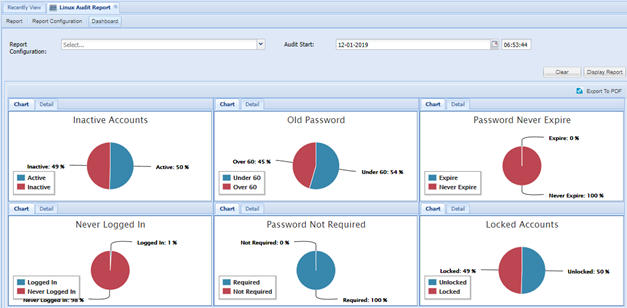
This report can be produced periodically. Details about accounts can be viewed from a graphical dashboard. Linux Local User Audit Report is used to report current security status of local Linux accounts.
Create Report Configuration
- Log in to the Single Connect Web GUI
- Navigate to “Linux Audit Report”
- Open the “Report Configuration” tab
- Create report configuration by filling the appropriate fields.
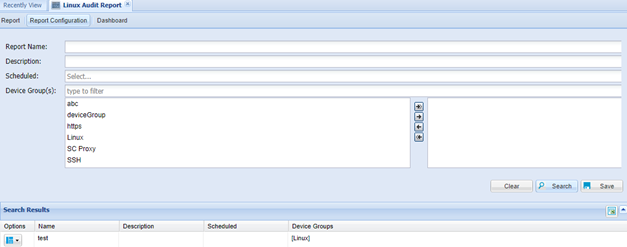
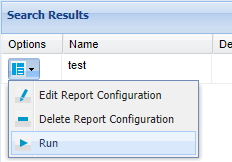
The report job can be executed manually. Click on the “Options” drop-down menu button and select "Run"
Report Details
When the job finishes, reports are listed in the Reports tab.
- Log in to the Single Connect Web GUI,
- Navigate to “Linux Audit Report”
- Open the “Report” tab
- Click “Options” drop-down menu button and select
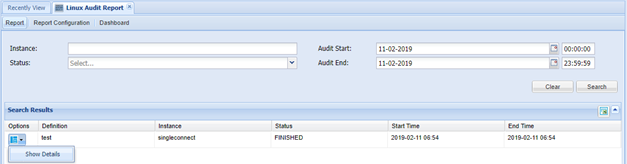
Report details are shown at Linux Audit Report Details Section

Dashboard
- Log in to the Single Connect Web GUI
- Navigate to “Linux Audit Report”
- Open the “Dashboard” tab
- Choose fields and then click the “Display Reports” button