2.6 Managing Menu Lists
Managing Menu Lists
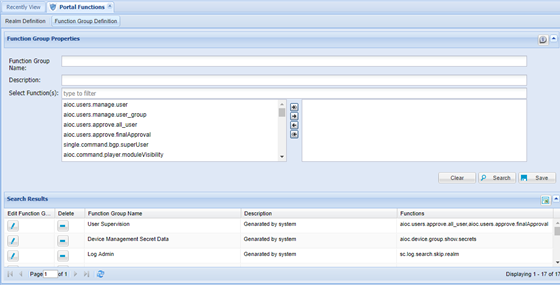
Adding Function Groups
Single Connect’s menu view and the rights to be assigned to the users can be managed based on user groups.
- Log in to the Single Connect Web GUI
- Navigate to Policy Control > Portal Functions
- Open the Function Group Definition tab
- Enter “Function Group Name” and “Description”.
- Select rights and module views to be assigned to the users
- Save
Available Function List
Function | Description |
|---|---|
aioc.device.group.moduleVisibility | Grants rights to view the Device Group module |
aioc.device.group.show.secrets | Grants rights to view device secrets |
aioc.discovery.discover.device | Grants rights to discover and add new devices |
aioc.discovery.manage.operationMode | Grants rights to manage devices in operation mode |
aioc.discovery.manage.unassigned | Grants rights to manage devices in unassigned device groups |
aioc.element.type.moduleVisibility | Grants rights to view the Element Type module |
aioc.help.manager.moduleVisibility | Grants rights to view the Help Manager module |
aioc.platform.activity.logs.moduleVisibility | Grants rights to view the activity logs module |
aioc.platform.sysconfig.moduleVisibility | Grants rights to view the System Config Management module |
aioc.users.approve.all_user | Grants rights to approve new users |
aioc.users.approve.finalApproval | Grants rights for final new user approval |
aioc.users.manage.user | Grants rights to manage users |
aioc.users.manage.user_group | Grants rights to manage user groups |
netright.admin.datasource.manager.moduleVisibility | Grants rights to view the Datasource Manager module |
netright.components.moduleVisibility | Grants rights to view the Components module |
netright.config.moduleVisibility | Grants rights to view the Configuration module |
netright.discovery.moduleVisibility | Grants rights to view the Discovery module |
netright.jobs.moduleVisibility | Grants rights to view the Job Scheduler module |
netright.log.moduleVisibility | Grants rights to view the Logs module |
netright.mailSender.moduleVisibility | Grants rights to view the Mail Sender module |
netright.memory.moduleVisibility | Grants rights to view the Memory Manager module |
netright.nsso.moduleVisibility | Grants rights to view the SSH/Telnet Proxy Module |
netright.realms.moduleVisibility | Grants rights to view the Portal Functions module |
netright.sql.moduleVisibility | Grants rights to view the SQL Query module |
netright.user.approval.moduleVisibility | Grants rights to view the User Approval module |
netright.user.auth.log.moduleVisibility | Grants rights to view the User Authentication Logs module |
netright.users.moduleVisibility | Grants rights to view the User Management module |
sc.aaa.remote.db.moduleVisibility | Grants rights to view the Remote Database module |
sc.devops.moduleVisibility | Grants rights to view the Devops module |
sc.log.search.network.admin | Grants rights to view all logs for the devices included the user’s device group realms |
sc.log.search.skip.realm | Grants rights to view all logs |
sc.secret.data.vault.admin | Grants rights to manage data vault accounts |
sc.secret.data.vault.auditor | Grants rights to list all records on Secret Data Vault |
sc.secret.data.vault.moduleVisibility | Grants rights to view the Data Vault module |
sc.secret.data.vault.viewer | Grants rights to view data vault accounts |
single.connect.aapm.moduleVisibility | Grants rights to view the AAPM module |
single.connect.cli.moduleVisibility | Grants rights to view the SSH/Telnet Client module |
single.connect.dasboard.moduleVisibility | Grants rights to view the Dashboard module |
single.connect.freeradius.acc.moduleVisibility | Grants rights to view the Radius Accounting Log module |
single.connect.freeradius.rest.moduleVisibility | Grants rights to view the RADIUS REST module |
single.connect.httpProxy.ui.moduleVisibility | Grants rights to view the HTTP Proxy module |
single.connect.policy.enforcement.moduleVisibility | Grants rights to view the Policy module |
single.connect.rdp.client.moduleVisibility | Grants rights to view the RDP/VNC Client module |
single.connect.remote.desktop.moduleVisibility | Grants rights to view the RDP/VNC Proxy module |
single.connect.sapm.admin | Grants rights to manage all SAPM accounts and view all logs |
single.connect.sapm.approval.requirement | Grants rights to view password after approval |
single.connect.sapm.auditor | Grants rights to list all SAPM accounts without seeing details |
single.connect.sapm.historical.password.viewer | Grants rights to view old passwords |
single.connect.sapm.log.viewer | Grants rights to view all logs in the SAPM Management Menu |
single.connect.sapm.moduleVisibility | Grants rights to view the SAPM module |
single.connect.sapm.network.admin | Grants rights to manage and view all accounts of devices defined to a user |
single.connect.sapm.network.auditor | Grants rights to list all accounts of devices defined in user device group realms without seeing details |
single.connect.sapm.secondlevel.admin | Grants rights to give second level approval for all SAPM accounts and view all logs |
single.connect.sapm.approval.requirement | Grants rights to view password after two-level approval |
single.connect.sapm.secondlevel.network.admin | Grants rights to give second level approval for all accounts of devices defined in user device group realms |
single.connect.session.active.logs.moduleVisibility | Grants rights to view the Session Activity Logs module |
single.connect.sessionmanager.ui.moduleVisibility | Grants rights to view the Session Manager module |
single.connect.setup.wizard.moduleVisibility | Grants rights to view the Setup Wizard module |
single.connect.sql.proxy.moduleVisibility | Grants rights to view the SQL Proxy module |
single.connect.TACACS.acc.moduleVisibility | Grants rights to view the TACACS+ Accounting Logs module |
single.connect.twofactor.acc.moduleVisibility | Grants rights to view the Two-Factor Authentication Activation module |
single.connect.user.logs.moduleVisibility | Grants rights to view User Logs module |
single.connect.windows.audit.report.moduleVisibility | Grants rights to view the Windows Audit Report module |
tfaProvisioningViewer | Grants rights to view the Two-Factor Authentication Provisioning Screen |
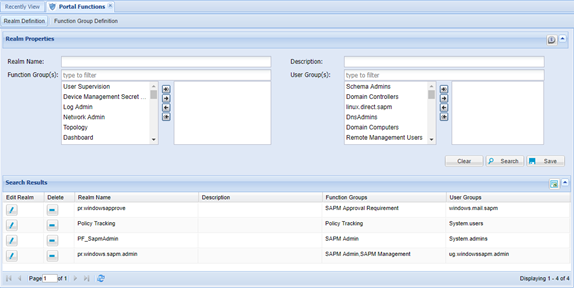
Adding Function Realm
- Log in to the Single Connect Web GUI
- Enter “Realm Name” and “Definition”
- Select “Function Groups” and select “User Groups” to be assigned.
- Save