Password Vault Account Permissions
Kron PAM administrators can assign different authorization levels to different user groups or users for Password Vault accounts. For example, one user group or user can get full control rights for a Password Vault account, while another gets list-only rights.
To set permissions on Password Vault accounts:
- Navigate to Secrets > Vault.
- Open the Vault tab.
- Select the account to set permissions for, click Options, and select Permissions.
- Select the user (User or User Group) and the permission types.
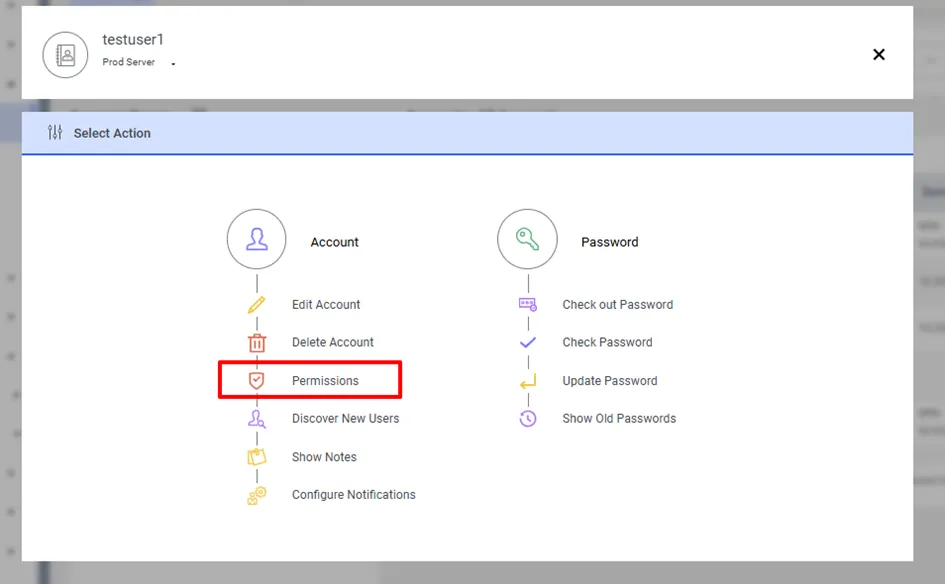
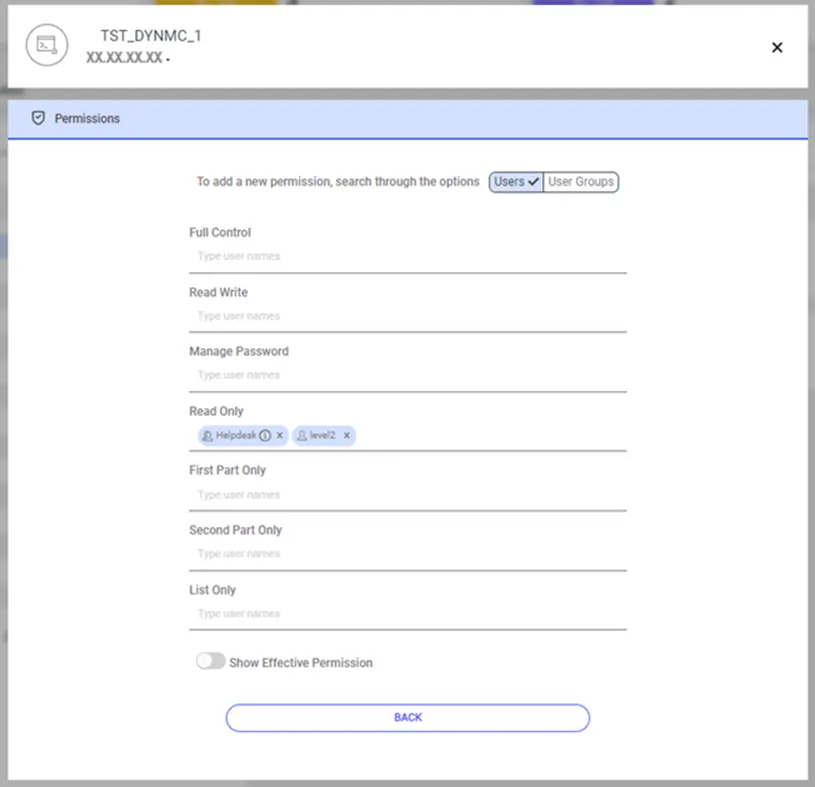
In the permission lines listed on the screen, you can select which user or user group has permission. To list the users in a user group on the screen, click the little ℹ️ button next to the group name.

Permission types:
- LIST_ONLY: Grants only the authority to see the Password Vault account.
- READ_ONLY_FIRST_PART: Grants only the authority to see the first half of the Password Vault password.
- READ_ONLY_SECOND_PART: Grants only the authority to see the second half of the Password Vault password.
- READ_ONLY: Grants only the authority to see the Password Vault password.
- MANAGE_PASSWORD: Grants only the authority to manage the Password Vault password.
- READ_WRITE: Grants full control permission, except for the Permissions option.
- FULL_CONTROL: Grants full control. Applies to admins of the Password Vault account. These users have full authority for actions such as resetting the password, changing the password, and granting permission to other users.
You can assign multiple permissions to a user group or user. Based on the permission levels, users access accounts with the highest permission granted to them.
A user can belong to multiple user groups with different rights. In this case, the following permission order applies:
FULL_CONTROL > READ_WRITE > MANAGE_PASSWORD > READ_ONLY > READ_ONLY_FIRST_PART > READ_ONLY_SECOND_PART > LIST_ONLY
If authorized users are assigned to Password Vault management, the Kron PAM administrator must define the following parameter in System Configuration Manager to authorize their accounts to access other user groups:
Parameter Name | Parameter Value |
|---|---|
sapm.all.usergroup.seen.permission | true |