Dashboards
The Dashboards page lists all dashboards in Kron PAM Reporting module. Use this page to find, open, create, and import dashboards.
To find and open a dashboard:
1. Click Dashboards on the top menu.
2. Narrow the list with one or more filters:
o Type a dashboard name in the Name field.
o Select a value in the Status, Owner, Favorite, Certified, or Modified by field.
3. Click the dashboard name to open the dashboard in the viewing mode.
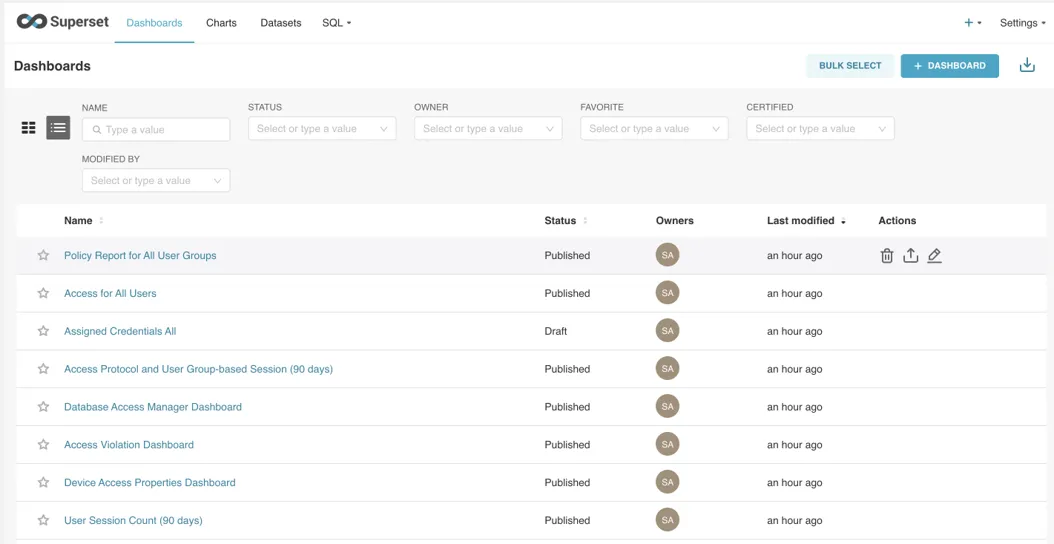
Click the star icon next to a dashboard name to mark the dashboard as a favorite. To list only your favorite dashboards, use the Favorite filter.
The columns on the Dashboards page
Column | Description |
|---|---|
Name | Shows the dashboard name. Click the name to open the dashboard in the viewing mode. |
Status | Shows the dashboard status, for example Published or Draft. |
Owners | Shows the owner of the dashboard. |
Last modified | Shows the time that has passed since the last change. |
Actions | Provides the following actions for each dashboard: Delete removes the dashboard, Export exports the dashboard, and Edit opens Dashboard Properties for editing. |
To work with dashboards, use the following controls:
· + Dashboard: Opens the dashboard editor to create a new dashboard. For details, see Creating a New Dashboard.
· Bulk Select: Selects multiple dashboards at once.
· Import icon: Imports a previously exported dashboard.
· List and grid icons: Switch between the list view and the grid view.