Configuration Property to Show Password to Multiple Users
By default, an account password can only be seen by one user at a time for dynamic accounts. If a user has seen the password, and it has not changed yet, another user who tries to view it cannot see it and is informed that another user has the password.
If multiple users from the same user group may need to see an account password at the same time, the Allow it to be seen by multiple users property must be set to true.
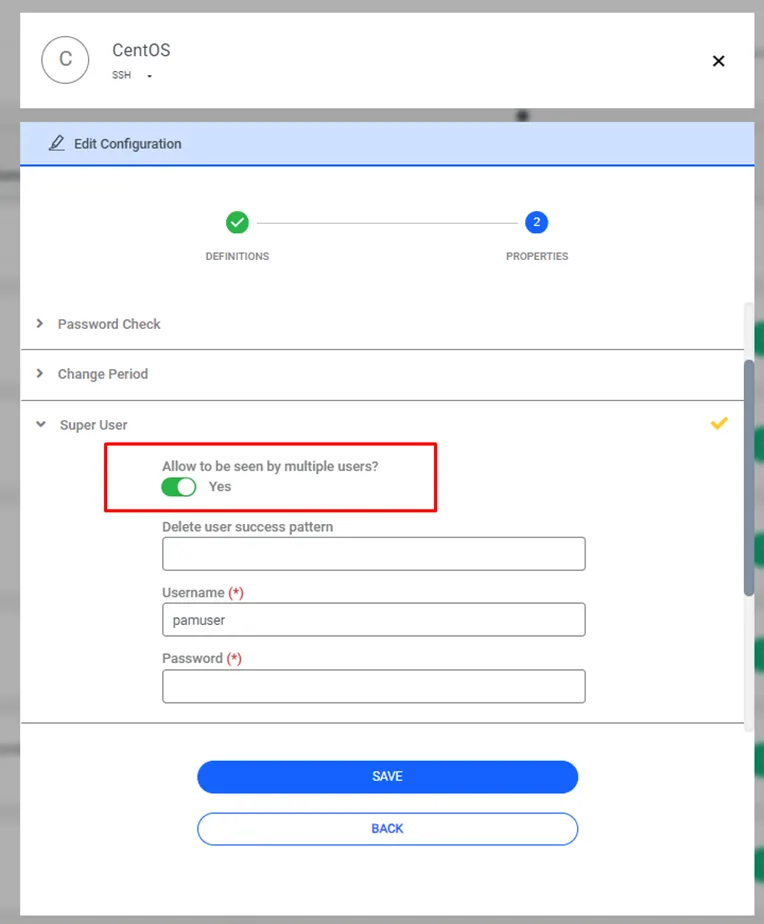
This lock isn't limited to password checkout. When neither Allow to be seen by multiple users nor Change password only at change periods is enabled for a non-static account, Kron PAM also blocks other users from connecting to the target device through the SSH or RDP Session Manager with that account, for as long as the lock is active.
Kron PAM sets an account's status to Seen when a Session Manager SSH or RDP Proxy connection starts with that account, and clears it back to Unseen when the connection ends. You can see the current value in the account's expanded details on the Vault screen, in the Status field.
This lock applies to non-static accounts only, and only when both Allow to be seen by multiple users and Change password only at change periods are disabled.
Normally, once an account becomes Unseen again, Kron PAM rotates its password immediately.
Releasing a Seen Account Without Changing Its Password
To release the lock on a Seen account without forcing an immediate password change, an admin can check it in instead of waiting for it to go Unseen on its own:
- Navigate to Secrets > Vault.
- Select the account. It must currently be in Seen status.
- Click the Options button and select Check in Password.

Kron PAM keeps the account's current password unchanged, and changes its status from Seen back to Unseen. It defers the actual password rotation to the account's scheduled Next Change Time, instead of rotating it immediately.
If another user checks out or views the password again before the scheduled Next Change Time, Kron PAM automatically pushes that time forward by the duration of the new access. For example, if a user checks out the password for a thirty-minute window, Kron PAM reschedules the change to occur thirty minutes later than originally planned. This way, Kron PAM only rotates the password after every active viewing session has ended.