Using MFA for SSH Connections
MFA can be used to establish connections to target devices using any method. This section will provide information on how to configure MFA for SSH connections.
Only users in MFA-enabled User Groups can use MFA for SSH connections: Enabling Multi-Factor Authentication (MFA)
Admin and users have the QR code, installed the Kron PAM Mobile Client Application, scanned the QR code with the Kron PAM Mobile Client Application, and MFA is enabled for the user group that will be using MFA for SSH connections. (See sections Sending the MFA QR Code to Users, Creating a Connection Between Kron PAM and the Kron PAM Mobile Client Application , Enabling Multi-Factor Authentication (MFA) )
- Establish an SSH connection to Kron PAM server.
- Run the following commands to set the required parameters in the config file: cd /pam/ssh/conf/ vi nsso.properties Check the configuration file to see if the parameter below is already configured in it. If not, add the lines below. If there is a hash (#) sign in front of the parameters, delete the hash (#) sign to activate the parameter. If the parameter value is false, change it to true. To type or add anything in the vi editor, first press the Insert button on the keyboard, then type in the necessary line. Press Esc to exit typing mode. To save the file press Esc, then colon (:), type in wq! and press Enter. If you do not want to save the changes to the file, press Esc, then colon (:), then type in q! and press Enter. nsso.connection.otp.enabled=true nsso.otp.cache.enabled=true nsso.otp.cache.seconds=300 The first parameter enables MFA for SSH connections through Kron PAM Web GUI. The second parameter sets up OTP caching, and the third one sets the cache value to 300 seconds. This means that if a user logs in with OTP they will not be asked for any new OTP for the next 300 seconds, even if they disconnect and connect again.
- After the parameters are set, restart SSH by running the command: sudo systemctl restart pam-ssh
- After these settings, a user belonging to an MFA-enabled user group will be asked for a token when logging in to an SSH server.
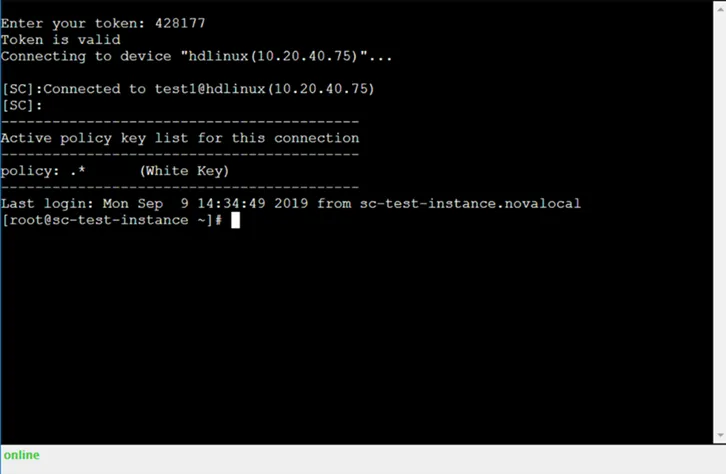
SSH Connection Using MFA Token