User Types for Remote Privileged Access Management
In Kron PAM, users are separated into “PAMOnly”, “PAMLimited&RPAM”, and “PAM&RPAM” user types:
· The PAMOnly (only internal as it is known in previous releases) user type can use Web GUI and Desktop Client to access the KronPAM servers and use all features except for Remote Privileged Access Management.
· The PAMLimited&RPAM (only external as it is known in previous releases) user type can use Remote Privileged Access Management features and solely access device management on the Kron PAM Web GUI and Desktop Client (though over-permissions can be granted to this user type, the user still can only access device management on the Kron PAM Web GUI and Desktop Client),
· The PAM&RPAM (RemoteAccessEnabled as it is known in previous releases) user type can use both Remote Privileged Access Management and features on the Kron PAM Web GUI and Desktop Client together.
User Type | Web GUI & Desktop Client | Remote Privileged Access Management |
|---|---|---|
PAMOnly | Yes | No |
PAMLimited&RPAM | Limited (device management only) | Yes |
PAM&PRAM | Yes | Yes |
Two Remote Privileged Access Management Boolean flags should be defined to handle user types. These flags are attached to user groups and users:
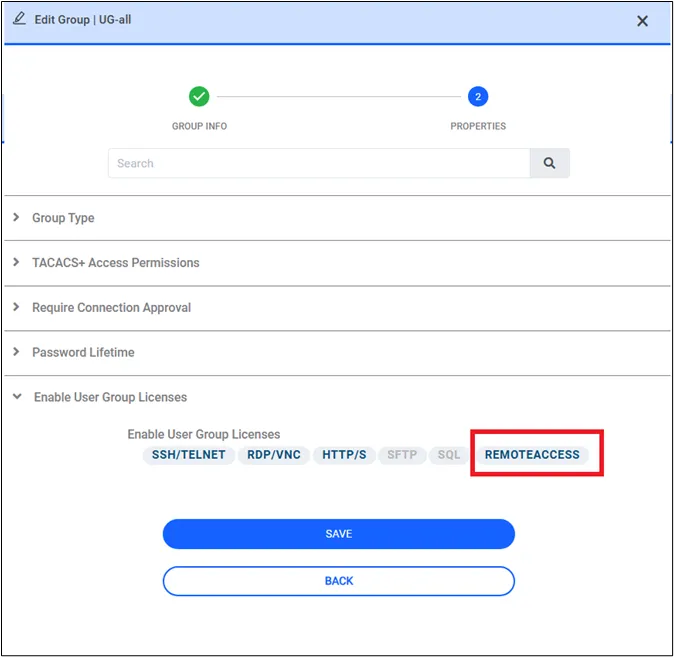
- The Boolean flag attached to the user group shows whether the members of the user group are PAM&RPAM or PAMOnly user types altogether. This flag can be called PAM&RPAM, and if this flag is True, the members of the user group are PAM&RPAM user types, if this flag is False, the members of the user group are PAMOnly user types.
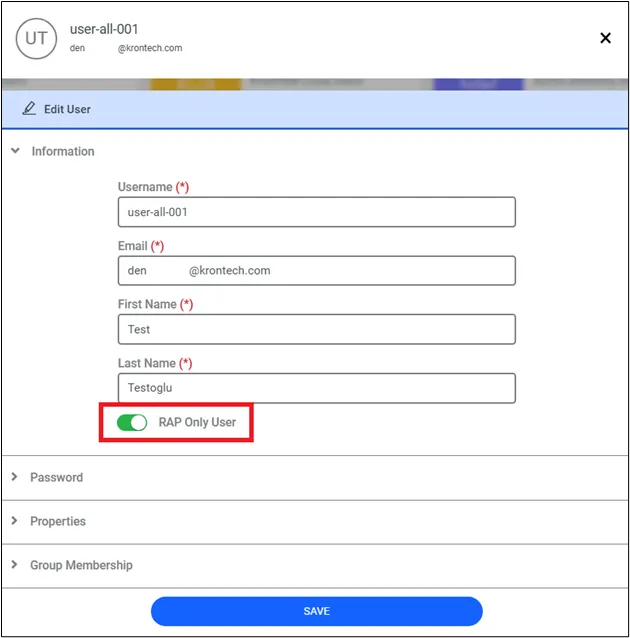
The Boolean flag attached to the user shows whether the user is PAMOnly, PAM&RPAM or PAMLimited&RPAM user type. This flag can be called PAMLimited&RPAM, and if this flag is True, the user is PAMLimited&RPAM user type and if this flag is False, the user is either PAM&RPAM or PAMOnly depending on his/her group PAM&RPAM’s value.
PAM&RPAM Flag | PAMLimited&RPAM Flag | User Type |
|---|---|---|
True | True | PAMLimited&RPAM |
True | False | PAM&RPAM |
False | True | PAMLimited&RPAM |
False | False | PAMOnly |