Adding a New Tenant
The system administrator can add a new tenant:
- Click Add.
- Fill in the form with the tenant details (See below for field description).
- Click the image icon.
- Locate and upload the company logo image (mandatory).
- Click Edit Licenses to edit the tenant license counts (Refer to the section Adding / Editing Tenant Licenses for more information) and save.
- Click Save.
The new tenant will now be listed among the tenants.
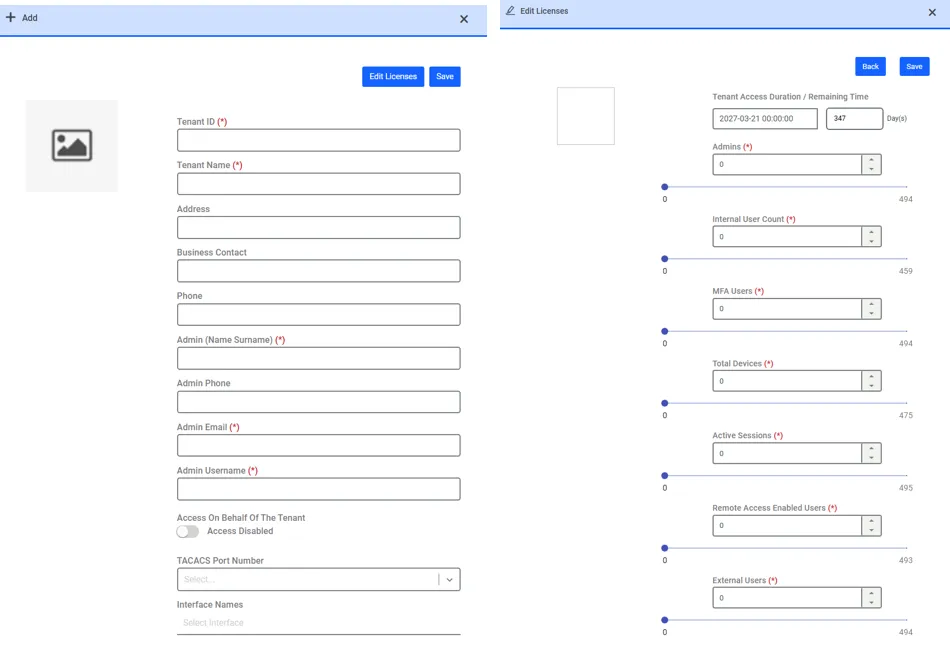
The system administrator can set the expiration date of the tenant during the tenant’s creation. If the system administrator doesn’t assign the expiration date of the tenant, the remaining duration of the tenant is set same as the remaining duration of the host.
When a certain amount of time is left before the tenant's expiration date (for example, last 15 days), information about the tenant's expiration date appears at the top of the tenant screen every time, and when the period expires, the tenant is disabled. This value should be parametric; the name of the system parameter should be tenant.expiration.warning.before.day and the default value should be 15. tenant.expiration.warning.before.day parameter should be set on the host environment.
Once a tenant's license expires, the tenant becomes disabled, and all license numbers from the deactivated tenant are included in the host's license (for example, assume that the host has 100 user licenses, 30 of which are from the tenant, 70 are on the host. After the tenant's license expires, the host has a total of 100 user licenses).
New tenant form field description (* means mandatory field):
- Tenant ID*: The descriptive tenant keyword, which is used in the tenant schema name and during log-in (a tenant user should log in as “<username>@<Tenant Id>”). Only lower-case letters should be used. It cannot be changed once the tenant is created.
- Tenant Name*: The name of the tenant, shown in the tenant list on the Tenant Manager screen.
- Address: The tenant’s street address.
- Business Contact: The name of the business contact for the tenant.
- Phone: The phone number of the business contact for the tenant.
- Admin (Name Surname) *: The name/surname of the main administrator for the tenant.
- Admin Phone: The phone number of the tenant administrator.
- Admin Email*: The email address of the tenant administrator. An email with the password setup link is sent after the new tenant is created.
- Admin Username*: The unique username for the main tenant administrator. This user is created along with the tenant schema becomes the first user of the new tenant, and has access to all administration modules. This user can share these duties with other tenant users once they are added to the tenant schema.
- TACACS Port Number: The port number that the TACACS devices in the tenant schema will use for the TACACS protocol. The alternative values that appear in this combo box are defined by the multitenancy.tacacs.port.range parameter in the System Config. Man. interface.
- Access on Behalf of the Tenant: When it is enabled, the host users can have access to the tenant interface and make changes on their behalf, if the host users are imported by means of LDAP or Microsoft EntraID integration.
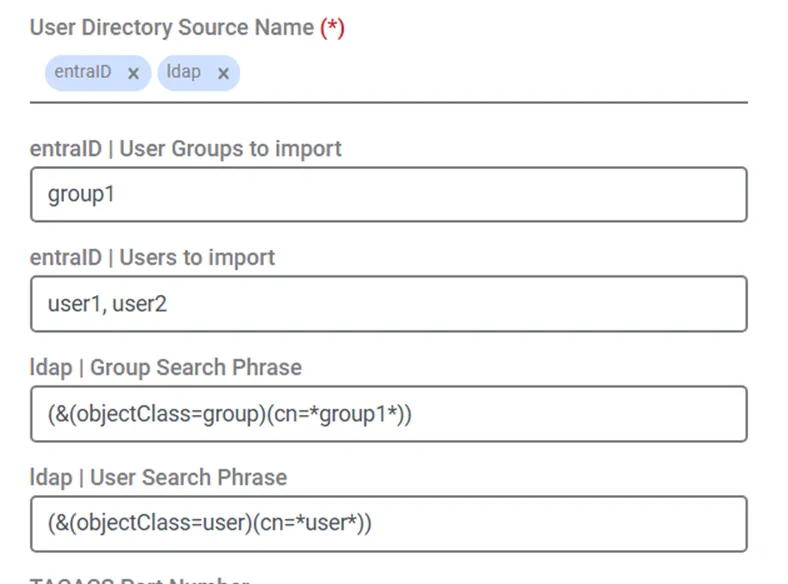
o User Directory Source Name (*): If the Access on Behalf of the Tenant is enabled, the defined user directories on the host environments should be selected at least one in this field.After user directories are selected, the group and user textboxes for the selected user directories will be displayed as blank on this page.
- If the host’s administrator user does not fill in these fields (keep them as blank), definitions under LDAP or Microsoft Entra ID integration on the host’s environment will be used depending on the user directory type (either Active Directory or Entra ID directory). For example, if the host gets 5 users from LDAP Integration, the tenant will also have the same 5 users.
- If the host’s administrator user fills these fields, the new definitions will be used rather than defined in the host environment. Thanks to this, the host's administrator can differentiate the users received by LDAP or Microsoft Entra ID Integration in the host and tenant environment.For example, if the LDAP integration of the host environment has “(&(objectClass=user)(cn=John))” user search phrase, and during the tenant creation, if the tenant environment has “(&(objectClass=user)(cn=Jane))” user search phrase, the host environment has “John” user, whereas the tenant environment has “Jane” User.
Additionally, if it is required, the host’s admin user can select a subgroup of users from among those pre-selected for the host’s environment, for the tenant environment. For example, if the LDAP integration of the host environment has “(&(objectClass=user)(cn=*Mary*))” user search phrase, and during the tenant creation, if the tenant environment has “(&(objectClass=user)(cn=*Mary Ann*))” user search phrase, the host environment might have multiple users like: “Mary”, “Mary George”, “Mary Ann” etc.., whereas the tenant environment has “Mary Ann” which is also found in the host environment.
"The access on behalf of" users are only counted in the host’s license. So, if 5 "the access on behalf of" users are defined in 20 tenants, a 5-user slot is occupied only in the host’s license. These users are visible and used; however, they are not counted in the tenants’ licenses.
- Interface Names: The VRF interfaces that can be used by the tenants.