Using MFA for RDP Connections
To activate MFA for an RDP connection to a target device:
Admin and users have the QR code, installed the Kron PAM Mobile Client, scanned the QR code with the Mobile Client, and OTP is enabled for the user group that will be using MFA for RDP connections (See sections Sending the MFA QR Code to Users, Creating a Connection Between Kron PAM and the Kron PAM Mobile Client, Enabling Multi-Factor Authentication (MFA) )
- Log in to the Kron PAM Web GUI.
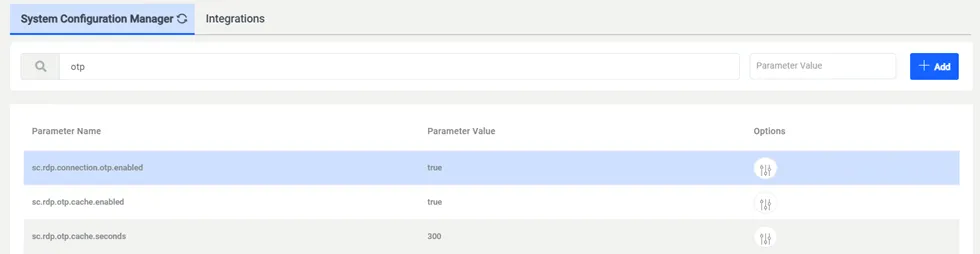
- Navigate to Administration > System Configuration Manager.
- Set these required parameters: sc.rdp.connection.otp.enabled=true (one-time-password enabled for RDP connections) sc.rdp.otp.cache.enabled=true (If the cache parameter is activated, after entering an MFA the user will not be asked for OTP during the cache duration) sc.rdp.otp.cache.seconds=240 (cache time in seconds)
- After these settings, a user belonging to an enabled user group will be asked for a token when logging in to an RDP server.
Using MFA to Establish an RDP Connection