Navigate through spaces
K
Reference Guide
Kron PAM Administration
Kron PAM Web GUI
License Manager
Email Server Configuration
Language Settings
Menu Lists Management
System Configuration Parameters
Enabling Push Notifications for Mobile Application
Enabling HTTPS on the Kron PAM Web GUI
Backup Management
SAML Authentication
Hardware Security Module (HSM) Integration
Windows Authentication on the Kron PAM GUI
PKI Authentication
Logo and Background Customization
Multitenancy
User Management
Device Management
Policy Management
Approval Management
Session Manager
Secrets
Multi-Factor Authentication
Unified Access Manager
Data Access Manager
Cloud PAM
Cloud Infrastructure Entitlement Management (CIEM)
Privileged Task Automation
Kron PAM Reporting and Logging Functions
Monitoring & Alarms
High Availability
Failover Scenario
Reporting
Multitenancy
DevOps Integration
Kron PAM Remote Access
APPENDIX 1: System Config Manager Parameters
APPENDIX 2: Job Descriptions for Job Scheduler
Docs powered by
Archbee
Reference Guide
...
Global SSH Key Connections
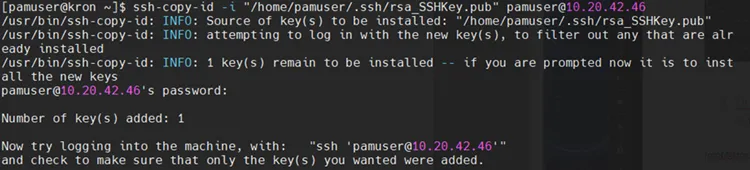
Uploading Public Component of Key Pair to Target SSH Device
ssh copy id i \<publickeypair path> username\@remote host the output of the public key pair can also be manually copied and pasted to the authorized keys file at the target
PREVIOUS
Generate SSH Key with SSH-Keygen Tool
NEXT
Adding Private Key as a Global SSH Key
Docs powered by
Archbee
Docs powered by
Archbee