Tenant Selection on SSH Proxy
When a host user connects to Kron PAM from any 3rd party SSH client (for instance Putty), and if the on behalf of feature is enabled on any existing tenants, the host user can select the tenant, after which the SHH device can be chosen.
- Log in to Kron PAM over the 2222 port with any SSH client (here we use Putty as a third-party SSH client)
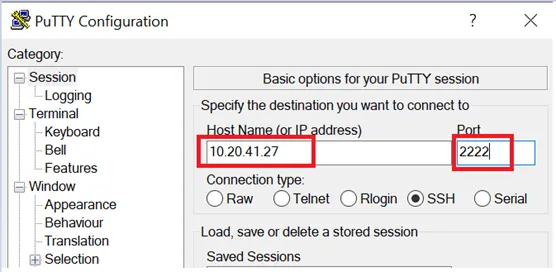
Manage Tenant and Host over the SSH Client
- Type start (*) to see if the tenants or hosts to the logged-on user have access rights.
- Select the on behalf of enabled tenant to manage.
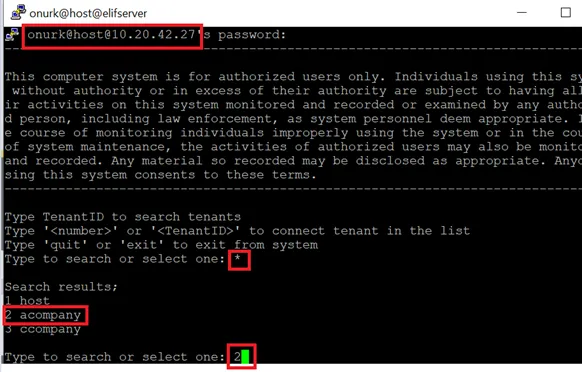
Select Tenant or Host over an SSH Client
After the tenant selection, devices to which the user has the right to log in will be listed. In this case, there is only one device to connect to at tenant accompany (number 2), so it is directly connected to that device.
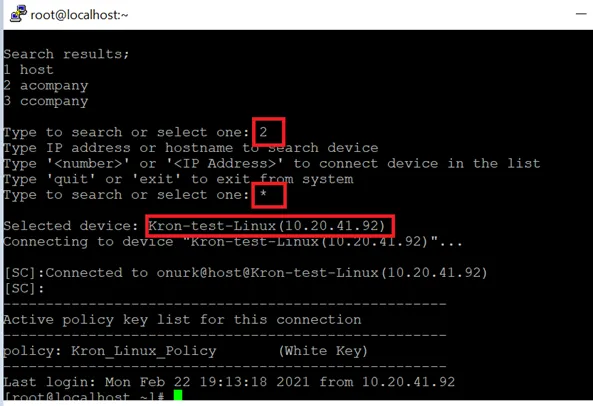
Connect to a Tenant or Host SSH Device over an SSH Client
After connecting to a device, type exit to go back and select a different device under the same tenant. By typing exit again, a different tenant can be selected.
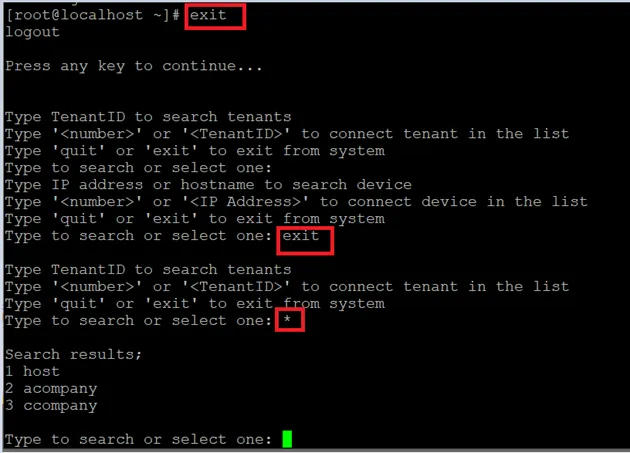
Exit from SSH Device or Tenant