Password Blacklist for Vault Static Accounts
Since the passwords for Static Vault Accounts are manually defined, it is necessary to check whether the entered password is on the list of most commonly used passwords and provide a warning message to the user. Three methods are used for password blacklist validation.
EXACT: Used to check whether the entered password is identical to any values in the most commonly used password list.
CONTAINS: Used to check whether the entered password contains any values from the most commonly used password list.
REGEX: Used to define specific patterns based on the values in the most commonly used password list and find texts that match these patterns.
For now, the most commonly used passwords are inserted into the database tables using an Excel list.
- The below methods will be used as password validation when creating the most commonly used password list.
- EXACT
- CONTAINS
- REGEX
DB_Id | Match Type | Match_Value |
|---|---|---|
3000125 | EXACT | amanda |
3000126 | EXACT | andrea |
3000127 | EXACT | andrew |
3000128 | EXACT | angel |
3000129 | CONTAINS | IST34 |
3000130 | CONTAINS | ANK06 |
3000131 | CONTAINS | IZM35 |
3000132 | CONTAINS | izm35 |
3000133 | CONTAINS | ank06 |
3000134 | CONTAINS | ist34 |
3000135 | CONTAINS | 1234qwer |
When creating a Static Vault account or using the update password option, the entered password is checked according to the password method in the database, and a warning message is displayed to the user on the screen.
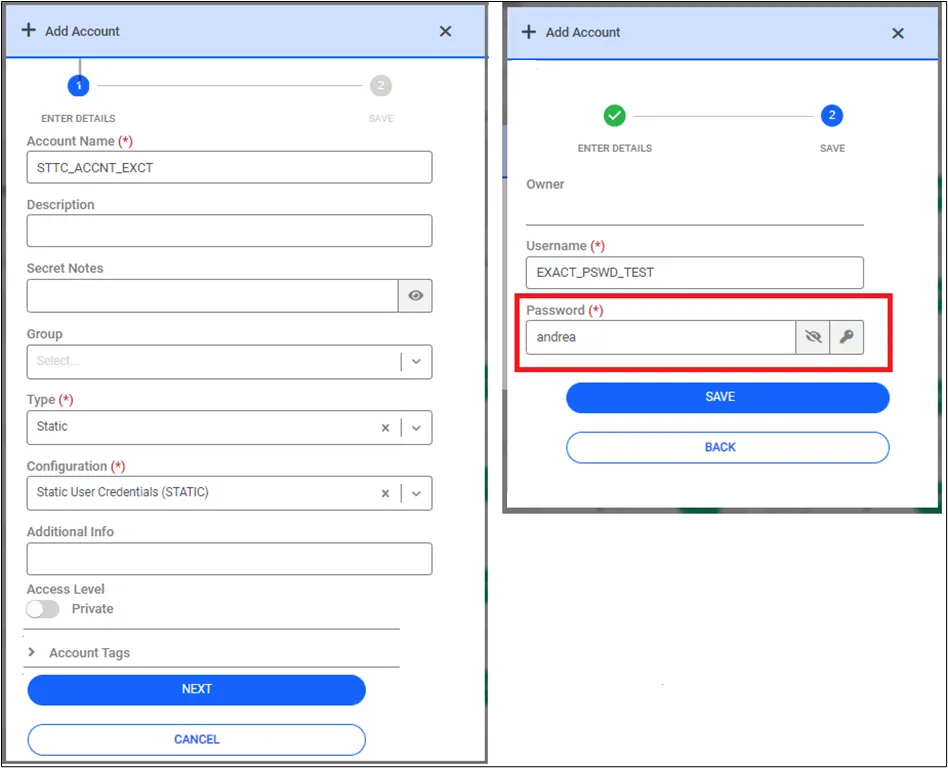
If the user still wants to use the password then click the continue button and the warning message will be shown. Once the Vault account is successfully created, the user is notified that the process is completed.