OCR Logs Configuration
OCR log can be disabled/enabled for remote applications and devices. Below is the workflow of this functionality.
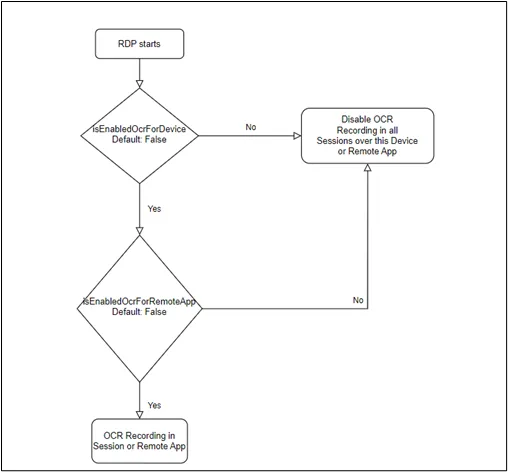
OCR Workflow
Disable for a Remote Application:
- Log in to the Kron PAM Web GUI.
- Navigate to Devices > Inventory > Device Groups.
- Click the desired Device Group and select Remote Apps.
- Set the Disable OCR box.
- Now OCR Logs generated from the RDP session are disabled for the Remote App.
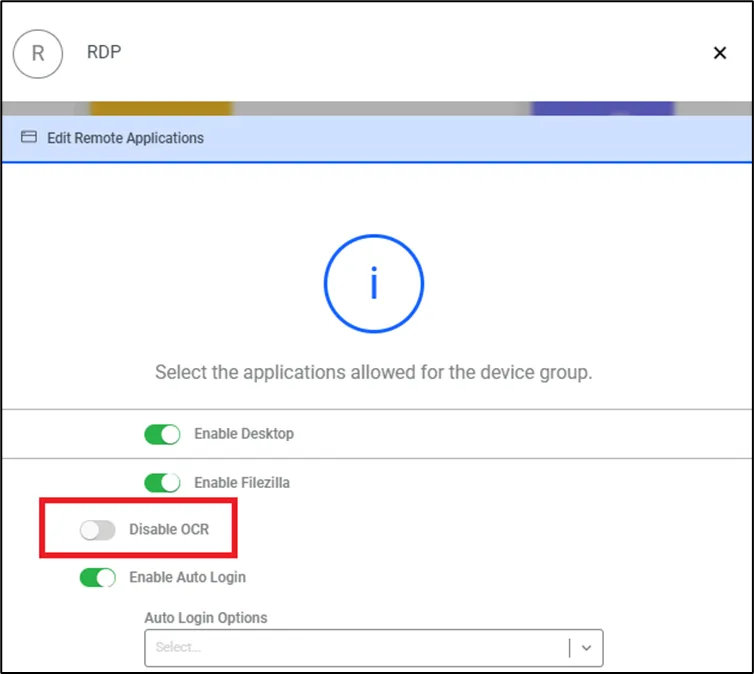
Disable OCR for a Remote App
Disable for a Device:
- Log in to the Kron PAM Web GUI.
- Navigate to the Devices > Inventory.
- Click the desired Device Group and device then select Edit Device.
- Add isEnabledOcrForDevice as a parameter with the value False from Custom Properties.
- Now OCR Logs generated from the RDP session are disabled for the device.