LDAP/AD Integration
Kron PAM allows LDAP/Active Directory integration with select integration options.
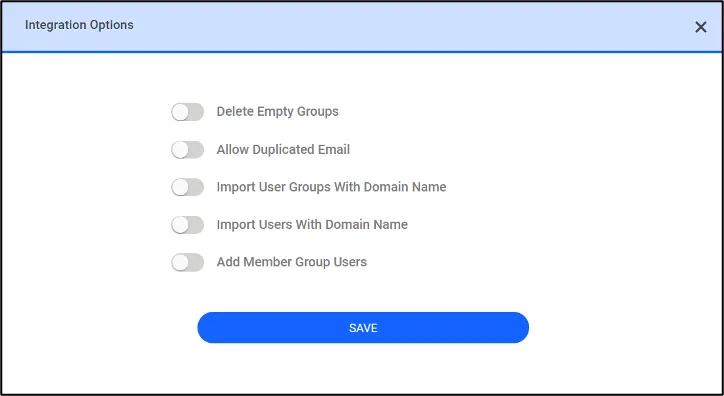
- Click the Integration Options.
- Edit button.
- Select the desired integration option and click Save.
- Click the Synchronize All button to import LDAP users.
Delete Empty User Groups: If this option is selected, the empty LDAP user groups are deleted from Kron PAM.
Allow Duplicated Email: Allows user import even if the users have the same email address. If this option is not selected, only one user with a unique email address will be imported.
Import Users With Domain Name: This value can be set as TRUE or FALSE. If the value is TRUE, the users of the domain name KronPAM\testuser or [email protected] are imported. If the parameter is set as TRUE, the userPrincipalName value should be added to the LDAP Definition.
Separator: The value can be set as “\” or “@”. The preferred separator is used to import users from the AD with the domain name. (Example: KronPAM\testuser or [email protected]). The default value is "\".
Import User Groups With Domain Name: This value can be set as TRUE or FALSE. If the value is TRUE, the user groups with the domain name KronPAM\TestuserGroup are imported.
Parameter Name | Sample Parameter Value |
|---|---|
sc.integration.ldap.baseDN_0 | DC=SingleConnectlab,DC=net |
sc.integration.ldap.baseDN_1 | DC=SingleConnect,DC=com |
sc.integration.ldap.domain_0 | SingleConnectlab.net |
sc.integration.ldap.domain_1 | SingleConnect.com |
sc.integration.ldap.eid_0 | |
sc.integration.ldap.eid_1 | |
sc.integration.ldap.group.import.with.domain.name | TRUE |
sc.integration.ldap.group.search.phrase_0 | (objectClass=group) |
sc.integration.ldap.group.search.phrase_1 | (objectClass=group) |
sc.integration.ldap.password_0 | ? |
sc.integration.ldap.principal_1 | ? |
sc.integration.ldap.source.name_0 | Ldap |
sc.integration.ldap.source.name_1 | ldap2 |
sc.integration.ldap.url | ldap://10.20.30.40#ldap://10.20.30.41 |
sc.integration.ldap.user.additional.attributes_0 | userPrincipalName |
sc.integration.ldap.user.additional.attributes_1 | userPrincipalName |
sc.integration.ldap.user.import.with.domain.name | TRUE |
sc.integration.ldap.user.search.phrase_0 | (objectClass=user) |
sc.integration.ldap.user.search.phrase_1 | (objectClass=user) |
sc.device.integration.ldap.user.membership_0 | false |
sc.device.integration.ldap.import.ou.as.group_0 | true |
sc.device.integration.ldap.device.group.search.phrase_0 | (|(objectClass=group)(objectClass=organizationalUnit)) |
sc.device.integration.ldap.allow.device.in.multiple.groups_0 | true |
sc.device.integration.ldap.allow.device.in.multiple.groups_1 | true |
After defining the above parameters, apply the steps outlined in sections Adding Users Automatically or Manually Trigger LDAP Sync Job.
Add Member Group Users: If this button is on, the users of the subgroups added to the parent group created in AD will be imported.