Database Discovery
Database Discovery allows you to scan network subnets or existing devices to find databases such as Oracle, PostgreSQL, Teradata, MySQL, MS SQL, Hive, and more. This feature enables you to automatically discover databases by accessing them with specified credentials and ports, and then add them to the appropriate device groups in your inventory.
To begin, navigate to Devices > Inventory and create device groups for each type of database you want to discover (e.g., Oracle, PostgreSQL, Teradata, MySQL, MS SQL, Hive). Ensure that you have a device group for every database type you intend to scan.
Next, set up the global credentials and subnet addresses for each device group:
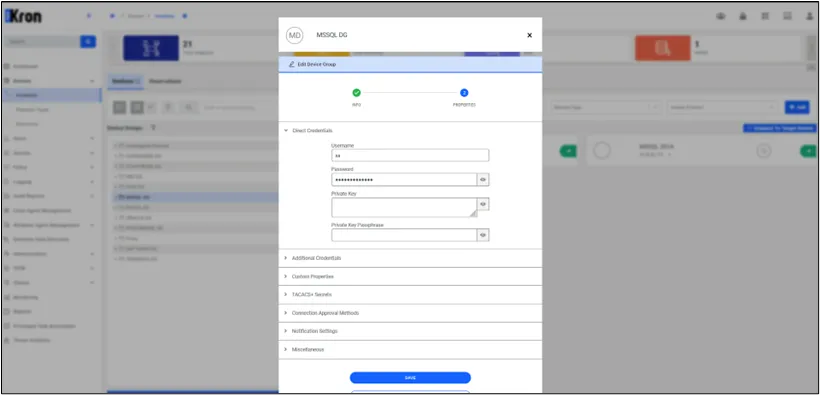
- Edit the device group by clicking on it and selecting Edit.
- In the Direct Credentials section, enter the Username and Password that will be used to access the databases.
- Save each property after entering the information.
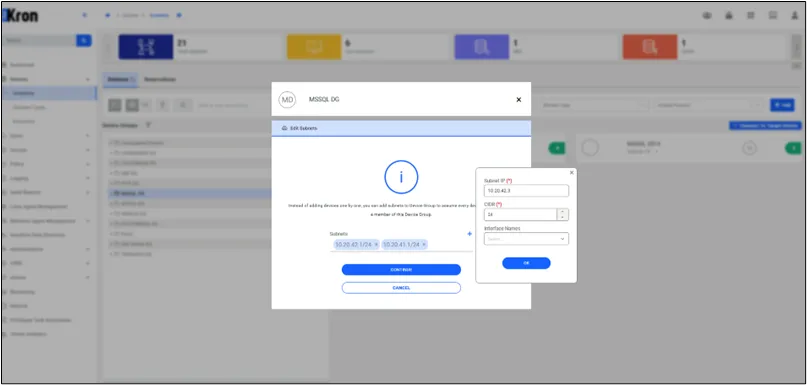
- Add the subnet addresses you wish to scan by selecting Subnet from the device group actions and entering the subnet information (e.g., 10.20.42.1/24 to scan IP addresses from 10.20.42.1 to 10.20.42.255).
Now, create a discovery profile for database discovery:
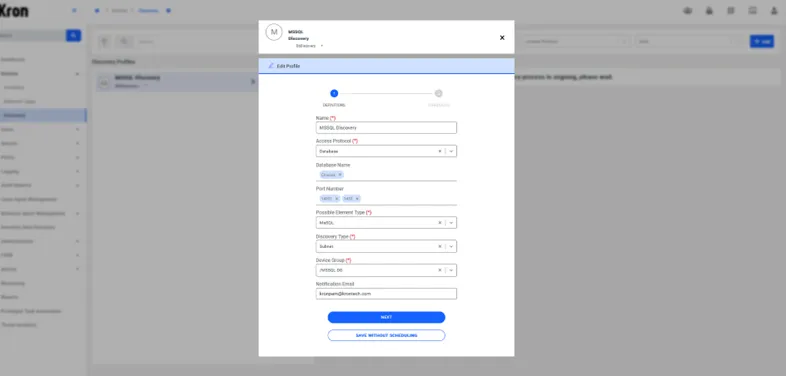
- Navigate to Devices > Discovery and click on Add Discovery Profile.
- Enter a name for your discovery profile, such as MS SQL Discovery.
- For the Access Protocol, select Database.
- In the Database Credentials section, add the database names and corresponding ports you wish to discover (e.g., database names like master or SHINOC, and ports like 1433 or 14331).
- Select the device groups you want to include in the discovery (e.g., the MS SQL device group you created earlier).
- Set the Discovery Type to Subnet to scan the subnets specified in the device groups.
- Enter a mail address for notification.
- Optionally, set a cron expression if you wish to schedule periodic scans.
- Save the discovery profile and click on Run Discovery to start the process immediately.
Once the discovery process begins, it will attempt to access databases within the specified subnets using the provided credentials and ports. If a database is successfully accessed and logged into, it will be added to the inventory under the appropriate device group, and the database credentials will be stored.
You can monitor the discovery process and view results in the Discovery Logs. If there are errors—such as being unable to access a device or failing to log in—the logs will display detailed error messages when you click on specific entries. This helps in troubleshooting any issues encountered during discovery.
- Oracle
- MS SQL
- PostgreSQL
- MySQL
- Teradata
- SAP HANA
- DB2
- Cassandra
- Hive