Auto Login Configuration
To use the Auto-Login feature on individual webpages defined as devices in Kron PAM:
- Navigate to Devices > Element Type.
- Click the Search button and select the related webpage element created earlier.
- Click the Options menu to edit the properties of the element type then click the Edit Element Type.
- Select the Association Tags as HTTP then click the Next button.
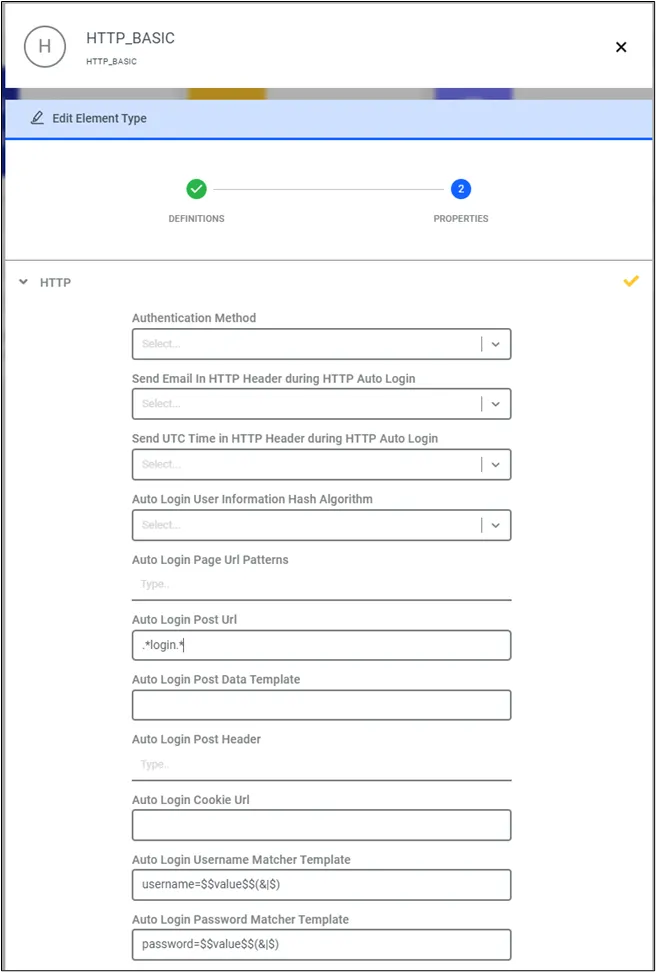
- Fill in the below parameters:
Element Type Property | Explanation |
|---|---|
Auto Login Password Matcher Template | This parameter is used to find and replace the password with the global password. |
Auto Login Post URL | Web application/site login URL. Regex can be used to define the URL property Example: /login/device-based/regular/login/.* |
Auto Login Username Matcher Template | This parameter is used to find and replace the username with the global username |
Bypass Domain | Web applications/sites can use multiple domains for images, chats, emails, etc. If you do not add these domains to the whitelist, the webpage will not be displayed as-is. Some images, videos, etc. will be blocked because of the improper HTTPS certificate. |
To better understand these element properties, a Facebook login can be used as an example:
- Open facebook.com on a web browser.
- Right-click the screen and click Inspect.
- Click the Network tab at the top of the screen.
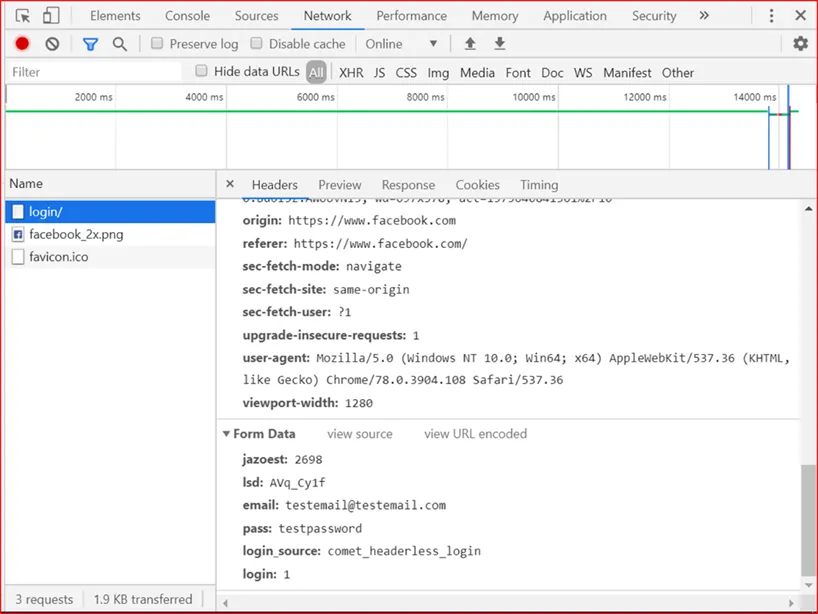
- On the Facebook Login screen, insert a test email and password and click Login.
- Facebook will return an error because the test credentials are incorrect.
- Look at the inspection code to find the test email and password. Check the parameter’s name and configure it in the element type. On the left column, there are post URLs. These should be configured in the Auto Login Post URL for Facebook. It is login so the Auto Login Post URL parameter will be defined as '/login.'. Regex characters are needed since there could be other sub-pages, therefore, the post URL always ends with “. “. Now look for the test username and password in the inspection code post URL. The test username and test password are posted under specific containers in the login URL. In Facebook, these parameters are email and pass. These parameters will be defined in:
- Login Username Matcher Template as email=$$value$$(&|$), and Auto Login Password Matcher Template as pass=$$value$$(&|$)
So, these parameters will be used in the Element Type. If these parameters are different, (highlighted with red) “pass” and “email” parts of the parameter definition should be changed as needed. The other part, “=$$value$$(&|$)”, should remain the same in the definition.
- To apply all the changes made in the element type, the HTTP Proxy needs to be restarted. Restart the HTTP Proxy from the Kron PAM CLI. Establish an SSH connection to Kron PAM as root and run the command: sudo systemctl restart pam-http
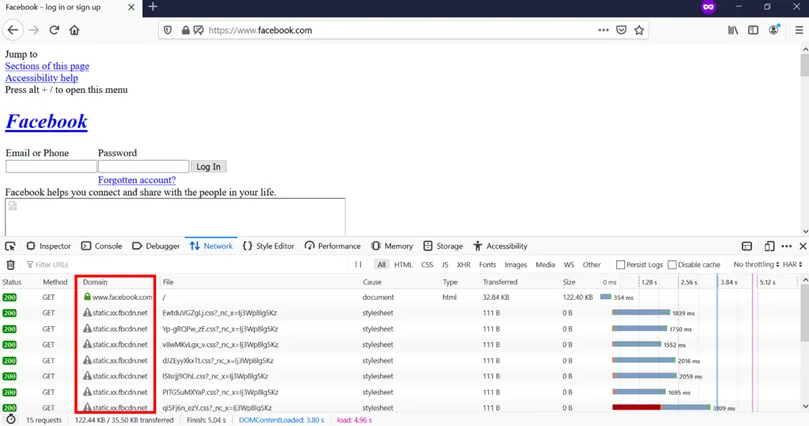
- The last element type property is the Bypass Domain. These are external domains that the main webpage loads some data and elements from. The Firefox web browser is used to find the bypass domains. Open the Facebook webpage by using an HTTP Proxy on Firefox. The web page will be loaded incorrectly. Frames can be different, photos will not be shown, etc. This means that some information or data coming from another domain is blocked since they are not allowed. These domains are what we call bypass domains.
- Right-click the screen and click Inspect.
- Click the Network tab and check the Domain column.
- Any domains other than facebook.com need to be added as bypass domains. This step should be repeated after the login page or any other page as well, to find all bypass domains.
- Once all the bypass domains are added to http.bypass.domain, another restart is required using the command: sudo systemctl restart pam-http
- All of these parameters need to be configured in the Element Type Property as illustrated in the screenshot below.
The auto-login mechanism is triggered when the username/password field is empty or an auto-login keyword text is entered. Some of the websites allow the username/password field prompt to be empty and the login button can be clicked, while other websites do not allow it.