Adding Accounts in Password Vault
Kron PAM is flexible in adding and managing accounts. Thanks to the portal rights given to users, they can add their accounts, just like admins. In this respect, management rights can be assigned to an admin or authorized user. User rights will be detailed in the Password Vault User Rights section.
To assign Password Vault to users, the sapm.admin.manage.all.accounts parameter must be configured in System Config Manager as false.
Users can set accounts added to Password Vault as private, as long as the Private field on the form screen is set as YES. If an account is set as private, it cannot be seen by other users in the same User Group.
Private accounts can be set to work by default through the system, by configuring the following parameters in the System Configuration Manager:
Parameter Name | Parameter Value |
|---|---|
sapm.private.option.default.value | YES |
sapm.private.option.hide | true |
Each account has one user ownership. Users can share the account with their group or with other groups whenever they want.
Accounts can be added based on case sensitivity. To make the account unique, the following parameter needs to be defined in System Configuration Manager:
Parameter Name | Parameter Value |
|---|---|
sapm.allow.case.insensitive.account.name | false |
In the PAM system, for users defined in the password vault, headers have been placed at the top of the screen to provide a summary based on the Strategy type value and configurations.
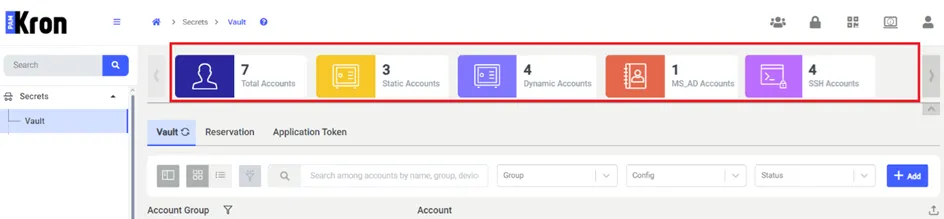
In the relevant panel, the distribution of accounts defined for the password vault is displayed schematically, with each represented by a different icon and color. The following are shown separately in the PAM system:
- Total number of Vault accounts,
- Number of Dynamic Accounts,
- Number of Static Accounts,
- Number of Vault Accounts by protocol type (regardless of whether they are Dynamic or Static), such as SSH and MS_Active_Directory.