Adding a Script Realm
Script Realms in Privileged Task Automation are used to manage script execution permissions by associating user groups with script groups. Script Realms allow administrators to define which user groups can play, edit, or delete scripts within specified script groups.
The user must have sufficient permissions to add Script Realms. At least one User Group and Script Group must exist.
To add a script realm:
- Navigate to the Realms Tab.
- Open the Realms tab.
- Click the Add button.
- In the Add Realm window, provide the following details:
- Realm Name: Enter a descriptive name for the script realm.
- Description: Provide a brief description of the realm to explain its purpose.
- User Group(s): Select the user group(s) authorized to access the scripts within this realm.
- Script Group(s): Select the script group(s) to be included in the realm.
- Define Group Permissions.
- Under Allow Groups, configure the permissions for user groups:
- Edit: Toggle this option ON to allow editing of scripts.
- Delete: Toggle this option ON to allow the deletion of scripts.
- Play: Toggle this option ON to allow script execution (playing)
- Click Save to finalize the creation of the script realm.
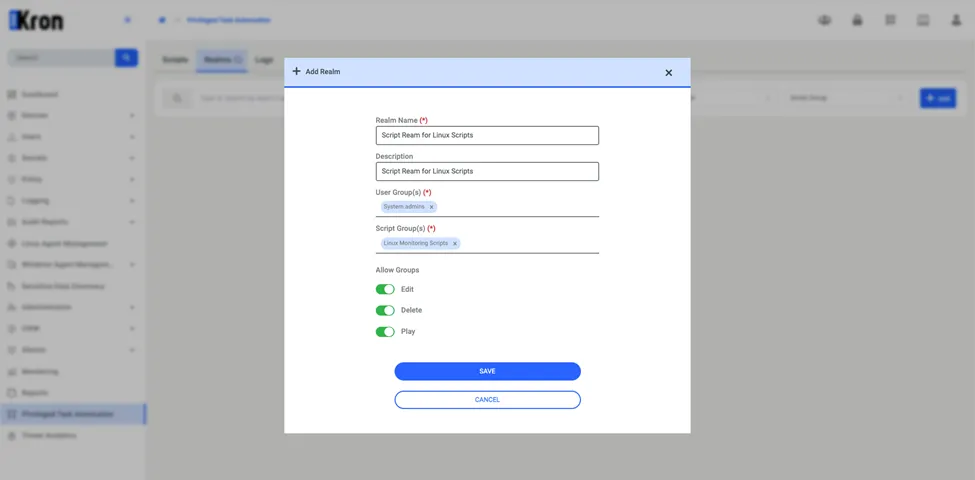
Adding Script Realm