Adding Vault Configurations
To manage passwords via Password Vault, a Vault configuration is required. Vault configurations consist of the command sets to make the password changes in target systems. There are pre-defined Vaultconfigurations in Kron PAM, but if the target device differs from those pre-defined in the system, a new Vault configuration must be created. Different Vault configurations should be created for each kind of target system whose passwords will be managed by the system. In the configuration screen, Strategy defines the method to change the password, and Configuration Properties defines the details for each configuration.
STATIC Strategy is a configuration where an account can be added to Password Vault without the target system.
To create a new Vault Configuration:
- Navigate to Secrets> Configurations.
- Open the Vault Configurations tab.
- Click on to Add Button.
- Fill in the Name, Strategy, and Description fields and fill in the desired parameters
- Click Save.
To add and/or edit properties for the Vault configuration:
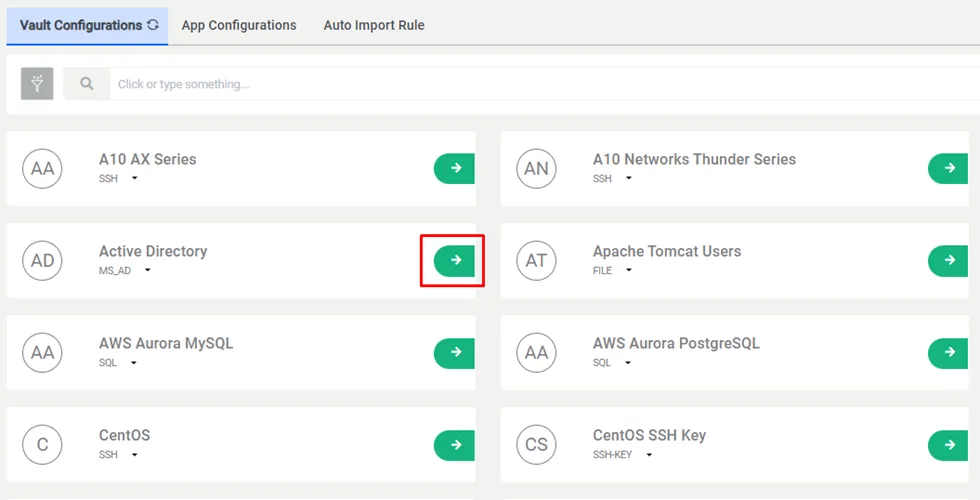
- Write the Advances Search Field to see saved configurations.
- Click the Green arrow button of the desired configuration and Edit Configuration.
- Type in the Property Value and click Save.
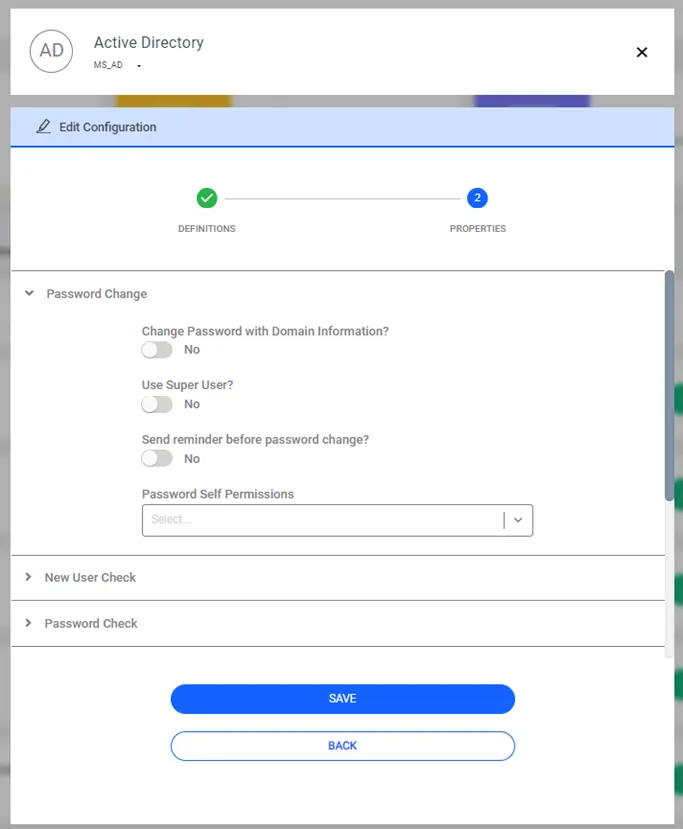
These are the properties that can be used for Vault configurations:
SAPM Configuration Property Key | Description | Pool Value |
|---|---|---|
account.level.properties | This property uses values that can be set to account-specific configurations, and that can be defined at the account level instead of values in the default configuration. Property values are defined on the SAPM Account screen. | Other properties |
allow.seen.by.multiple user | If set as “true”, the SAPM password can be seen by other users in same user group. By default, the SAPM password can be seen only by the user who got the password last. (For Dynamic Accounts Only) | true/false |
always.show.accounts.in.auto.login | Allows access to other servers with Active Directory and LDAP accounts. (Applies to SSH and RDP sessions.) | true/false Default value: true |
aws.iam.users.region | aws region to be accessed during password change | eu-central-1,eu-west-1,us-east-1 |
aws.super.user | authorized username to change a user's console or security credentials | Authorized user username |
aws.super.user.access.key | authorized user access key information to change a user's console or security credentials | Authorized user access key |
aws.super.user.secret.key | authorized user secret key information to change a user's console or security credentials (Encrypted) | Authorized user secret key |
change.password.with.other.account | The security credentials of the user who will change their console credentials must first be added as another account. Then this account should be defined as AccountName@GroupFullPath (Example: Account1@/ParentGroup) | Will change their credentials account |
change.password.after.session.login | If set as “true, " the Vault Account password will be changed just after the Kron PAM Session Manager starts an RDP or SSH session using this Vault account. By default, the Vault Account password is not changed after being used by the Session Manager.
| true/false |
change.password.command.template | The command is set to be used to change the password. This set can be different for each system. The command set consists of the commands to change the password in the target system. There are pre-defined sets for most used systems, but if the target device is not in the pre-defined systems, this command set needs to be configured. | Specific to the device type. E.g. for a Cisco device: en\n${superPassword}\nconf t\nline con 0\npassword ${newPassword}\nline vty 0 4\npassword ${newPassword}\nline vty 5 15\npassword ${newPassword}\nenable secret ${newPassword}\nend\nwr me\nexit |
change.password.failure.pattern | During each password change, Kron PAM gets an output from the system. It checks if the password was changed successfully. If there is a failure in the password change process, the system does not add the new password to its database. If the output matches this regex pattern, Kron PAM decides that the password change command has failed. If the “skip.password.validation.after.change” parameter is set as “false”, the result of the connection validation overrides this decision, and this parameter has no effect | Specific to the device type. E.g. for a Cisco device: % Invalid input detected.* |
change.password.only.at.change.period | When set as “true”, no duration information is required from the user, only comments will be requested. The password will not be changed after the checkout, and other users will be able to check out the same password until the next periodic change. By default, the user is asked for the duration, and the password is changed after the checkout. | true/false |
change.password.script.template | The Expect script is used to change the password. | Script written in expected language. E.g. for Cisco IOS Router: send "enable\r" expect "Password:" send "${superPassword}\r" expect { "Password:" { exit 1 "wrong enable password" } "#" { } } send "conf t\r" expect "#" send "username ${username} password ${newPassword}\r" expect { "#" { } "%" { exit 1 "command failed" } } send "do write\r" exit |
change.password.success.pattern | During each password change, Kron PAM gets an output from the system. It checks if the password was changed successfully, and if there is a failure during the password change process, the system does not write the new password in its database. If the output matches this regex pattern, Kron PAM decides that the password change command was successful, and stores the new password. If the “skip.password.validation.after.change” parameter is set as “false”, the result of the connection validation overrides this decision, and this parameter has no effect. | Specific to the device type. E.g. for Centos device: .*successfully.* |
change.password.with.domain | Usually, for some Active Directory (AD) systems, the domain name does not need to be sent during a password change request. However, some systems require the domain name to be included in the password change, such as “SINGLECONNECT.COM/richard” instead of just “richard”. By default, this parameter is set as “false”, and the domain name is not included in the command sent to the AD servers for AD user password change. When set as “true”, the domain name is included in the command sent. | true/false |
change.password.with.super.user | If set as “true”, the super user credentials defined by the super.username and super.password properties are used to change the SAPM account password in the target device. By default the value is “false”, meaning the SAPM account username and password are used to change the password. This option should be set as “true” when the SAPM account’s rights are not enough to change its own password. | true/false |
change.password.self.permission | Permission for Active Directory users to change their password. According to the Active Directory Self Permission, Kron PAM is given one of these permissions. | CHANGE_PASSWORD RESET_PASSWORD |
change.period.in.day | The default period to change passwords using this configuration (in days). There are two locations for this configuration. The first one is in the SAPM Account Definition, and it has the higher priority. If “Change Period (day)” is not set in the SAPM account definition, the “change.period.in.day” property value for the SAPM Configuration is used to change the password. If both the “Change Period” for the SAPM Account and the “change.period.in.day” property value for the SAPM Configuration are not set, an error occurs when changing the password. | Integer (in days) |
change.period.in.minute.on.fail | The period to attempt to change the password again when the periodic password change has failed. | Integer (in minutes) |
check.new.users.with.super.user | SAPM can check for new users in the target systems periodically, or on demand (See section Discover Newly Users for details). If this parameter is set as “true”, the super user credentials defined by the “super.username” and “super.password” properties are used to check for new users in the target device. The default value is “false”, meaning the SAPM account username and password are used to check for new users. | true/false |
check.password.command.template | The Password Vault can periodically check the validity of the passwords. The command set defined in this parameter is used to check if the stored password is valid or not. | Specific to the device type. |
check.password.success.pattern | The output pattern in regex format, which shows that the password is valid. | Specific to the device type. |
check.password.validation | If set as “true”, the SAPM accounts using this configuration can be included in periodic and one-time password validations. If set as “false”, the Check Password operation will not be executed for the SAPM accounts using this configuration. This property checks if the password is correct. | true/false Default value: true |
check.password.with.super.user | If it is set as “true”, the super user credentials defined by the “super.username” and “super.password” properties are used to check the validity of the SAPM account password in the target device. The default value is “false”, meaning the SAPM account username and password are used to check the password validity. | true/false |
connection.timeout | Timeout duration for connection. | Integer (unit:second) |
database.driver | Database driver to manage database passwords. | Oracle/Postgresql/MsSQLServer/MySQL/Cassandra/SAPHANADB/Teradata/Sybase driver in the following format: oracle.jdbc.driver.OracleDriver org.postgresql.Driver com.mysql.jdbc.Driver com.microsoft.sqlserver.jdbc.SQLServerDriver com.sap.db.jdbc.Driver org.apache.cassandra.cql.jdbc.CassandraDriver com.teradata.jdbc.TeraDriver com.sybase.jdbc4.jdbc.SybDriver |
delete.list.script.template | The Expect script used to delete users. | Script written in Expect language. E.g. for Cisco IOS Routers: send "enable\r" expect "Password:" send "${superPassword}\r" expect { "Password:" { exit 1 "wrong enable password" } "#" { } } send "conf t\r" expect "#" send "no username ${username}\r" expect { "#" { } "%" { exit 1 "command failed" } } send "do write\r" exit |
delete.user.command.template | The command set used to delete users. After checking for new users in the target devices, this parameter is used to delete users, after reviewing the New Users list. | Specific to the device type |
edit.comment.enable | Comments appear when accounts are enabled for editing. | true/false |
execute.post.command.with.super.usererror.check.account.command.template | If set as “true”, the super user credentials defined by the “super.username” and “super.password” properties are used to run the commands after the password change (E.g., to kill the active sessions started with the previous password).The default value is “false”, meaning the SAPM account username and password are used to run the commands after the password change. See section Configuration Properties to Execute Commands After Changing Passwords for more information. | true/false |
error.check.account.command.template | If "super.username" and "super.password" were added to configuration, "Error.check.account.command.template" commands can run on the server. The parameter just affects SSH strategy. | passwd -S ${username} |
error.check.account.command.parser | It parses the output of the command executed in the error.check.account.command.template parameter and prints the desired message to the screen. Regex is used. | \(.*\) |
file.path | Target file path for FILE strategy. The "file.regex.to.match" and "file.regex.to.replace" properties are also required for this strategy. See section Managing Passwords in a File for more information. | Specific to the device type. |
file.regex.to.match | The regex pattern to match with the password in the file path. The "file.path" and "file.regex.to.replace" properties are also required for FILE strategy. See section Managing Passwords in a File for more information. | Specific to the device type. |
file.regex.to.replace | When the "file.regex.to.match" matches the password field, it is replaced with this property value. "file.regex.to.match" and "file.path" properties are also required for FILE strategy. See section Managing Passwords in a File for more information. | Specific to the device type. |
http.change.password.body | The HTTP body for password change requests (used for HTTP strategy), for applications or devices that provide HTTP password change API. | Specific to the device type. |
http.change.password.headers | The HTTP header for password change requests (used for HTTP strategy), for applications or devices that provide HTTP password change API. | Specific to the device type. |
http.change.password.method | The HTTP method for password change requests (used for HTTP strategy), for applications or devices that provide HTTP password change API. | POST / GET / PUT |
http.change.password.url | The URL the password change requests will be sent to (used for HTTP strategy), for applications or devices that provide HTTP password change API. | Specific to the device type. |
http.check.password.body | The HTTP body for password check requests (used for HTTP strategy), for applications or devices that provide HTTP password check API. | Specific to the device type. |
http.check.password.headers | The HTTP header for password check requests (used for HTTP strategy), for applications or devices that provide HTTP password check API. | Specific to the device type. |
http.check.password.method | The HTTP method for password check requests (used for HTTP strategy), for applications or devices that provide HTTP password check API. | POST / GET / PUT |
http.check.password.url | The URL the password check requests will be sent to (used for HTTP strategy), for applications or devices that provide HTTP password check API. | Specific to the device type. |
http.delete.user.body | The HTTP body for delete user requests (used for HTTP strategy), for applications or devices that provide HTTP user delete API. | Specific to the device type. |
http.delete.user.headers | The HTTP header for delete user requests (used for HTTP strategy), for applications or devices that provide HTTP user delete API. | Specific to the device type. |
http.delete.user.method | The URL the delete user requests will be sent to (used for HTTP strategy), for applications or devices that provide HTTP user delete API. | POST / GET / PUT |
http.delete.user.success.pattern | The output pattern in regex format, to show the HTTP delete user request has succeeded, for applications or devices that provide HTTP user delete API. | Specific to the device type. |
http.delete.user.url | The URL the delete user requests will be sent to (used for HTTP strategy), for applications or devices that provide HTTP user delete API. | Specific to the device type. |
http.user.list.body | The HTTP body for user listing requests (used for HTTP strategy), for applications or devices that provide HTTP user listing API. | Specific to the device type. |
http.user.list.headers | The HTTP header for user listing requests (used for HTTP strategy), for applications or devices that provide HTTP user listing API. | Specific to the device type. |
http.user.list.method | The HTTP method for user listing requests (used for HTTP strategy), for applications or devices that provide HTTP user listing API. | POST / GET / PUT |
http.user.list.url | The URL the user listing requests will be sent to (used for HTTP strategy), for applications or devices that provide HTTP user listing API. | Specific to the device type. |
ldap.base.dn | Base Distinguished Name (DN) for LDAP | Specific to the LDAP structure. E.g.: OU=TestUser,DC=SingleConnect,DC=local |
ldap.domain | The domain name that will be included in the command sent to the AD servers for AD user password changes, when the “change.password.with.domain” property is set as “true” | Domain Name |
ldap.ignore.certificate | Ignore certificate for LDAP/AD | true/false |
ldap.password.attribute.name | The attribute name for the password in the LDAP/AD records. | If there is no exception, it is "userPassword" |
ldap.username.dn.template | The Distinguished Name (DN) template for users managed with this SAPM Configuration. | Specific to the LDAP structure. E.g.: CN=${username},DC=example,DC=com |
ldap.connection.timeout | Sets the LDAP and Active Directory response read timeout. | Default value:"5000" ms |
new.password.encryption.key | The encryption key to be used when "new.password.encryption.method" is chosen as AES. | String |
new.password.encryption.method | The method to be used for password encryption. | CLEAR / MD5 / AES / UNICODE_ENCLOSED_IN_DOUBLE_QUOTES |
new.user.exception.list | The list of users to be ignored in the new user checks. | |
new.user.found.action | The action to be taken when a new user is found. | LOG / NOTHING / DELETE / LOG_AND_DELETE |
password.change.reminder.day | The duration (in days) to wait before sending a reminder to the email addresses defined in the sapmMailList property in the device group, before a password change. | Integer (days) |
password.strength.symbol.chars | The pool of characters allowed as symbol characters in password strength. Double quotation mark (“) and percent mark (%) are not allowed for a SAPM password which has WinRM configuration. | Character string. E.g.: !"#$%&'()*+,-./:;<?@[\]^_`{|}~ |
password.strength.lowercase.count | The exact number of lowercase letters that must be included in passwords. | Integer |
password.strength.number.count | The exact number of numbers that must be included in passwords. | Integer |
password.strength.symbol.count | The exact number of symbol characters that must be included in passwords. | Integer |
password.strength.uppercase.count | The exact number for uppercase letters that must be included in passwords. | Integer |
post.command | The commands to be executed on the server after a successful password change (E.g., to kill active sessions started with the previous password). Multiple commands can be separated with \n characters. See section Configuration Properties to Execute Commands After Changing Passwords for more information. | Specific to the device type. |
post.command.failure.pattern | If the pattern set for this property is found in the command results of the “post-command”, the command is tagged as "FAILED". When this happens, the command execution is stopped, and the remaining commands are not executed if the “post.command.stop.on.fail” property is set as “true”. | Specific to the device type. |
post.command.stop.on.fail | When set as “true”, if any failure occurs during post command execution, the remaining commands are not executed. The default value is “false”. | true/false |
set.comment.to.account | Comments appear when prompted for password check out. | true/false |
skip.password.validation.after.change | If set as “true”, no password validation is done after a password change. The default value is “false”, meaning the password validation is done after a password change (For SSH and WinRM Strategy only). For TACACS+ devices it must be set as ”true”. | true/false |
show.accounts.in.auto.login.for.domain.match | It is defined to use Active Directory and LDAP accounts only in domain accounts. Domain parameter should be added on the device. | true/false Default value: false |
ssh.port | The port number for SSH connections, for SSH strategy. The default value is 22. | Specific to the device type. |
ssh.wait.between.commands.in.millisecond | Time to wait between commands | Integer (milliseconds) |
static.secret.type | Select the type of static accounts with static configuration. | USER_CREDENTIAL SSH_KEY SSL_CERTIFICATE OTHER (Secret Data)
|
super.password | The password of the super user who has superior rights on the target server. The value must be set when one of the "****with.superuser" properties is set as “true”. | String (hidden) |
super.username | The username of the super user who has superior rights on the target server. The value must be set when one of the "****with.superuser" properties is set as “true”. | String |
target.url.template | The AD/LDAP URL for Active Directory strategy. | Device specific. |
unlock.account.with.super.user | To unlock the AD user. A superuser must be used. | True/False |
user.group.parser.delimiter | The delimiter character separates multiple user groups when checking for new users in a server. | String |
user.list.command | The command to get the user list. | E.g.: cat /etc/passwd |
user.list.script.template | The expect script is used to get the user list. | Expect script. |
username.parser | The regex pattern to find usernames after the users are listed. | Specific to the device type. Ex: (.*?):.* |
update.comment.enable | Comments appear when prompted for a password update. | true/false |
winrm.auth.method | Authentication method for WinRM. | Basic, Digest, NTLM, Negotiate or Kerberos. |
winrm.ignore.certificate | When set to “true”, certificate errors will be ignored during WinRM connections. | true/false |
winrm.port | The port number for WinRM device configurations. | Integer |
winrm.secure | When set to “true”, the connection will be over HTTPS. Otherwise, it will be over HTTP. | true/false |
winrm.connection.timeout | Sets the WinRM response read timeout. | Default value:"5000" ms |