Adding Dynamic Accounts in Password Vault
To configure Password Vault for any given system, a Password Vault account needs to be added. Authorized users can define the target devices’ privileged users as Password Vaultaccounts. By configuring a Password Vault account, Kron PAM establishes a connection to the target system and changes the old password by generating a random password created by the Password Vault. The new password is encrypted and stored in the Kron PAM database. To add a Dynamic account:
- Navigate to Secret > Vault.
- Open the Vault tab.
- Click on to Add button and select Add Account.
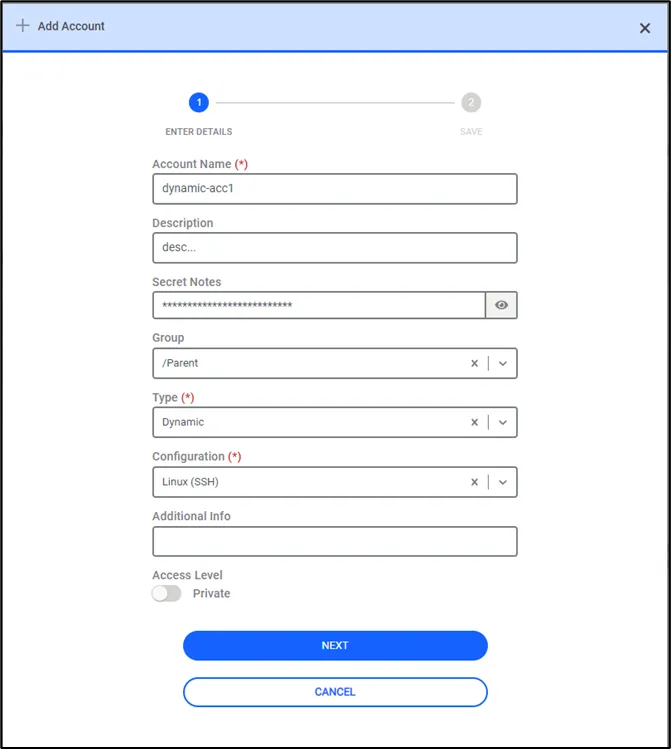
- Enter the Type (Dynamic), Account Name, Description, Group Name, Host (IP/Name), Private, Change the period, Owner, Additional Info, Username, Password and Configuration. (Configuration is the type of target system device. Kron PAM has pre-defined configurations for Password Vault, but any device configuration can be added from the Configuration tab. This is detailed in the upcoming sections)
- Click Save.
If Change Period (day) is not set in the Vault Tab, the change.period.in.day parameter value in the Configuration tab is used to change the password. If the Vault Account Change Period and change.period.in.day parameter values are not set during configuration, an error will occur when changing the password.