What to check if the Tenant Connector is not working (Troubleshooting)
1-Check that the secure boot is disabled on both the Kron PAM server and the tenant connector; if it is enabled, WireGuard might not work:
Linux CLI: [root@connector~]# mokutil --sb-state
2-Check the WireGuard configuration file on the Kron PAM server and the tenant connector:
*Read the Wireguard Config File Command:
Linux CLI | [root@pam~]# cat /etc/wireguard/wg-vpn-{port-number}.conf |
|---|---|
Example | [root@pam~]# cat /etc/wireguard/wg-vpn-10001.conf [Interface] PrivateKey = AAA231425CfCy55zsfG/37XkIZmngeV8az+XXXXXX= Address = 192.168.0.2/32 Endpoint = ${VPN_NODE_IP}:${TUNNEL_PORT} ListenPort = 10001 [Peer] PublicKey = AAAyno14GRH7aadq6cBzATMg8bVB3Ac5Ry3KuXXXXXX= AllowedIPs = 192.168.0.1/32 PersistentKeepalive = 25 |
Linux CLI | [root@connector~]# cat /etc/wireguard/wg-vpn-{port-number}.conf |
|---|---|
Example | [root@connector~]# cat /etc/wireguard/wg-vpn-10001.conf [Interface] PrivateKey = BBBlD/N5r2ff1pfIxu2d5aYk3cppDeDiXZjtBYYYYYY= Address = 192.168.0.1/32 ListenPort = 10001 [Peer] PublicKey = BBByno14GRH7aadq6cBzATMg8bVB3Ac5Ry3KuYYYYYY= AllowedIPs = 192.168.0.2/32 Endpoint = 10.10.10.10:10001 PersistentKeepalive = 25 |
*Ping the Kron PAM server’s WireGuard IP address and the tenant connector’s WireGuard IP address on both environments (you should see that messages are received/sent).
Linux CLI | [root@pam~]# ping {connector’s wireguard public IP} |
|---|---|
Example | [root@pam~]# ping 192.168.0.1 |
Linux CLI | [root@connector~]# ping {pam’s wireguard public IP} |
|---|---|
Example | [root@connector~]# ping 192.168.0.2 |
3-Check the iptables rules on the tenant connector machine:
4-Check the status of the pam-connector.service on the tenant connector machine:
5-Check the port allowance at the server level that is defined in the firewall service:
Stop the firewall service if it is not needed
6-Check the heartbeat messages on the Tenant Connector page of Kron PAM Web GUI: (you should see that the heartbeat is received by the Kron PAM server with a red line at the 4)
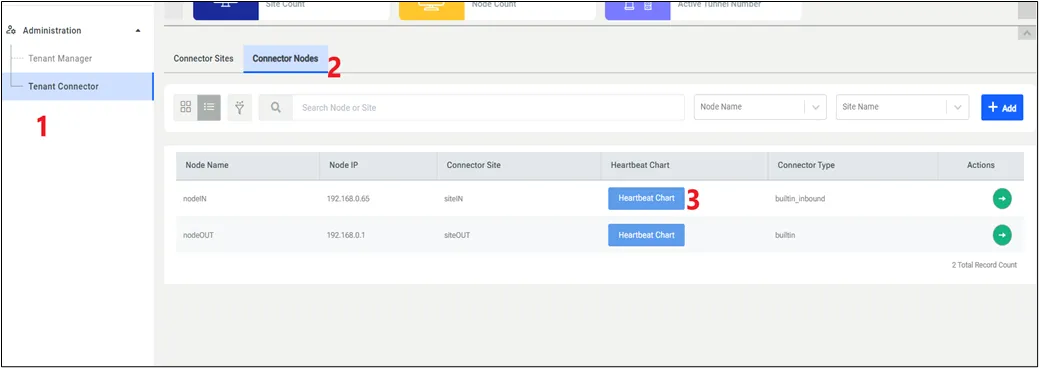
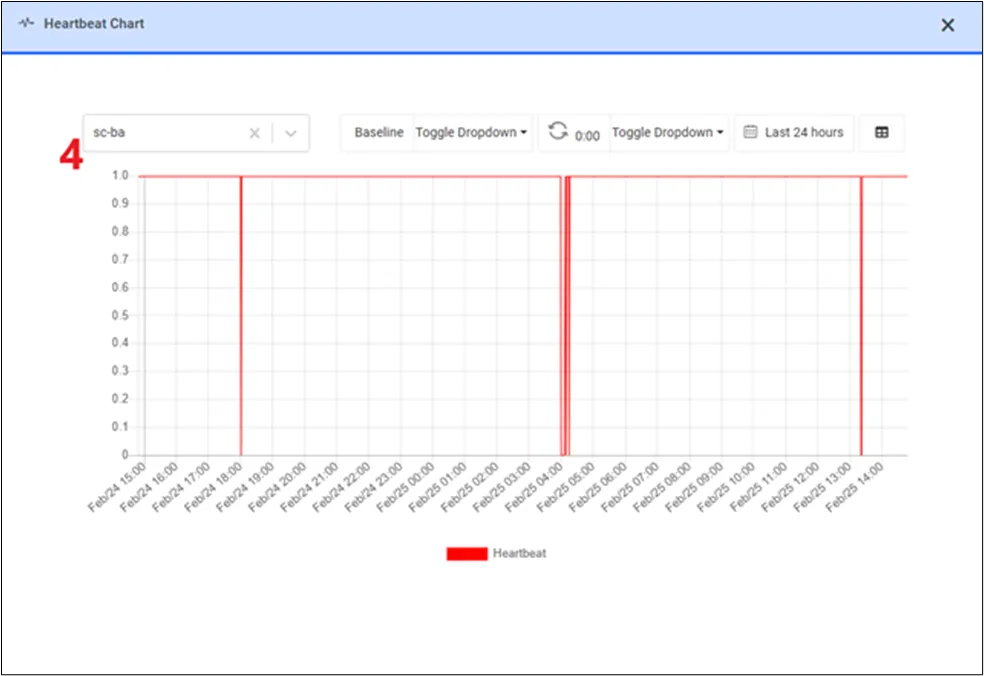
7-Check the IP routing configuration on the tenant connector:
The result should be 1, if it is 0, please enable IP routing by setting it to 1:
8-Check the SELinux security mode on the tenant connector:
The result should be permissive; if it is enforcing, please select permissive security mode with this command:
9-Check the connector.log under /pam/gui/logs on the Kron PAM server during the tenant installation after pressing the SAVE button on the GUI:
10-Check the catalina.out and localhost_access_log.2025-XX-YY.txt under /pam/gui/logs on the Kron PAM server during the session opened on the device assigned to the tenant connector:
Linux CLI | [root@pam~]# tail -1000f /pam/gui/logs/localhost_access_log.2025-{XX-YY}.txt |
|---|---|
Example | root@pam~]# tail -1000f /pam/gui/logs/localhost_access_log.2025-02-25.txt |
11-Check if messages are going through the tenant connector during the session opened on the device assigned to the tenant connector: (you can find the connector’s WireGuard IP on the WireGuard config file and device port on device properties at the Kron PAM Web GUI)
Linux CLI | [root@connector~]# tcpdump -i any host {connector’s wireguard IP} and port {device port assigned from Kron PAM server} -vv |
|---|---|
Example | root@connector~]# tcpdump -i any host 192.168.0.1 and port 40000 -vv |
12-LASTLY, please ask the customer to check their firewall at the network level. You can understand whether the firewall at the network-level blocks the secure tunnel messaging by executing the sudo wg show command and checking its result (if the transfer line is 0, the firewall at the network-level blocks the messages through the WireGuard port):