Kron PAM Server Configuration
1. Update the CORS configuration in web.xml:
Linux CLI | [root@pam~]# sudo vi /pam/gui/conf/web.xml |
|---|
2. Locate and update the following lines:
Linux CLI | /cors … <param-name>cors.allowed.origins</param-name> <param-value> {RAP URL} e.g., https://remote.cloudpam.com</param-value> … |
|---|
Using the * wildcard allows all access, but is not recommended for production environments.
3. Set the necessary and optional parameters to configure the Kron PAM Secure Remote Access. The following parameters are defined on the System Config Man. screen of the Kron PAM Web GUI.
The necessary parameter:
Parameter Name | Default Parameter Value | Description |
|---|---|---|
rap.cloud.server | http://localhost:7777/connect | This parameter defines the Remote Access Portal (RAP) address. The parameter can be defined as URL with IP (e.g., https://34.234.69.53/connect) or as URL with domain name (e.g., https://cloudpam.com/connect) |
Optional parameters:
Parameter Name | Default Parameter Value | Description |
|---|---|---|
rap.rdp.session.duration.limit.warning.before.min | 1 | This parameter defines how many minutes before the RDP session expires that the timeout warning will be sent. |
rap.ssh.session.duration.limit.warning.before.min | 1 | This parameter defines how many minutes before the SSH session expires that the timeout warning will be sent. |
rap.token.expiration.period | 1 | This parameter indicates the lifespan of a token and is used to prevent the creation of long-term invitation links. |
Optional parameters for SMS feature in Kron PAM Secure Remote Access:
Parameter Name | Example Parameter Value | Description |
|---|---|---|
rap.sms.http.url | https://api.XXXXXXX.com/v1/send-sms | This parameter defines the URL of SMS service that is used to send SMS via HTTP for Kron PAM Secure Remote Access tokens. |
rap.sms.http.body | <request><authentication><username>11111111</username><password>2222222</password></authentication><order><sender>KRON</sender><sendDateTime></sendDateTime><message><text> <![CDATA[Dear %userEid%, Please use the passcode below during login phase of your Kron PAM Secure Remote Access connection. Passcode: %passcode% Kron PAM Secure Remote Access Connection (Access On Web Browser): %connURL%]]> </text><receipents><number>%phoneNumber%</number></receipents></message></order></request> | This parameter defines the SMS message content using HTTP protocol for Kron PAM Secure Remote Access tokens. |
rap.sms.smpp.body (Alternative to the previous parameter) | {example SMPP body} | This parameter defines the SMS message content when using the SMPP protocol for Kron PAM Secure Remote Access tokens. |
rap.sms.http.headers | Content-Type:text/xml | This parameter defines the headers that are included in the SMS for Kron PAM Secure Remote Access tokens. |
rap.sms.http.encoding | UTF-8 | This parameter defines a character encoding used in the SMS for Kron PAM Secure Remote Access tokens. |
rap.sms.http.method | POST OR GET | This parameter defines the HTTP method used in SMS for Kron PAM Secure Remote Access tokens. |
rap.sms.http.delimiter | & | This parameter defines the delimiter character used in the SMS for Kron PAM Secure Remote Access tokens. |
rap.sms.channel | http OR smpp | This parameter defines the SMS channel typefor Kron PAM Secure Remote Access tokens. |
Prerequisite
Check the Secure Reboot Enabled status before the installation by running mokutil --sb-state command.
In case the secure reboot is enabled, it might cause an error during the Wireguard installation. Please disable it to continue the installation!!!
4. Download the Kron PAM server’s installation script on the Kron PAM server. The support team can provide the installation script. After downloading the script, unzip the Kron PAM server’s installation script on the Kron PAM server. The user can use unzip command to extract the files from the installation script file.
Linux CLI | [root@kron~]# unzip RAP-MTC-ONPAM-1.2.0.zip |
|---|
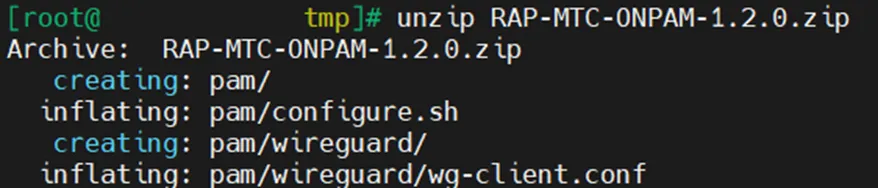
In case bash: unzip: command not found error is shown, the unzip package should be installed via sudo dnf install -y unzip command.
If somehow the user needs to start the script again (maybe, because of the wrong input or missing file etc…), please remove all installation files except for compressed Kron PAM server’s installation script file and unzip the compressed installation script file again. After this you can execute the script.
We highly recommend this method since the extracted files might be modified after the script execution for the first time, and executing the script with modified files might cause the problematic installation!
5. Navigate to the pam directory:
Linux CLI | [root@kron~]# cd pam / |
|---|

6. Run the configuration script:
Linux CLI | [root@pam~]# sh configure.sh |
|---|

In case you need to set script permissions to execute it, you need to run chmod +x configure.sh command.
You need root privileges to run this script.
7. The Kron PAM server’s installation script asks user either:
a. For the first-time installation on the Kron PAM server, the Wireguard configuration on the Kron PAM server should be configured from scratch, thus, the first option should be selected by entering 1 and pressing the enter key.

The Kron PAM server’s installation script asks several configuration details:
o The Wireguard IP address that will be assigned to Kron PAM server’s side,
o AWS public IP address of Remote Access Portal (RAP) environment,
o The port number of Wireguard,
o The IP segment of Wireguard,
o A public key generated by the Remote Access Portal (RAP)’s script.
Description | Example Values |
|---|---|
Wireguard IP address that will be assigned to the Kron PAM server’s side | 10.0.0.2 |
AWS public IP address of Remote Access Portal (RAP) environment | 204.236.208.204 |
The port number of Wireguard | 51820 |
The IP segment of Wireguard | 10.0.0.0/29 |
A public key generated by the Remote Access Portal (RAP)’s script | HHHHHHHeGWbkRiBGWzPq8neiAkE7egV8Iwt811T69Eg= |
After every information are filled in, the user should press y to continue, however, if the user fails to fill in every information successfully (either missing or wrong info), the user can press n to reenter information again.

Once the Kron PAM server’s installation script asks the user to enter the public key, if the user doesn’t know the public key generated by the Remote Access Portal (RAP)’s installation script yet, the user can set temporary public key for now
(e.g., AAAAAAA0NN0751JBnXoJ5R8M3uTw8NmAkTGI5bLy4=).
But please do not forget to set the public key by using the Kron PAM server’s installation script (please check 7.b at the section below), after the Remote Access Portal (RAP)’s installationscript generates a public key.

At the end of Kron PAM server’s installation script, the public key generated by this script is ready to use on the Remote Access Portal (RAP) environment
(e.g., CCCCCCC8tpC6nMNEzIzUtNxNuVePGDPvYF6rFHYBdmU= ).
Please do not forget to add this info on the Remote Access Portal (RAP) environment by using Remote Access Portal (RAP)’s installation script (please check 6.b at the Section-4.2).
b. Once the Kron PAM server’s Wireguard configuration has been fully installed, only one configuration is missing here regarding public key that would be generated by the Remote Access Portal (RAP)’s installation script. If the user executes the Remote Access Portal (RAP)’s installation script on the cloud (please, check 6.a at the Section-4.2), it generates a public key which would be used in the Kron PAM server here, thus now this option can configure the secure tunnel configuration file with the generated public key from Remote Access Portal (RAP)’s side.
The user should select the second option by entering 2 and pressing the enter key.

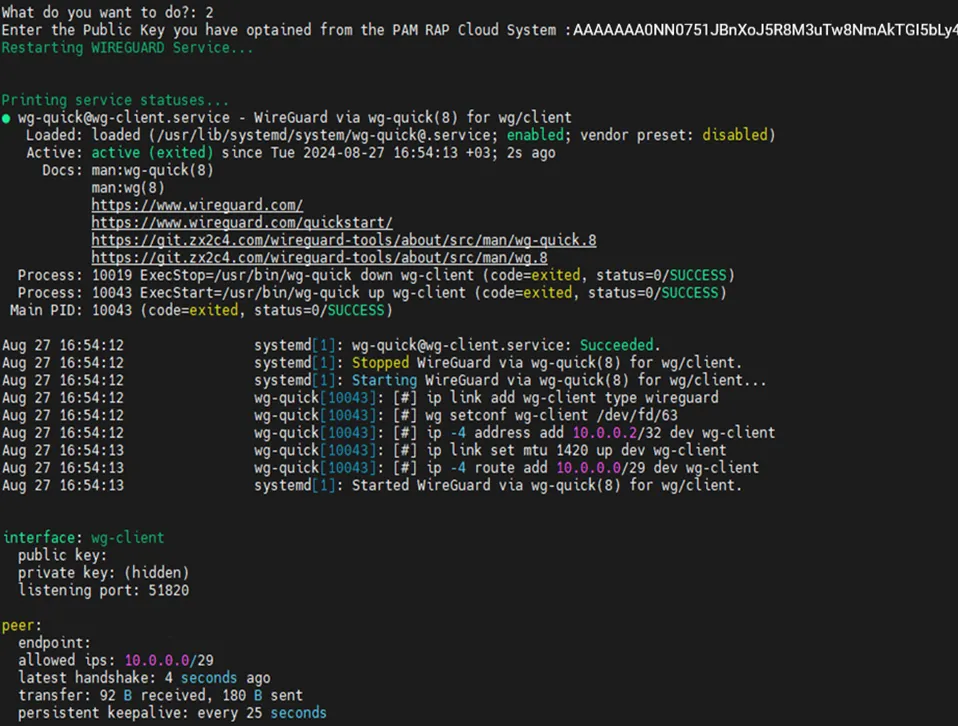
Set the public key data of the secure tunnel configuration file with a public key generated by the Remote Access Portal’s script
(e.g., H7THXCLy28P4pEn/ya2fJ0NgUgIWsV40NMBRyiz3iRI=).