SIEM Server and Log Parameters Set up
Kron PAM can send the logs selected in the SIEM Kron PAM can send the logs selected in the SIEM configuration page to the syslog listener. The information related to the server and content of the packets is managed with parameters defined in the System Config. Man. screen. The server to which the packets are sent can be configured using the parameters listed in the table below.
To configure SIEM integration:
- Navigate to Administration > System Config Management > Integrations.
- Select SIEM Configuration.
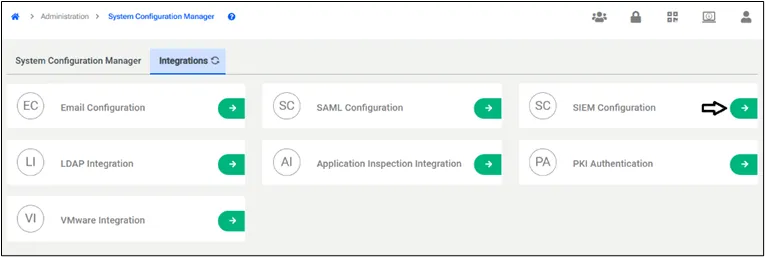
- Click to Add SIEM Server.
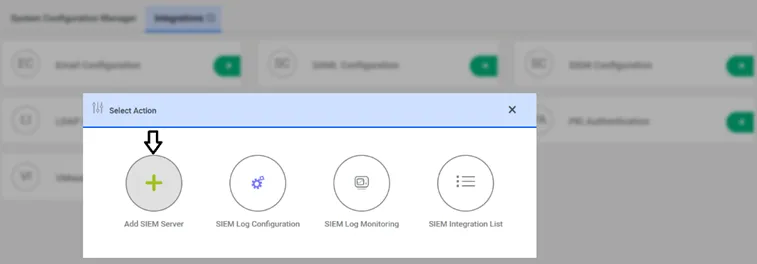
- Set the following parameters and Save.
Parameter Name | Parameter | Default Values | Possible Values |
|---|---|---|---|
SIEM Host Name | syslog.server.hostName | - | 10.20.10.10 |
SIEM Port | syslog.server.port | 514 |
|
RFC Format | syslog.message.rfcFormat | RFC_5424 | RFC_5424, RFC_3164 |
Protocol | syslog.connection.protocol | UDP | TCP, UDP |
Content Format | syslog.message.content.format | KEY_VALUE | KEY_VALUE, CEF, LEGACY_CEF |
- Establish an SSH connection to the Kron PAM server and restart netright-tomcat with the following command: [root@sc~]# systemctl restart netright-tomcat