Run Security Audit Compliance Reports
Organizations require security audit reports to maintain internal control and perform audits, in accordance with multiple standards, such as the Sarbanes-Oxley Act (SOX). For these audit and transparency purposes, Kron PAM provides detailed security audit compliance reports. This document describes how to run these reports.
Security Audit Compliance Reports
Logging Activity
Most audit reports require logging user access attempts to the system. Kron PAM allows you to monitor the log-in activities of privileged users.
Kron PAM records Login, Logout, and Login failure activities in detail, including time and source for SFTP, GUI(UI), TACACS+, RADIUS, and SSH connections, as well as the reasons for Login Failure.
To access the User Authentication reports:
- Navigate to Logging > User Auth. Logs
- Select Report Filters and click the Search button
- Click Export Data to Excel to get the report in Excel format

User Activity
User actions are recorded by Kron PAM so that important data for audit reports, such as which user did what and when can be reported as well.
SSH/TELNET Session Command Line Interface Activity
The Kron PAM Session Manager tracks Command Line Interface (CLI) operations performed during privileged sessions. User, Target Server, Session Start Date, and Session End Date logs are available in the Session Log field of the Kron PAM Web GUI.
To access the Session Logs Reports:
- Navigate to Logging > Session Log > Session Logs
- Select Report Filters and click the Search button
- Click Export Data to Excel to get the report in Excel format

Session log reports, including who did what in privileged sessions, satisfy SOX compliancy requirements. The Commands executed by user logs recorded for SSH/TELNET sessions are also logged in the Command Logs section.
To access the Command Detail reports:
- Navigate to Logging > Session Log > Command Logs
- Select Report Filters and click the Search button
- Click Export Data to Excel to get the report in Excel format
Remote Desktop (RDP/VNC) Session Activity
The Kron PAM Session Manager tracks RDP/VNC operations performed during privileged sessions. User, Target Server, Session Start Date, and Session End Date logs are available in the Session Log field of the Kron PAM Web GUI.
To access the Session Logs reports:
- Navigate to Logging > Session Log > Session Logs
- Select Report Filters and click the Search button
- Click Export Data to Excel to get the report in Excel format

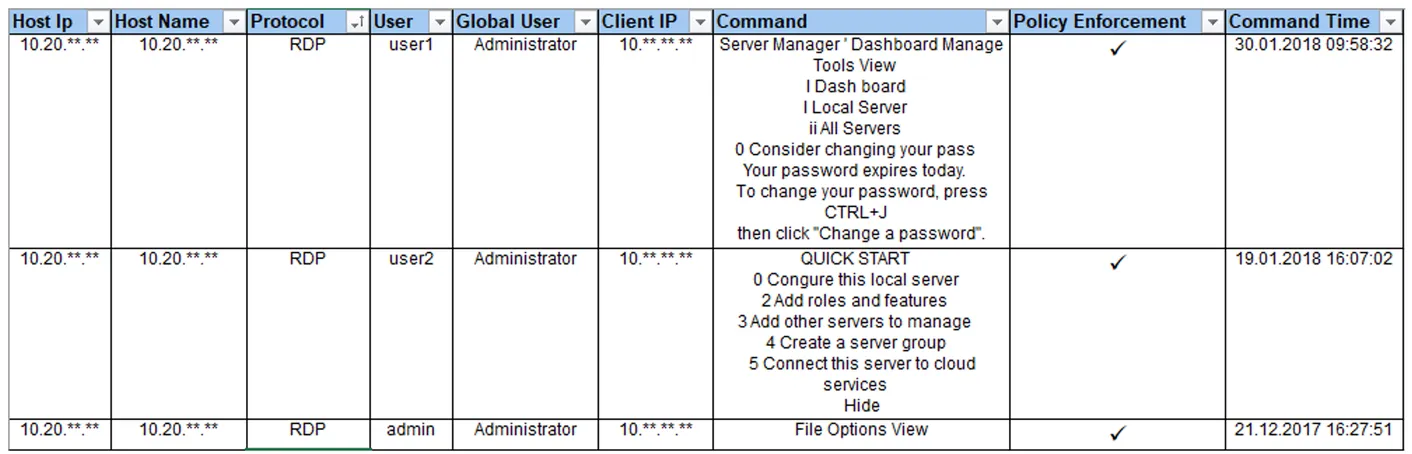
The Session logs reports, including who did what in privileged sessions, satisfy SOX compliance requirements. Text captured by the optical character reader (OCR), and keyboard and mouse movements for RDP sessions, are also logged in the Command Logs section.
To access the Command Detail reports:
- Navigate to Logging > Session Log > Command Logs
- Select Report Filters and click the Search button
- Click Export Data to Excel to get the report in Excel format
Secure File Transfer Session (SFTP) Activity
The Kron PAM Session Manager tracks File Transfer operations performed during privileged sessions. User, Target Server, Session Start Date, and Session End Date logs are available in the Session Log field of the Kron PAM Web GUI.
To access the Session Logs reports:
- Navigate to Logging > Session Log > Session Logs
- Select Report Filters and click the Search button
- Click Export Data to Excel to get the report in Excel format

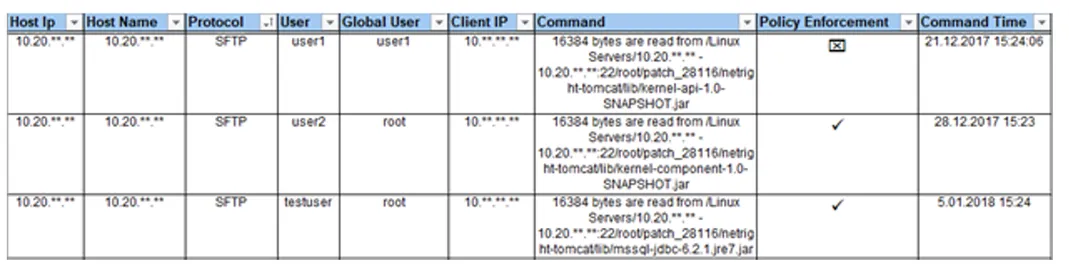
Session log reports, including who did what in privileged sessions, satisfy SOX compliance requirements. The Commands executed by user logs recorded for SFTP sessions are also logged in the Command Logs section.
To access the Command Detail reports:
- Navigate to Logging > Session Log > Command Logs
- Select Report Filters and click the Search button
- Click Export Data to Excel to get the report in Excel format
Database (SQL) Session Activity
The Kron PAM Session Manager tracks Database operations performed during privileged sessions. User, Target Server, Session Start Date, and Session End Date logs are available in the Session Log field of the Kron PAM Web GUI.
To access the Session Logs reports:
- Navigate to Logging > Session Log > Session Logs
- Select Report Filters and click the Search button
- Click Export Data to Excel to get the report in Excel format

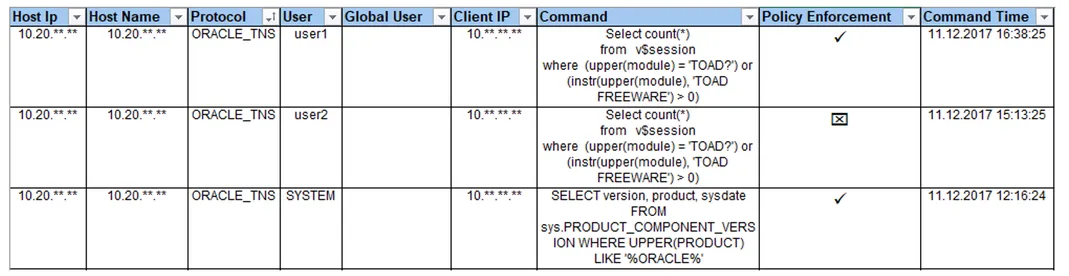
Session log reports, including who did what in privileged sessions, satisfy SOX compliancy requirements. The “Commands executed by user” logs recorded for SQL sessions are also logged in the Command Logs section.
To access the Command Detail reports:
- Navigate to Logging > Session Log >Command Logs
- Select Report Filters and click the Search button
- Click Export Data to Excel to get the report in Excel format
Web Session (HTTP/S) Activity
The Request URL of User data is logged via the HTTP Proxy component of Kron PAM.
To access the HTTP Proxy Log reports:
- Navigate to Logging > HTTP Proxy Logs
- Select Report Filters and click the Search button
- Click Export Data to Excel to get the report in Excel format

Password Checkout Activity
The Kron PAM Password Manager module provides one of the “User Activities” reports, which includes the users’ password checkout activities for device connections.
To access the Password Change Log reports:
- Navigate to SAPM Management > SAPM Management > Password Change Log
- Select Report Filters and click the Search button
- Click Export Data to Excel to get the report in Excel format

Device Administration Activities (TACACS+, RADIUS)
TACACS+ Account Log
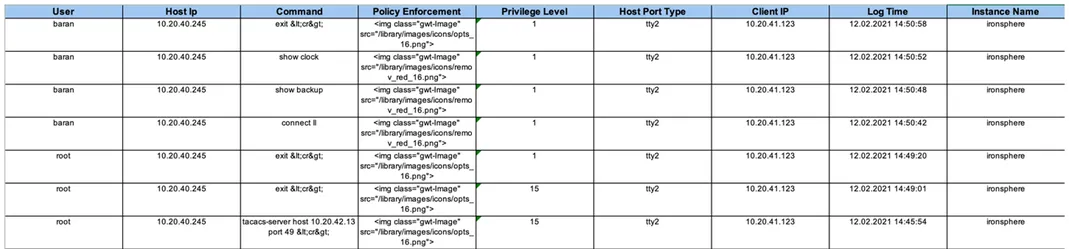
The Commands executed by user logs recorded for TACACS+ connections are available from the TACACS+ Account Log section of the Kron PAM Web GUI. These logs can be used as one of the User Activities reports.
To access the TACACS Account reports:
- Navigate to Logging > Tacacs Account Log
- Select Report Filters and click the Search button
- Click Export Data to Excel to get the report in Excel format
RADIUS Account Log
Accounting and authorization activities are logged for RADIUS connections. These logs can be used as one of the User Activities reports.
To access the RADIUS Account reports:
- Navigate to Logging > Radius Account Log
- Select Report Filters and click the Search button
- Click Export Data to Excel to get the report in Excel format

Kron PAM UI Activities
All user activity on the Kron PAM Web GUI is recorded. In the UI Activities section, reports can be run for various activities, such as adding/deleting devices, defining users, and searching records.
To access the User Activities reports:
- Navigate to Logging > Activity Logs
- Select Report Filters and click the Search button
- Click Export Data to Excel to get the report in Excel format
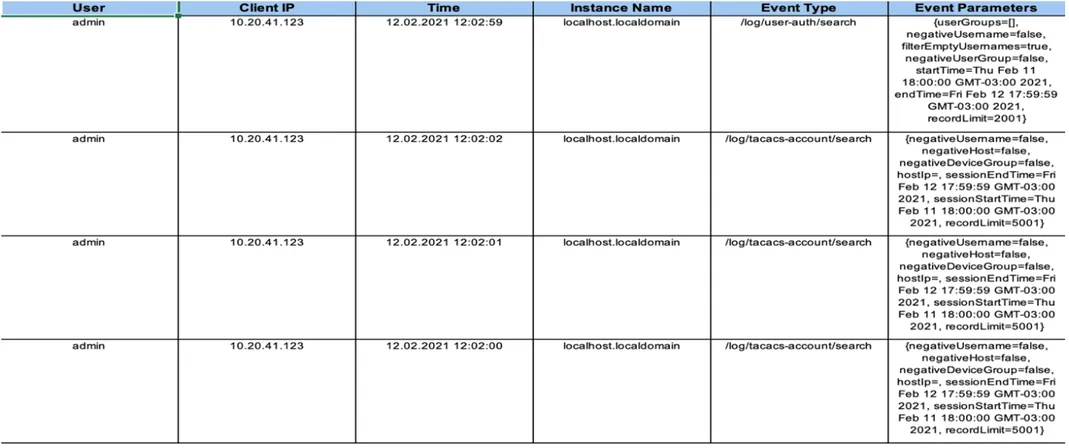
Some of the “Event Types” are listed below:
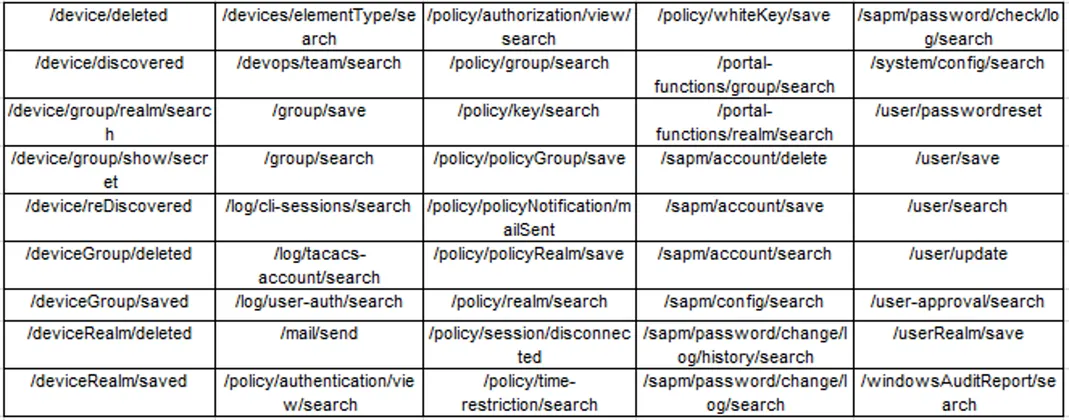
Access Controls
Policy enforcement is a major part of security requirements. Kron PAM knows which systems users can access, and what they are allowed to do on these systems. The Policy tracking function is useful for access control reports of auditing reports.
Authentication logs provide visibility into which users can access which devices; Authorization logs show which activities are authorized (whitelisted) or unauthorized (blacklisted) for which users are on the devices they are allowed to connect to.
To access the Authorization reports:
- Navigate to Policy Control > Policy Tracking > Authentication
- Select Report Filters and click the Search button
- Click Export Data to Excel to get the report in Excel format
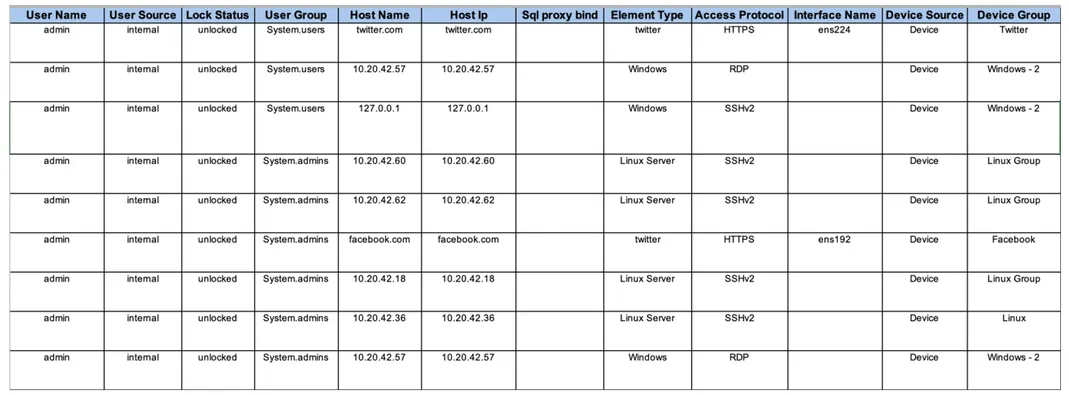
To access the Authentication reports:
- Navigate to Policy Control > Policy Tracking > Authorization
- Select Report Filters and click the Search button
- Click Export Data to Excel to get the report in Excel format

Report Security
All logs and records are kept in a database, in binary format. The database access is restricted by the DB admin.
Sensitive data in the logs is encrypted with a customer-specific master key and data encryption key. All the data is hashed and checked regularly for data integrity.