Integrate with ITSM
Ticketing systems manage critical processes in an enterprise environment, such as change, incident, and problem management within its network. Kron PAM supports ready-to-use integration with ITSM systems, like ServiceNow, HP-SM, and One Desk.
Once integrated with an ITSM system, whenever a privileged user attempts to access a device, Kron PAM checks the system for valid and approved change tickets for this user/device/time period. Based on the ensuing validation process results, Kron PAM either connects or denies the user access to the device.
ITSM Configuration
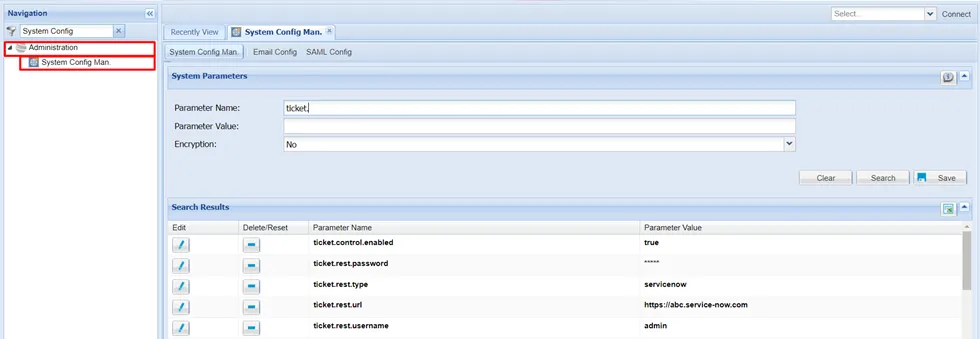
The configurations for ticketing system integration are made through Kron PAM System Config Management and Device Groups screens. Below is a sample configuration definition for ServiceNow integration. Please note that these configurations should be done according to the customer’s own Ticketing System.
Setting Up System Config Management Parameters
- Navigate to Administration > System Config Man.
- Add parameters with the appropriate values. See the table below for available parameters:
Parameter | Value | Definition |
|---|---|---|
ticket.control.enabled | true | This parameter enables ticketing system integration. |
ticket.rest.type | servicenow | The user can choose the type through this parameter (servicenow, onedesk, etc.) |
ticket.rest.url | https://abc.service-now.com | The user should enter the url of the rest api of the ticketing system into this field. |
ticket.rest.username | admin | This parameter is the username while calling the rest api of the ticketing system. |
ticket.rest.password | sHka47s37!s2819 (encrypt) | This parameter is the password while calling the rest api of the ticketing system. |
Setting Up Device Groups Parameters
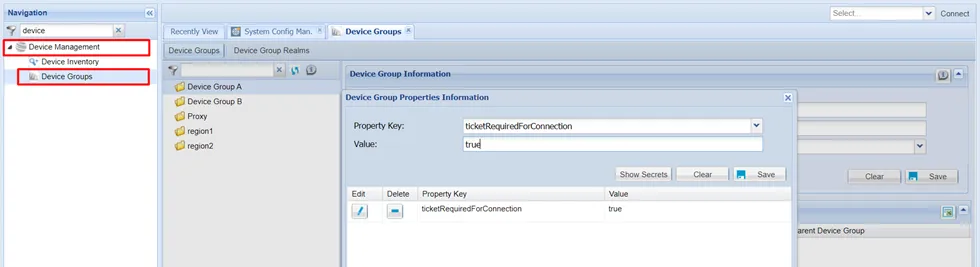
- Navigate to Administration > Device Management > Device Groups.
- Set the ticketRequiredForConnection parameter as true. This parameter specifies if the ticketing integration will be considered while connecting to the specified device group.
Process flow with Kron PAM & Ticketing System integration (Use Case)
- User A wants to connect to any device (RDP / SSH).
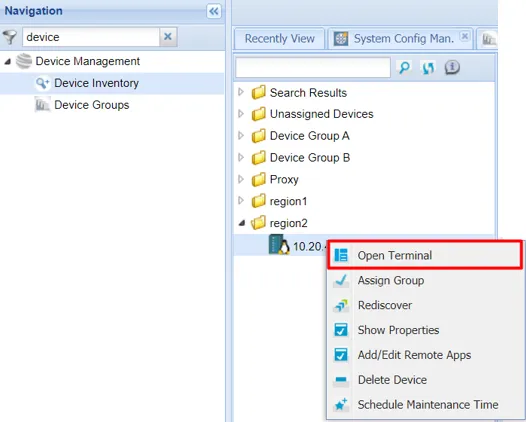
- Kron PAM uses the IP address of the device and checks for any open task in the ticketing system associated with that specified IP.
- If the result is positive, the current time is cross-checked with the planned activity’s date & time of the open task in the ticketing system.
- If the result matches, the open task’s assigned user is cross-checked to determine if User A is a match.
- If not a match, User A’s group is cross-checked with the ticketing system to determine if the groups are the same.
- If the groups match, Kron PAM connects the user to the device. Otherwise, the user will be denied access.