Injecting Secrets into Kubernetes Applications
3 min
YAML file is used to patch the secret to the application. It is necessary to fill in the mandatory fields defined in Kron PAM in the YAML file. These fields are secret name, secret path and token values.
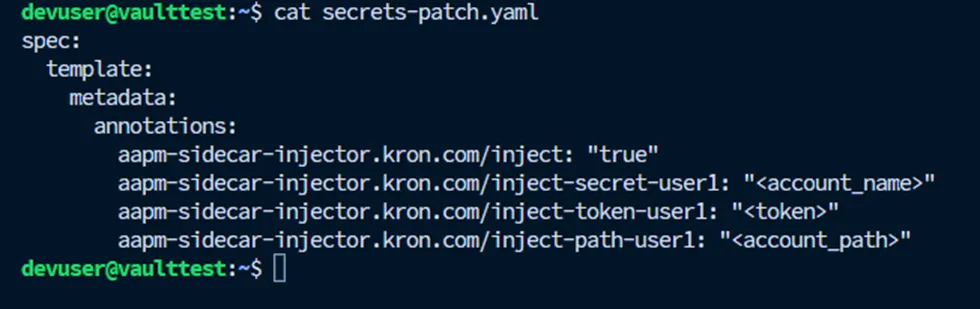
Secret Patch
The patch file must be filled with the secret information it wants to access for each application. Multiple secrets can be set in the same file under annotations.
Apply the patch using kubectl cmd proving the name of deployment and patch file
# kubectl patch deployment my-test-deployment --patch "$(cat secrets-patch.yaml)"
deployment.apps/my-test-deployment patched
# kubectl get pods
NAME READY STATUS RESTARTS AGE
kron-aapm-agent-5c57584465-crws8 1/1 Running 0 30m
my-test-deployment-d7ff55c4b-68gxx 1/1 Running 0 15s (Pod name changed)
After patching, the sidecar was injected. Aapm-client container should appear in the application's pod.
# kubectl get pods my-test-deployment-d7ff55c4b-68gxx -o jsonpath='{.spec.containers[*].name}'
nginx aapm-client
The Nginx container and AAPM Client container now use keystore shared volume. They can read the secret information with the shared environment file kept under the keystore.
# kubectl exec -it my-test-deployment-d7ff55c4b-68gxx -c nginx -- cat /keystore/user1.env
serviceuser ={"secret":{"password":"fME8I5bq","username":"sapmuser1"}}
# kubectl exec -it my-test-deployment-d7ff55c4b-68gxx -c aapm-client -- cat
/keystore/user1.env
serviceuser ={"secret":{"password":"fME8I5bq","username":"serviceuser"}}