Enable TLSv1.3 At HTTP Proxy
This section is the property of Krontech and its subsidiaries. The information provided herein is confidential, solely intended for our clients, and may not be published or redistributed without the prior written consent of Krontech or its subsidiaries.
Please note that the information provided in this document may change with each release. We keep our documents updated to the best of our ability. Confirm you are making use of the correct document, as referenced by the document version.
Introduction
This document describes how the enable TLSv1.3 at HTTP Proxy. The method to be disclosed in this document will be applicable at 3.2.0 and ongoing releases.
How It Works
With the configuration to be made on the HTTP Proxy service file, TLS versions to be supported on the proxy can be determined.
How to Enable It
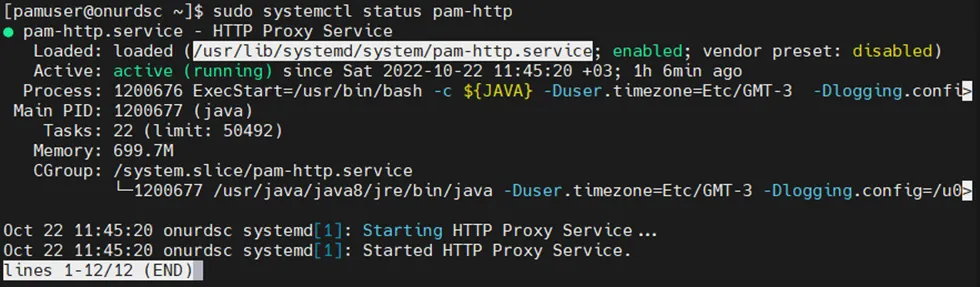
The first service file path of HTTP Proxy is determined. It is */usr/lib/systemd/system/pam-http.service *at current 3.2.0 release but it can be found with Sudo systemctl status pam-http
Then http.service file should be edited with
-Djdk.tls.client.protocols=<desired TLS versions>
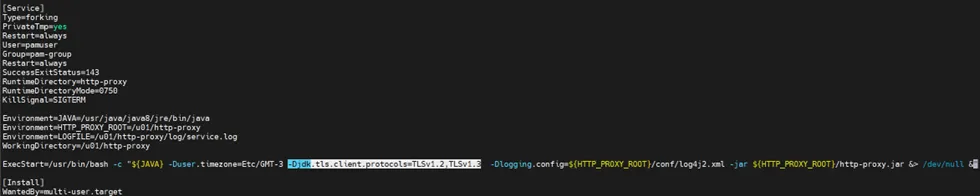
After editing and saving the service file changes will be applied with the below commands.
sudo systemctl daemon-reload
sudo systemctl restart pam-http