Edit Group Properties
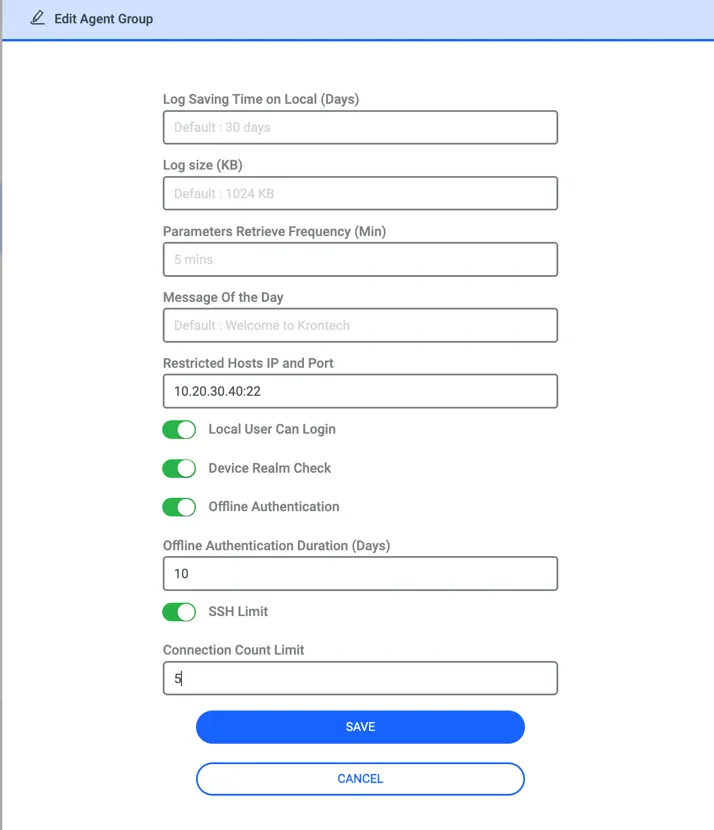
From this menu user can configure some parameters specific to that agent group.
Log Saving Time on Local (Days) | Retention period for logs saved on the local machine. |
|---|---|
Log Size (KB) | This size determines when an agent sends the log to the Kron PAMor. By default, when a log reaches 1024kb Agent sends it to the Kron PAM. |
Parameters Retrieve Frequency (Min) | This is the frequency which the Agent retrieves configurations from Kron PAM. By default, the Agent gets the police every 5 minutes. |
Message of The Day | Login message displayed to the users upon authenticating to the machine. |
Local Users Can Login | By toggling this on local users in the endpoint can log in to the device. Toggling off will disable local authentication. By default, local user authentication is allowed. Also,an exception list can be defined in the system configuration management page. Mentioned a few steps ahead |
Device Realm Check | When this parameter is disabled, the User and Device are not mandatory to be in the same Device Realm. By default, Device Realm Check is disabled |
Restiricted Hosts IP and Port | The default value is empty. For example, if a definition such as 10.20.30.40:22 is configured, it means that access to this specific IP address and port is restricted from the server where the agent is installed. |
Offline Authentication and Authorization (AA) | The default status is disabled. When enabled and a numeric value is entered for the duration in days, end users can access the endpoint using an OTP while the agent is offline. Also, OTP elevation works during this period |
SSH Limit | This configuration limits the maximum number of concurrent SSH connections allowed to the server where the agent is installed. |
If an entry has been made in the Restricted Host and Port section, and a connection is attempted from the server where the agent is installed toward that destination, a warning will be displayed as shown below:

If an SSH connection count limit has been set via the Agent Group and an attempt is made to establish a connection exceeding that limit, the agent provides notification to the most recent session as shown in the screenshot below.

In the system configuration management page, when you define local accounts with the below parameters, these local accounts can log in when you disable the Local User Can log-in parameter on the agent group, but others cannot. The same parameter can receive multiple values at a time by separating commas. By default, there is no defined user.
lin.agent.local.account.login.exceptions = root,testuser