Interactive Installation for Linux Based OS
Prior to installation, specific Linux Agent jobs must be configured within the Kron PAM job scheduler. In particular, the following jobs must be set up correctly to ensure the agent functions as intended:
· EPMLinuxProcessRuleJob
· EPMLinuxAgentParametersJob
· EPMLinuxAdvanceProcessRuleJob
To install the agent on a Linux-based operating system, agent installation script and a registration token are required. Both can be obtained from the Kron PAM Linux Agent Management screens as described below.
1. Login to Kron PAM Web GUI
2. Navigate to Linux Agent Management menu.
3. Go to the Agent Dashboard
4. Click the Add button at the top right of the screen, select Agent Installation, and then click “here” to download the installation script. This script(sh) will be copied on endpoint and the rights of the script should be arranged accordingly.
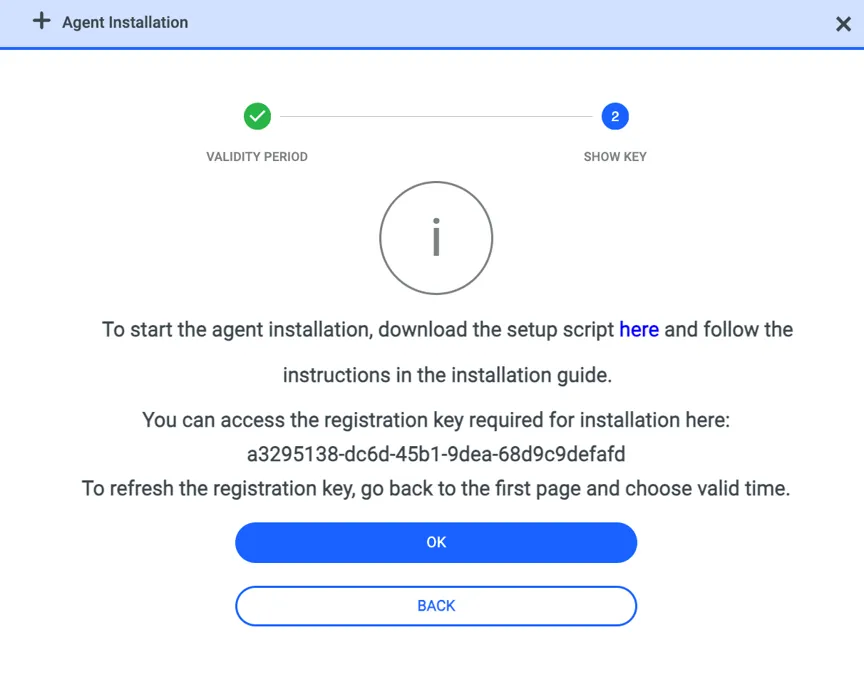
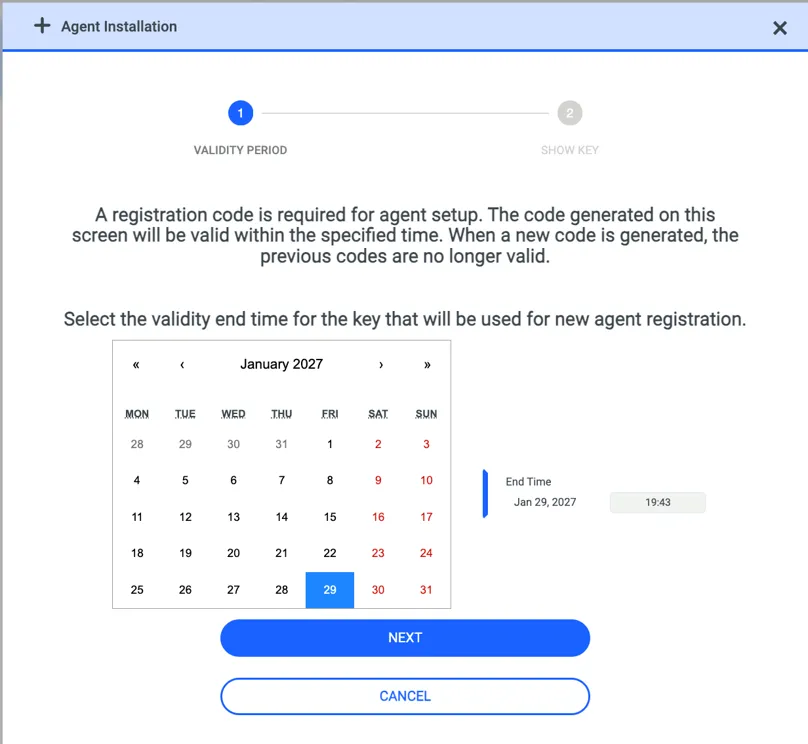
If there is already a token for registration you can directly copy that token to use for installation. If there is no, first you need to enter an expiration time for token. This token can be used to install agents until the expiration time. Click the Next button to generate registration key. The registration key will be entered during Linux Agent installation process.
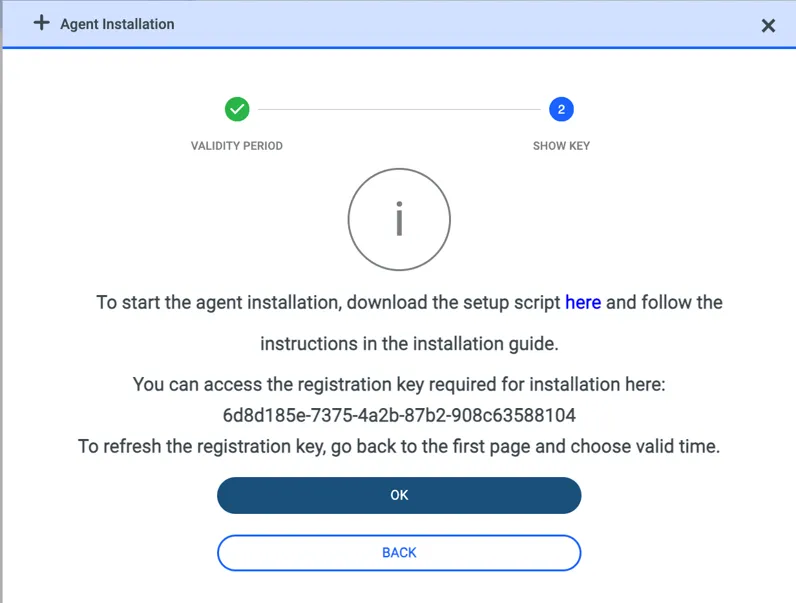
At this point we have installation script and registration token. Now login to endopint as root user which Kron PAM Linux Agent to be installed.
And copy installation script to the OS then give execution right. Then execute the script with root user.
root@pamagent ~]# ./setup_sc_api.sh
OS ~> redhat  OS version ~> 8.2
chcon  found:  /usr/bin/chcon
semodule_package  found:  /usr/bin/semodule_package
semodule  found:  /usr/sbin/semodule
restorecon  found:  /usr/sbin/restorecon
sestatus  found:  /usr/sbin/sestatus
Selinux status: true
Current selinux mode: enforcing
Selinux policy for the kron pam agent will be installed...
libcrypto.so.1.1 found:  libcrypto.so.1.1 (libc6,x86-64) => /lib64/libcrypto.so.1.1
libssl.so.1.1 found:  libssl.so.1.1 (libc6,x86-64) => /lib64/libssl.so.1.1
Checking installation
/pam/bin/kron-pam-linux-agent  is not found
/pam/bin/sudo  is not found
/pam/bin/checkmodule  is not found
/pam/conf/agent.json  is not found
/pam/lib/kron_monitor.so  is not found
/pam/lib/kron_pam_auth.so  is not found
/pam/lib/libnss_kronpam.so.2  is not found
/usr/lib64/security/kron_pam_auth.so  is not found
/usr/lib64/libnss_kronpam.so.2  is not found
============================================================
Valid download modes: https ftp ftp-tls sftp filesystem
Please Provide Download Mode: https
Selected download mode: https
============================================================
Please Provide Download Host IP : 1.1.1.1
============================================================
Please Provide Download Package URL Folder [default: repo/linux-agent]:
============================================================
Start Downloading From Download Host 1.1.1.1
============================================================
Downloading via HTTPS: curl -k -O --remote-name --location https://10.20.42.156/repo/linux-agent/kron_agent_package.tar.gz
  % Total    % Received % Xferd  Average Speed   Time    Time     Time  Current
                                 Dload  Upload   Total   Spent    Left  Speed
100 20.5M  100 20.5M    0     0  94.2M      0 --:--:-- --:--:-- --:--:-- 94.6M
Curl return code: 0
pam/
pam/bin/
pam/bin/sudo
pam/bin/checkmodule
pam/bin/kron-pam-linux-agent
pam/lib/
pam/lib/kronpam_wrapper.so
pam/lib/libnss_kronpam.so.2
pam/lib/kron_monitor.so
pam/lib/kron_pam_auth.so
pam/runtime/
pam/runtime/ld.so.preload
pam/runtime/kron-pam-linux-agent.service
pam/backup/
pam/policy/
pam/policy/kron_pam.te
pam/blib/
pam/blib/libk5crypto.so.3.1
pam/blib/libcrypto.so.1.1
pam/blib/libssl.so.1.1
pam/blib/libssh.so.4
pam/blib/libcrypto.so
pam/blib/libk5crypto.so.3
pam/blib/libk5crypto.so
pam/blib/libcrypto.a
pam/conf/
pam/conf/agent.json
pam/setup/
============================================================
Do you want to configure PAM settings now?[Y/n]Y
Please Enter Primary Management Address(e.g 10.20.30.40:443) : 1.1.1.1
Please Enter Install Token : xxxxx.yyyyy.zzzzzz.tttttt.fffff
Do you want to change hostname?(current:pamagent)[Y/n]n
Do you want to change interface?(current:10.20.30.40)[Y/n]n
/pam/bin/kron-pam-linux-agent: /lib64/libcurl.so.4: no version information available (required by /pam/bin/kron-pam-linux-agent)
chown: cannot access '/pam/setup/install_linux_agent.sh': No such file or directory
chmod: cannot access '/pam/setup/install_linux_agent.sh': No such file or directory
Created symlink /etc/systemd/system/multi-user.target.wants/kron-pam-linux-agent.service → /pam/runtime/kron-pam-linux-agent.service.
Created symlink /etc/systemd/system/kron-pam-linux-agent.service → /pam/runtime/kron-pam-linux-agent.service.
============================================================
Checking system status
============================================================


Kron PAM Linux Agent Active...
System Alive...
Installer script ended
When the script is executed, it wil ask a few things:
1- Download Mode: this is for downloading necessary packages from Kron PAM server anf generally choose as https. But if you want to copy packages from Kron PAM server to another repository and download from there you have some other optons like ftp, sftp, ftp-tls, filesystem. And if you choose other than https you need to indicate packkage file path or URL.
2- Download Host IP: this is generally one of the IP addresses of Kron PAM instance in your architecture to download the package.
3- Download Package URL Folder: This is mentioned in first step if you use default mode(https) you dont need to write something here. If you choose other modes you need to write path of the folder.
4- Do you want to configure PAM settings now: Answer as “Y”
5- Enter Primary Management Address: IP address of the Kron PAM master instance
6- Install Token: This will be mentioned in the previous section and will be taken from Kron PAM
7- Do you want to change hostname: if you dont want to change display name of your server just write “n”, if you want to see something different from your server hostname on Agent Dashboard you can say “Y” and give a new name.
8- Do you want to change interface: if you have more than one network interface on your server you can choose any of them by saying “Y”, then choose the IP of that interface otherwise default one’s IP of ens192 will be chosen.
If the agent has been installed successfully, executing the command below will confirm that the agent service is up and running.
[root@pamagent ~]# systemctl status kron-pam-linux-agent.service
● kron-pam-linux-agent.service - KRON PAM LINUX AGENT
   Loaded: loaded (/pam/runtime/kron-pam-linux-agent.service; enabled; vendor preset: disabled)
   Active: active (running) since Wed 2026-04-15 09:32:44 EDT; 5 days ago
 Main PID: 3668 (kron-pam-linux-)
    Tasks: 18 (limit: 23203)
   Memory: 19.5M
   CGroup: /system.slice/kron-pam-linux-agent.service
           └─3668 /pam/bin/kron-pam-linux-agent
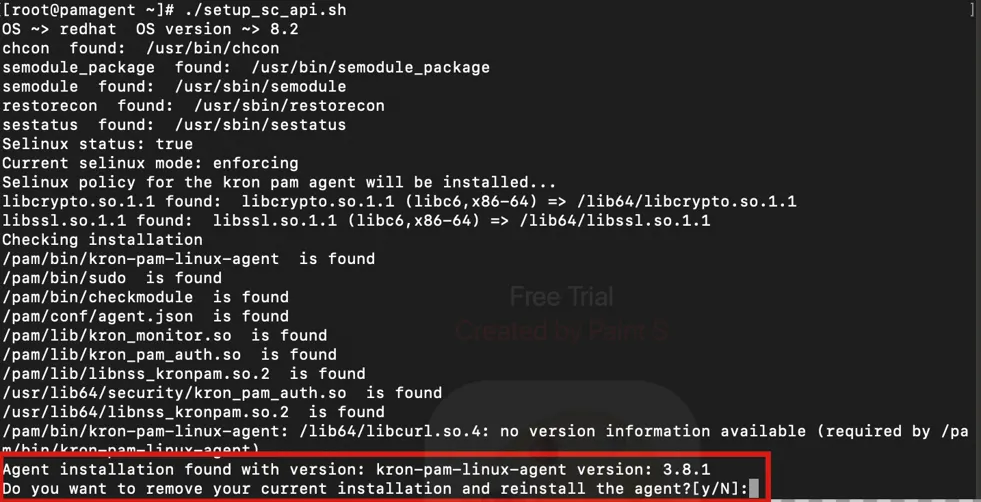
If the installation script is executed again on a server where the agent is already installed, the script first checks for an existing installation. If a current installation is detected, a warning is displayed as shown below:
And on Linux Agent Dashboard you will see that Agent is online. And the agent will be under the predefined group “Unassigned Agents” in this agent group, agent does not apply any rule just monitor and log the session.
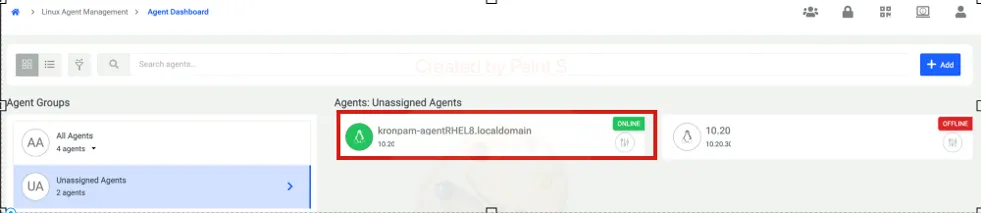
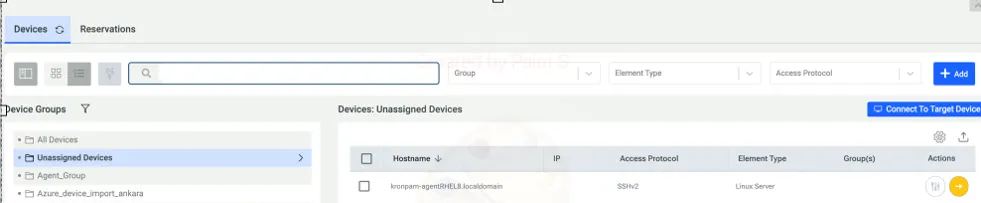
And the first-time registered agent on endpoint will be seen on Device Inventory, under Unassigned Devices.