Edit Group Properties
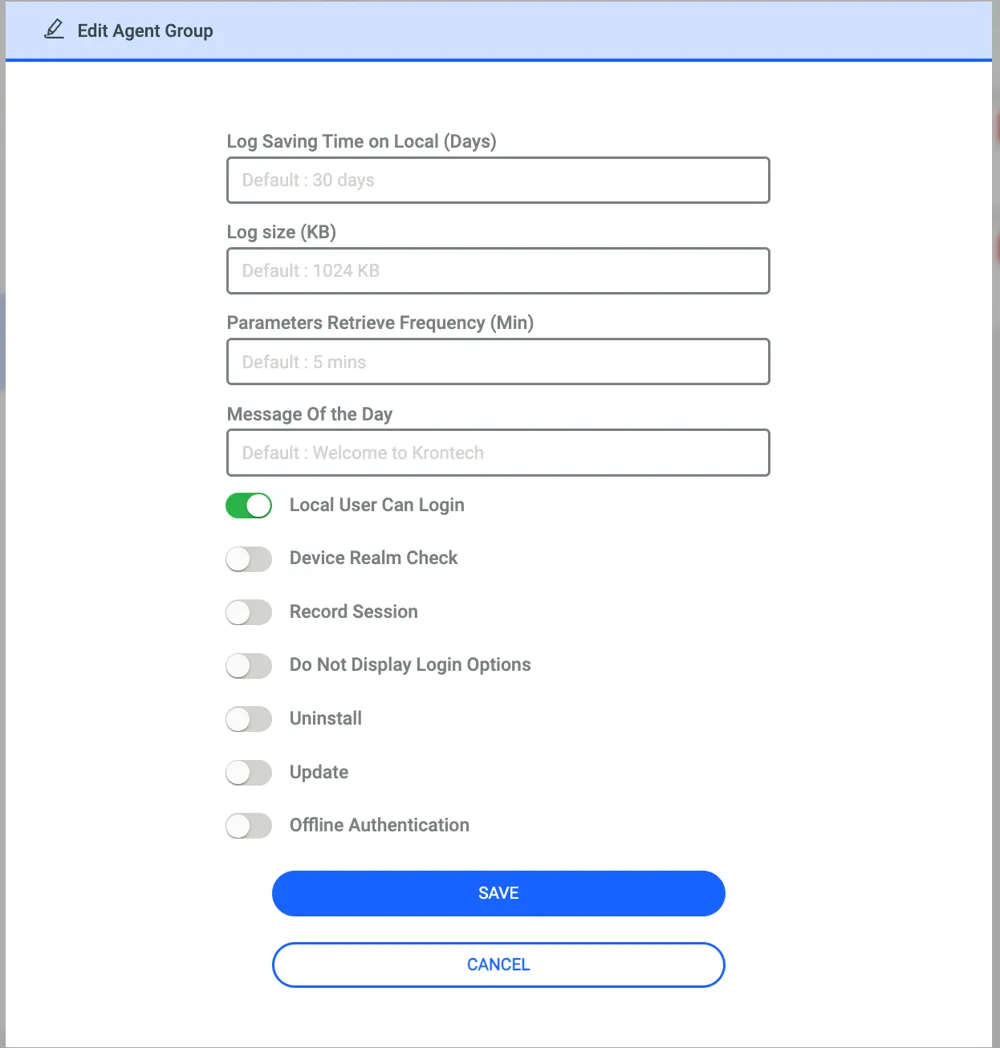
From this menu, users can configure some parameters specific to that agent group.
Parameters | Description |
|---|---|
Log Saving Time on Local (Days) | Retention period for logs saved on the local machine. |
Log Size (KB) | Determines when an agent sends the logs to Kron PAM. By default, Agent sends logs to Kron PAM when the logs reach 1024 KB. |
Parameters Retrieve Frequency (Min) | The frequency at which the Agent retrieves configurations from Kron PAM. By default, the Agent checks the policies every 5 minutes. |
Message of The Day | Login message displayed to the users upon authenticating to the machine. |
Local Users Can Log In | If true, local users on the endpoint can log in to the device. Toggling off will disable local authentication. By default, local user authentication is allowed. Also, an exception list can be defined on the system configuration management page (read more on this at the bottom of this section). |
Local Saving Time on Local (Days) | Retention period for logs saved on the local machine. |
Device Realm Check | When false, the User and Device are do not have to be in the same Device Realm. By default, Device Realm Check is enabled. |
Record Session (Video Record of the session) | On the agent group, you can configure a video recording of sessions. Disabled by default. |
Do Not Display Login Options | If this is enabled, the only credential provider will be Kron Windows Agent; other credential providers will not be shown on the login screen. Disabled by default. |
Offline Authentication and Authorization (AA) | Disabled by default. When enabled and a numeric value is entered for the duration (in days), end users can access the endpoint by entering an OTP while the agent is offline. OTP elevation also works during this period. |
Update | To update the agent remotely. Details at Remote Operations. |
Uninstall | Disabled by default. When enabled, it prepares all agents within the configured group for bulk uninstallation. This process removes security restrictions from the Agent services, allowing the agent to be uninstalled easily. |
In the system configuration management page, when you define local accounts with the parameter below, these local accounts can log in even if the Local User Can Login parameter on the agent group is disabled.
win.agent.local.account.login.exceptions = Administrator, PamAdmin, SystemAdmin
The same system configuration parameter can receive multiple values at a time by separating the values with commas. By default, there is no defined user type.
A device realm check is a kind of security enforcement lets users see and log in to endpoints on Kron PAM (or not, if they do not share a realm with the device in question). The same logic is implemented on the agent but from the agent's parameter (by default it is disabled). You need to define device realms for every user and device if you enable this check. So, this brings some operational load on the system admin.