Elevate Policy Group
Under this policy with elevation configuration, when an end user attempts to launch an application included in the policy, a prompt will be triggered, requesting the user to set a time limit for its usage. The end user has the authority to determine the duration for which this application can be accessed. Once the elevation request is approved by the end user's manager, a temporary rule is generated specifically for that user.
This temporary rule remains active until the designated time limit expires. Upon reaching the expiration time, the temporary rule is automatically removed, revoking the elevated privileges previously granted to the user for that application. This mechanism ensures that elevated access is granted only for the required period, promoting security and control over privileged application usage.
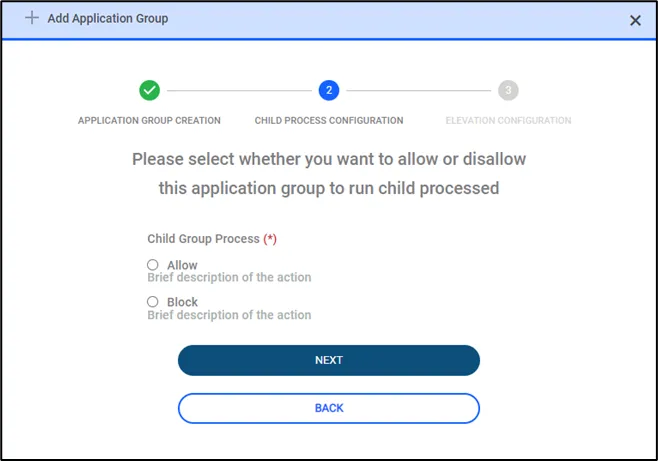
In this step, users will be configuring child processes. When an application is launched it may be required to run some child processes to make the application function. Since not every application requires this and it could be used as an attack vector, system admins can decide whether this application will be permitted to call and execute child processes or not. If this is not configured with care, it can prevent applications from running normally.
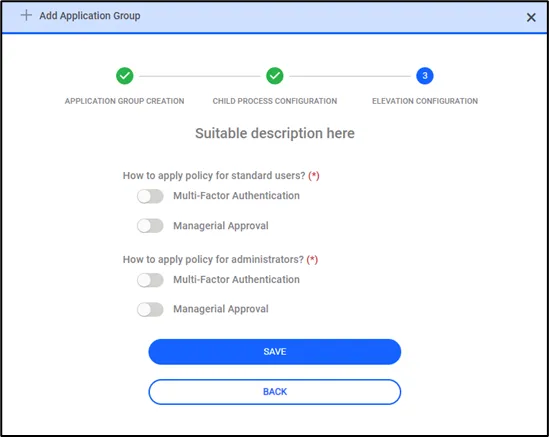
In the last step, the user is expected to configure a just-in-time access configuration. When an agent blocks an application users can ask for an elevation to access the blocked application. Users can configure the required security steps to grant access to the user. This can be configured separately for admins and standard users. To get access depending on the configuration users can be asked for MFA and Managerial approval via email.