Edit Group Properties
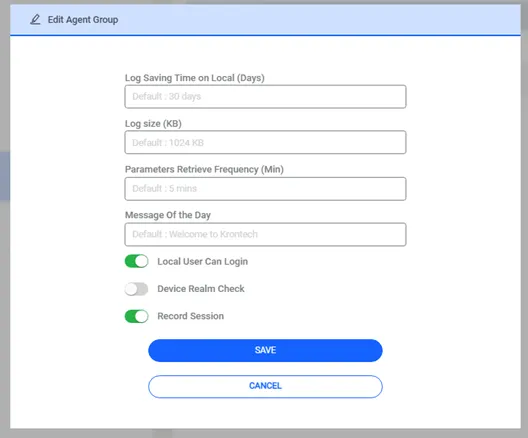
The user can configure some parameters specific to that agent group from this menu.
Log Saving Time on Local (Days) | Retention period for logs saved on the local machine. |
|---|---|
Log Size (KB) | This size determines when an agent sends the log to the Kron PAMor. By default, when a log reaches 1024kb Agent sends it to the Kron PAM. |
Parameters Retrieve Frequency (Min) | This is the frequency at which the Agent retrieves configurations from Kron PAM. By default, the Agent gets the police every 5 minutes. |
Message of The Day | Login message displayed to the users upon authenticating to the machine. |
Local User Can Login | By toggling this on local users in the endpoint can log in to the device. Toggling off will disable local authentication. By default, local user authentication is allowed. Also, an exception list can be defined on the system configuration management page. Mentioned a few steps ahead. |
Local Saving Time on Local (Days) | Retention period for logs saved on the local machine. |
Device Realm Check | When this parameter is disabled, the User and Device are not mandatory to be in the same Device Realm. By default Device Realm Check is enabled |
Record Session (Video Record of the session) | On the agent group, you can configure a Video Recording of the Session. |
In the system configuration management page, when you define local accounts with the parameters below, these local accounts can log in. When you disable the Local User Can log-in parameter on the agent group, others cannot. The same parameter can receive multiple values at a time by separating commas. By default, there is no defined user.
win.agent.local.account.login.exceptions = Administrator, PamAdmin, SystemAdmin
A device realm check is a kind of security enforcement for users to see and log into endpoints on Kron PAM. The same logic is implemented on the agent but from the agent's parameter (if we enable this parameter(by default it is enabled) you need to define device realms for every user and the device. So, this brings some operational load on the system admin. Hence you are no longer able to do it more easily.