Defining an Alarm Policy (cloned)
In the Policy tab, select and edit an existing policy.
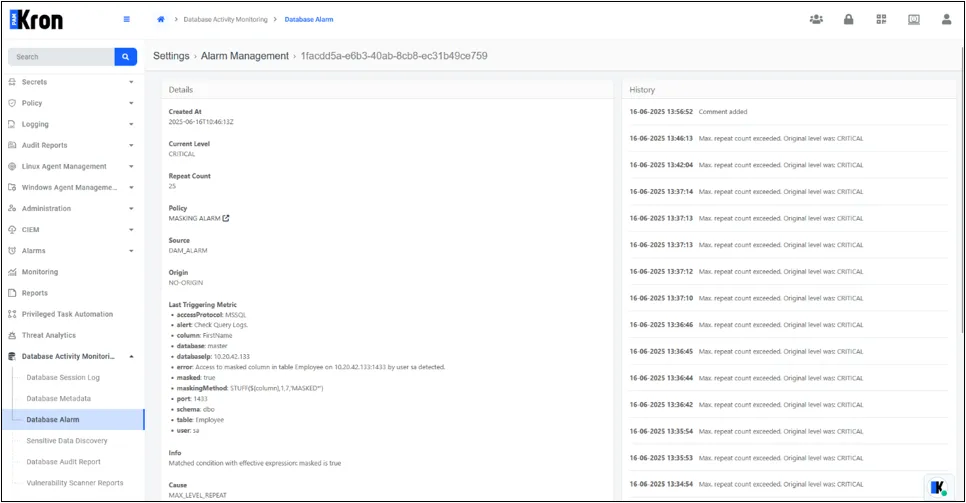
Kron DAM Masking Alarm
- Masking Method is defined under Policy ▸ Masking Method (e.g., STUFF(${column},1,7,'MASKED') for MSSQL).
- A Masking Policy is created specifying database, schema, table, column, and the masking method.
- The policy is added to a Policy Group, then the group is linked to the appropriate Policy Realm.
- When the SQL proxy detects a query on a masked column, the data set is presented in its masked form and the corresponding alarm rule (if configured) is evaluated.
Kron DAM Policy Alarm
- A Policy Key of type Black Key is created (regex or literal query fragment).
- The key is placed in a Policy Group and associated with the target device realm.
- The Key Action is set to Generate Error so that any query containing the forbidden key is denied.
- On execution of a black-key query, the session is terminated, the user receives an error, and the alarm workflow is triggered.
Kron DAM Buffer Overflow Alarm
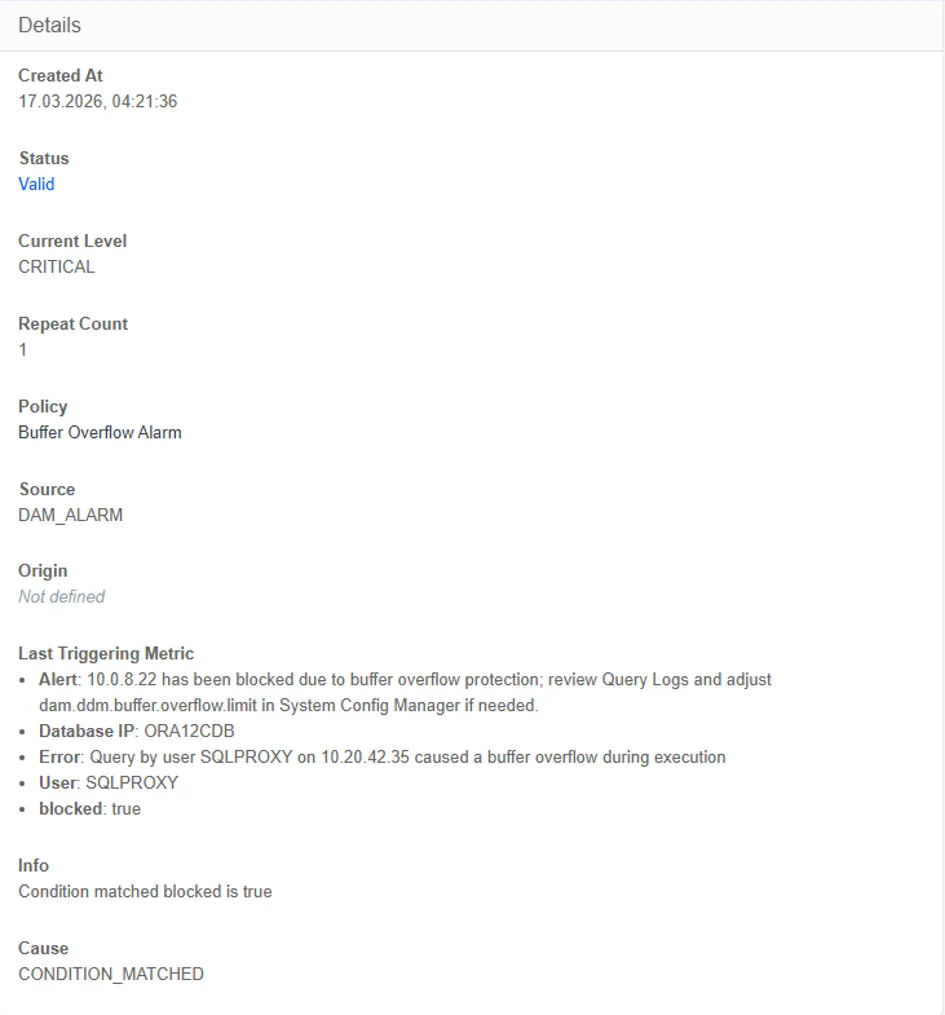
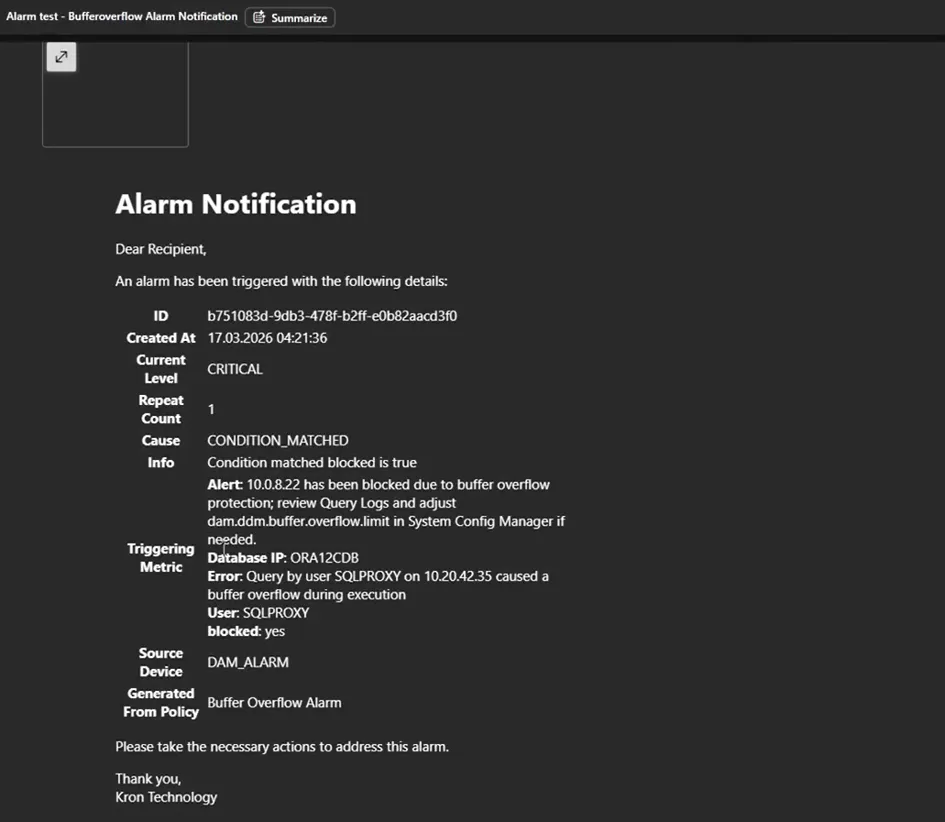
Kron DAM implements buffer overflow protection at the SQL proxy layer by validating incoming request sizes. If a request exceeds the defined buffer size limit, it is blocked immediately to prevent potential overflow attacks or abuse patterns such as denial-of-service vectors, and the system alarm is generated. The mechanism ensures system resilience against malformed or maliciously large queries.
· The Buffer Overflow Alarm is provided as a system-defined policy.
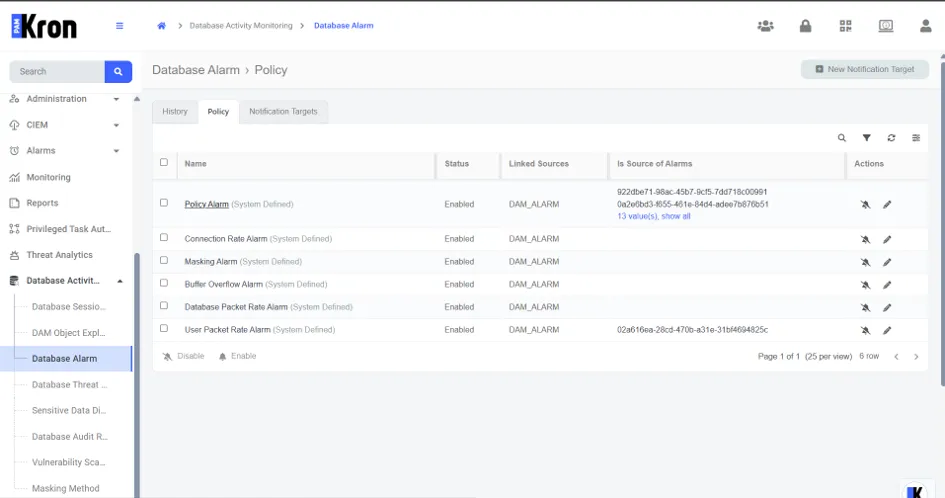
· The alarm status can be enabled by navigating to Database Alarm → Policy → Actions and clicking the bell icon.
· The notification target and alarm level can be customized via Database Alarm → Policy → Edit Policy.
· Email fields and subject lines can be edited through Database Alarm → Notification Targets → Admin.
· Triggered alarms can be viewed under Database Alarm → History → Parent Policy → Buffer Overflow Alarm.
This feature is disabled by default. To enable buffer overflow protection, set the following master parameter:
Parameter | Description | Default |
|---|---|---|
dam.ddm.buffer.overflow.attack.protection | Enables the buffer overflow protection mechanism. | false |
dam.ddm.buffer.overflow.limit | Maximum allowed request size in bytes. Values below 8192 bytes are not recommended due to minimum metadata requirements. | 65535B |
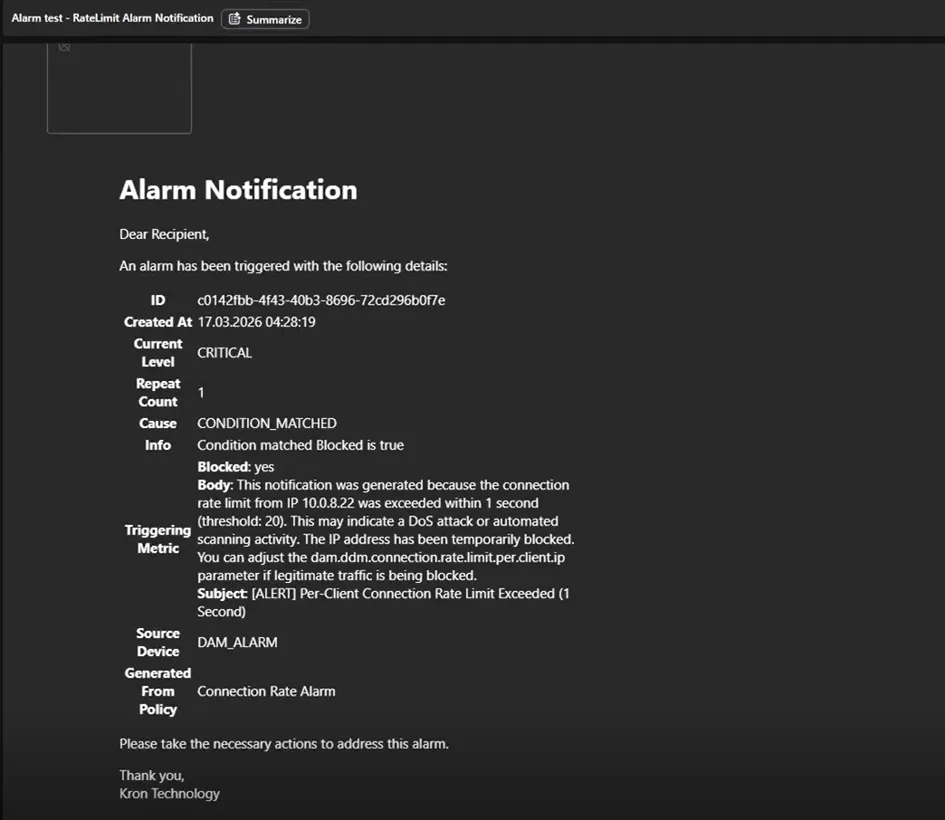
Kron DAM Connection Rate Alarm
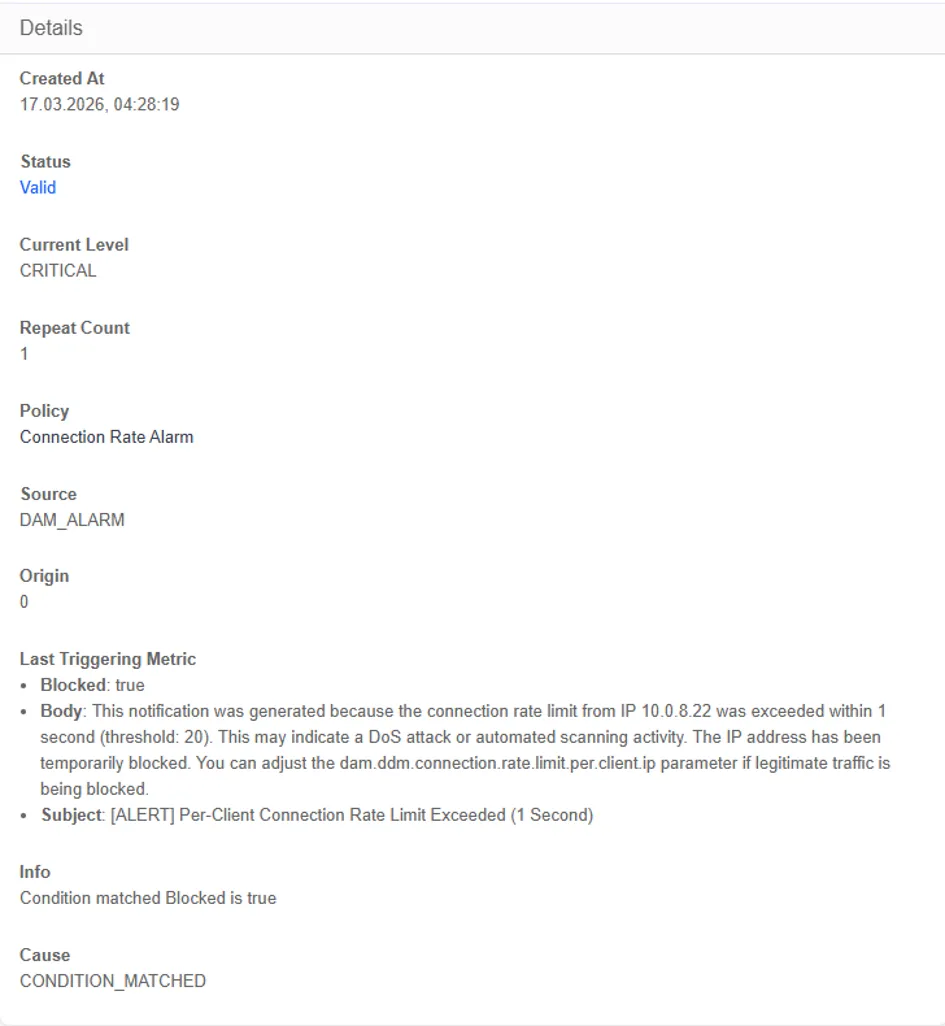
Kron DAM implements protection against excessive connection requests at the SQL proxy layer by monitoring incoming database connection attempts. When the number of requests exceeds the threshold defined in the System Configuration Manager, an alarm is triggered. This mechanism helps prevent abnormal load conditions and potential abuse patterns, ensuring system stability and availability.
· The Connection Rate Alarm is provided as a system-defined policy.
· The alarm status can be enabled by navigating to Database Alarm → Policy → Actions and clicking the bell icon.
· The notification target and alarm level can be customized via Database Alarm → Policy → Edit Policy.
· Email fields and subject lines can be edited through Database Alarm → Notification Targets → Admin.
· Triggered alarms can be viewed under Database Alarm → History → Parent Policy → Connection Rate Alarm.
This feature is disabled by default. To enable buffer overflow protection, set the following master parameter:
Parameter | Description | Default |
|---|---|---|
dam.ddm.buffer.overflow.attack.protection | Enables the buffer overflow protection mechanism. | false |
dam.ddm.connection.rate.limit.per.client.ip | Maximum allowed number of concurrent connection attempts per client IP. | 20 |
Kron DAM Connection Rate Alarm
Kron DAM implements protection against excessive connection requests at the SQL proxy layer by monitoring incoming database connection attempts. When the number of requests exceeds the threshold defined in the System Configuration Manager, an alarm is triggered. This mechanism helps prevent abnormal load conditions and potential abuse patterns, ensuring system stability and availability.
· The Connection Rate Alarm is provided as a system-defined policy.
· The alarm status can be enabled by navigating to Database Alarm → Policy → Actions and clicking the bell icon.
· The notification target and alarm level can be customized via Database Alarm → Policy → Edit Policy.
· Email fields and subject lines can be edited through Database Alarm → Notification Targets → Admin.
· Triggered alarms can be viewed under Database Alarm → History → Parent Policy → Connection Rate Alarm.
This feature is disabled by default. To enable buffer overflow protection, set the following master parameter:
Parameter | Description | Default |
|---|---|---|
dam.ddm.buffer.overflow.attack.protection | Enables the buffer overflow protection mechanism. | false |
dam.ddm.connection.rate.limit.per.client.ip | Maximum allowed number of concurrent connection attempts per client IP. | 20 |
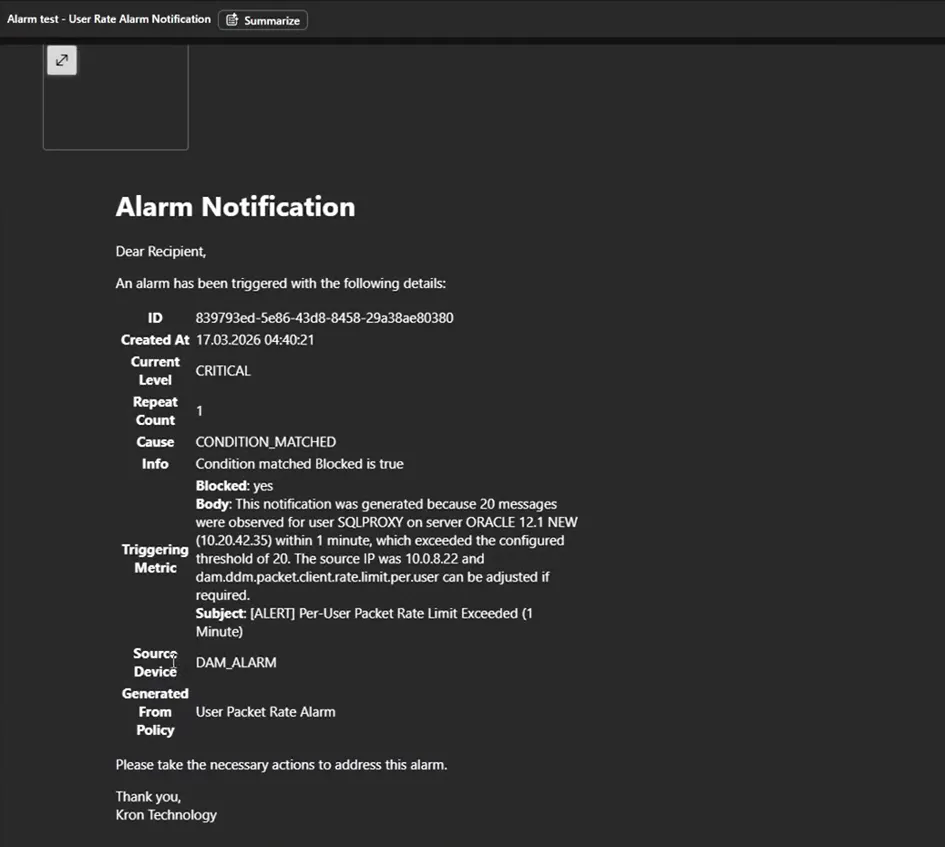
Kron DAM Database Packet Rate Alarm
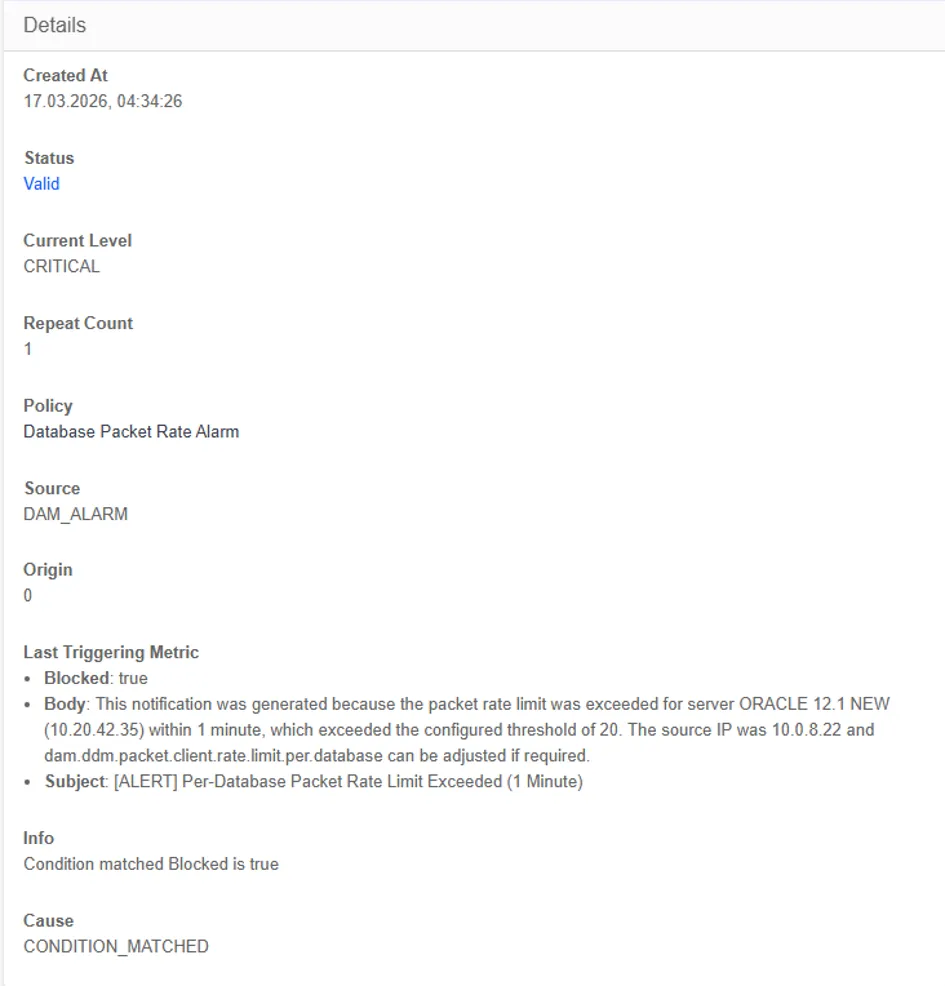
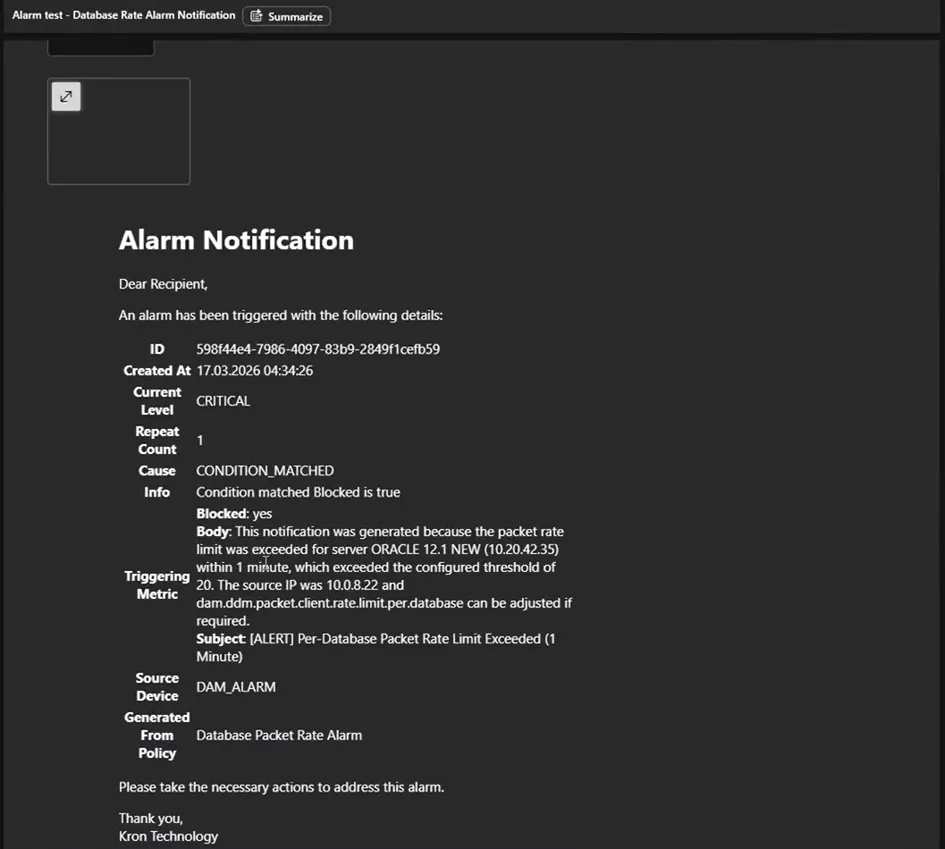
Kron DAM implements monitoring of client packet traffic at the SQL proxy layer after a session is established by analyzing packets directed to a database, such as queries and ping operations. When the number of client packets sent to a database exceeds the threshold defined in the System Configuration Manager, an alarm is triggered. This mechanism helps detect abnormal traffic patterns targeting a database and prevents potential misuse, ensuring system performance and stability.
· The Database Packet Rate Alarm is provided as a system-defined policy.
· The alarm status can be enabled by navigating to Database Alarm → Policy → Actions and clicking the bell icon.
· The notification target and alarm level can be customized via Database Alarm → Policy → Edit Policy.
· Email fields and subject lines can be edited through Database Alarm → Notification Targets → Admin.
· Triggered alarms can be viewed under Database Alarm → History → Parent Policy → Packet Rate Alarm.
This feature is disabled by default. To enable buffer overflow protection, set the following master parameter:
Parameter | Description | Default |
|---|---|---|
dam.ddm.buffer.overflow.attack.protection | Enables the buffer overflow protection mechanism. | false |
dam.ddm.packet.client.rate.limit.per.database | Maximum allowed number of client packets (queries, pings, etc.) per database within the session period. | 20 |
Kron DAM Packet Rate Alarm
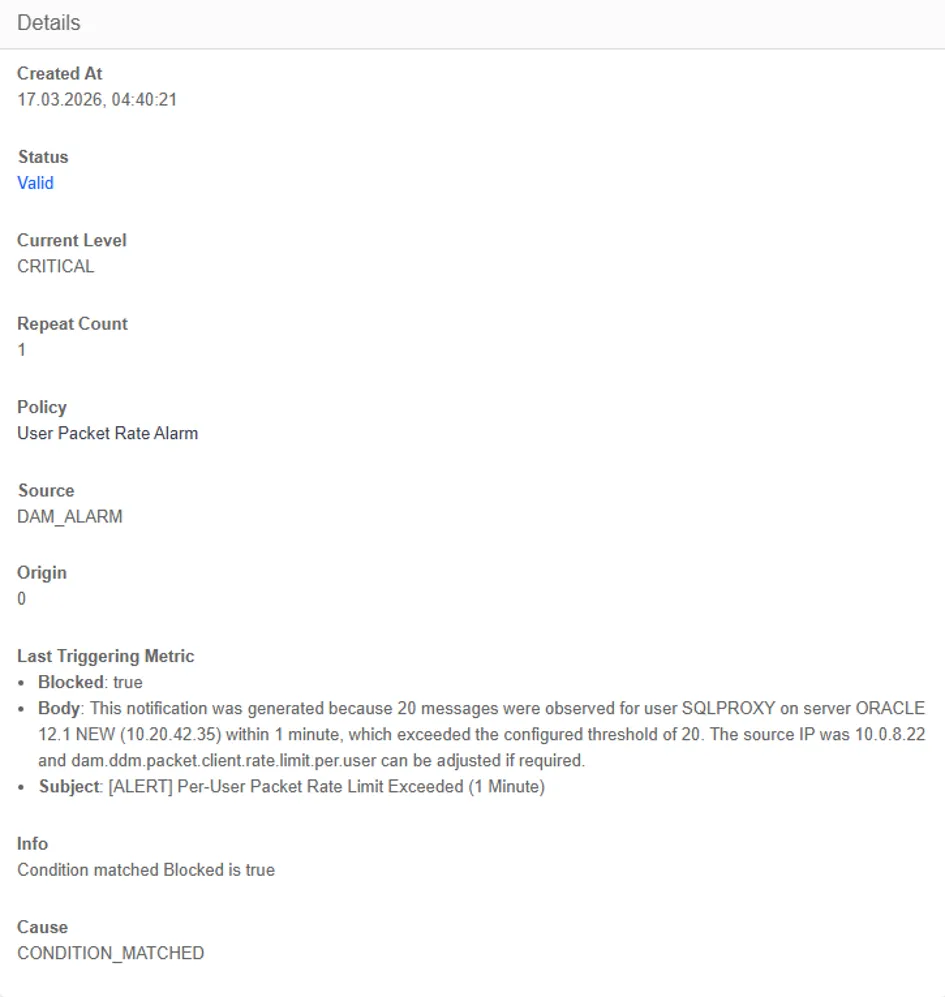
Kron DAM implements monitoring of client packet traffic at the SQL proxy layer after a session is established by analyzing packets originating from a user, such as queries and ping operations. When the number of client packets generated by a user exceeds the threshold defined in the System Configuration Manager, an alarm is triggered. This mechanism helps detect abnormal traffic patterns originating from a user and prevents potential misuse, ensuring system performance and stability.
· The User Packet Rate Alarm is provided as a system-defined policy.
· The alarm status can be enabled by navigating to Database Alarm → Policy → Actions and clicking the bell icon.
· The notification target and alarm level can be customized via Database Alarm → Policy → Edit Policy.
· Email fields and subject lines can be edited through Database Alarm → Notification Targets → Admin.
· Triggered alarms can be viewed under Database Alarm → History → Parent Policy → User Packet Rate Alarm.
This feature is disabled by default. To enable buffer overflow protection, set the following master parameter:
Parameter | Description | Default |
|---|---|---|
dam.ddm.buffer.overflow.attack.protection | Enables the buffer overflow protection mechanism. | false |
dam.ddm.packet.client.rate.limit.per.user | Maximum allowed number of client packets generated by an individual user. | 20 |
Kron DAM Policy Alarm
· Policy Alarm, Connection Rate Alarm, Masking Alarm, Buffer Overflow Alarm, Database Packet Rate Alarm, User Packet Rate Alarm defined by the system.
· Navigate to Database Alarm > Policy.
· Select an existing policy from the list.
· Click the Edit button to modify the configuration.
o If Enabled is selected, the policy becomes active immediately.
· Define rule parameters such as Alarm Level, Repeats Before Trigger, Max Repeat Count, Watched Metric/Operator/Value and Combinator to Next to specify the triggering conditions of the alarm.
o Alarm Level: Defines the severity of the triggered alarm.
o Repeats Before Trigger: Specifies how many identical events are required before raising an alarm.
o Max Repeat Count: Limits how many times an alarm can be triggered for the same condition.
o Watched Metric / Operator / Value: Determines the condition that activates the alarm rule.
o Combinator to Next: Defines the logical relation between multiple conditions (AND / OR).
· Click the Save button to complete the configuration.
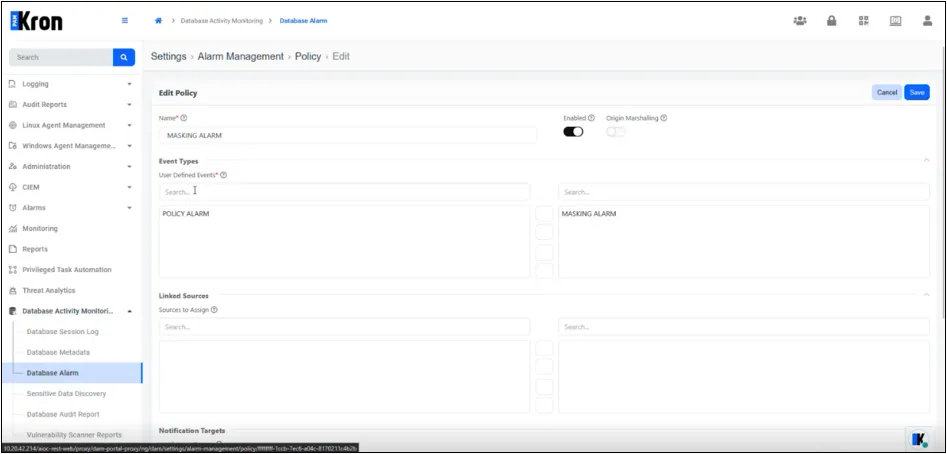
In the policy list, ensure the bell icon is toggled so that the policy is marked enabled. the relevant alarm policy is highlighted and the edit icon is activated. Populate the header fields:
· Name – logical identifier displayed in reports.
· Enabled – activates the policy immediately.
· Linked Sources – choose DAM_ALARM or other data sources that may trigger the policy.
· Move one or more targets into the Notification Targets pane.
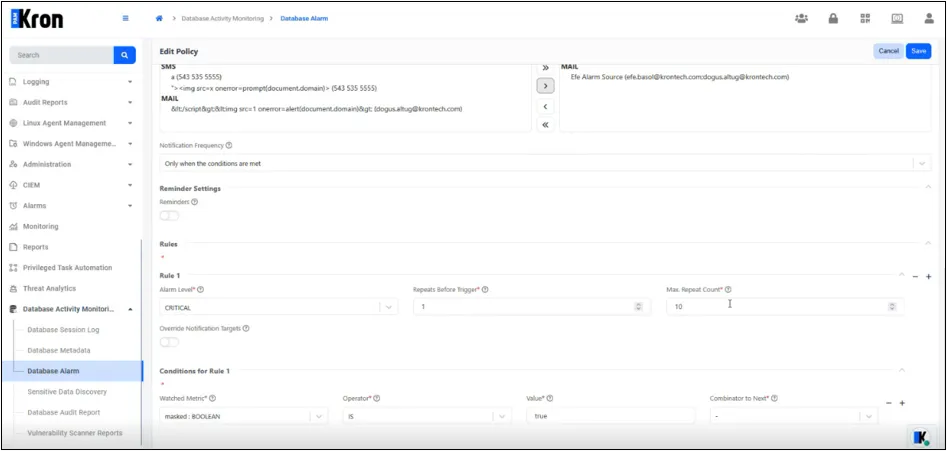
Each alarm policy includes one or more rules that define the triggering conditions. When an event matches all rule criteria, an alarm is raised at the designated severity.
Field | Purpose | Accepted Values / Behaviour |
|---|---|---|
Alarm Level | Sets the severity that will be recorded and propagated to external systems (e-mail, SIEM, SNMP, etc.).When an alarm is first triggered it inherits this level; subsequent repeats may escalate automatically (see § 4.2). | CLEAR, MINOR, MAJOR, CRITICAL (drop-down shown in Figure 5a). |
Repeats Before Trigger | Defines the number of identical events that must be observed consecutively before the rule fires for the first time. | Positive integer (default = 1). |
Max Repeat Count* | Caps the total number of alarm messages that may be generated by this rule while the triggering condition remains true. Escalation logic: when the cap is reached, the alarm level is promoted one step up the list in the table above (tooltip shown in Figure 5b). | Positive integer (0 disables escalation; required value). |
Override Notification Targets | When toggled on, a per-rule recipient list may be supplied, replacing the policy-level targets. | Boolean switch (off by default, see Figure 5c). |
Field | Purpose | Accepted Values / Behaviour |
|---|---|---|
Watched Metric* | Selects an event attribute that is evaluated. The list is derived dynamically from the event-type associated with the policy. | blocked : BOOLEAN user : STRING error : STRING |
Operator* | Comparison applied between Watched Metric and Value. | IS (equality) or NOT (inequality). |
Value* | Critical value that triggers the rule when the comparison evaluates true. Type depends on metric (string, boolean, numeric). | true (boolean) for blocked, or a literal username for user. |
Combinator to Next* | Logical connector used when multiple condition lines are defined. Use the placeholder “-” for a single-line rule. | AND, OR, XOR. |
“+” / “−” Icons | Add or remove additional condition lines. | UI controls at the right margin. |
Example:
Watched Metric : masked : BOOLEAN
Operator : IS
Value : true
Alarm Level : CRITICAL
Repeats Before : 1
When a query returns masked data the rule above triggers a CRITICAL alarm, increments Repeat Count, and stops issuing new notifications after ten occurrences.
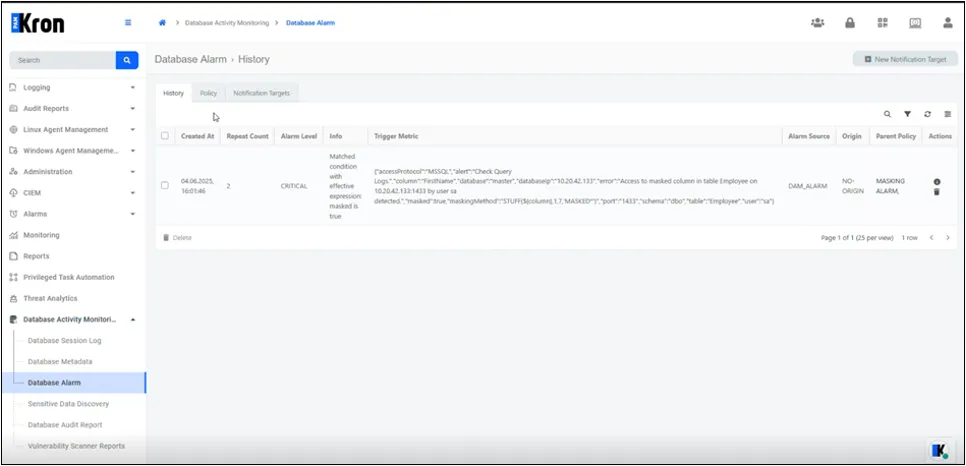
Reminder: After rules are saved, the parent policy must be enabled via the bell icon in the policy list; otherwise no alarm or notification will be produced.