RDP/VNC Session Log Records
1 min
Kron PAM records all session logs and videos. Authorized users can replay video recordings of RDP/VNC sessions with Kron PAM's Logging functionality.
- Navigate to Logging > Session Log menu.
- Enter search filters. You can enter user, date & time, IP address, command, and device group to search by.
- Click the Search button. Kron PAM lists all sessions based on your criteria.
- Kron PAM also has an OCR (optical character recognition) functionality to see texts captured by OCR during sessions. Click the Show Details button in the Options menu. To replay the session, click the Play Session button.
- To convert the session record to video format, click the Convert to Video button. When the session video converting process finishes, the Video Availability status changes to Available.
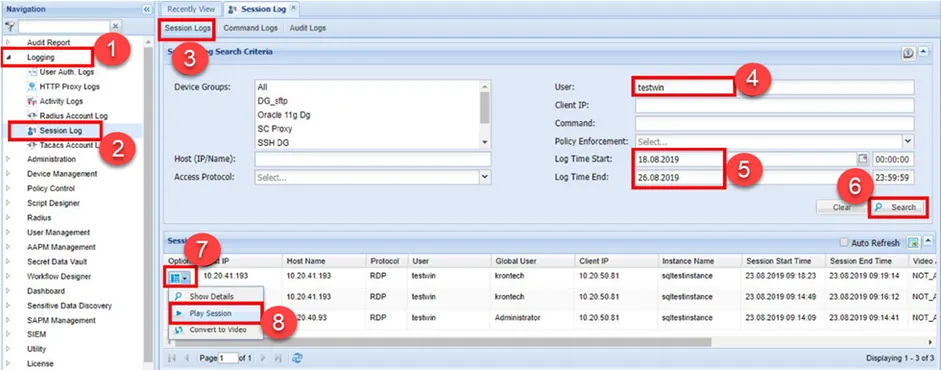
Session Log