Sending MFA QR Codes to Users
1 min
To sync Kron PAM and the Kron PAM mobile app, user’s the QR code should be scanned. Kron PAM admins can send QR codes to the users.
To send a QR code:
- Log into Kron PAM as Admin.
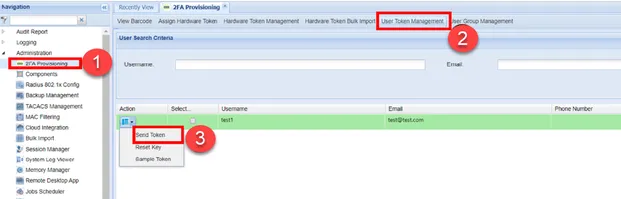
- Navigate to Administration > 2FA Provisioning.
- Open the User Token Management tab.
- Search the user by name, open the Options menu of the related user, and click Send Token.
- A pop-up window opens with the options via SMS or e-mail. Choose one and send it.
Send Token