Preliminary Steps for SQL Proxy
1 min
Before utilizing SQL Proxy for database connection, adhere to the following preliminary steps:
- Database Addition: a. Accurately add the relevant database to the Kron PAM environment.
- Property Entry: a. Input properties of this database, including; i. db.name ii. db.username iii. db.password iv. sql.proxy.bind.port
- User Creation: a. Create a user in Kron PAM with the same username as the one added to the database.
- Policy Key Creation: a. Formulate a policy key within Kron PAM, ensuring it can dictate user permissions within the SQL proxy (e.g., "White Key Type - Policy Key: “ .* ")
- Group and Realm Formation: o Establish groups using the user, device, and policy key, and subsequently create a Realm.
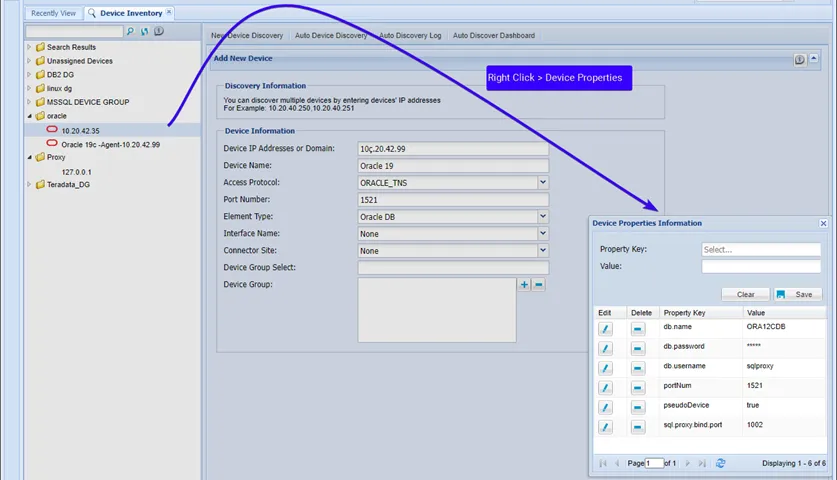
illustrates the panel for adding a device in Kron PAM.
The username and password are the same as the user credentials used to directly connect to the database. The username must be defined as a user in Kron PAM, and realms must be created for connection and policy enforcement by a system Admin.